
Installation, authorization
This page covers the installation and authorization process for Linked API SDKs.
Installation
To install the SDK, run following command for your package manager:
npm install -S @linkedapi/nodeAuthorization
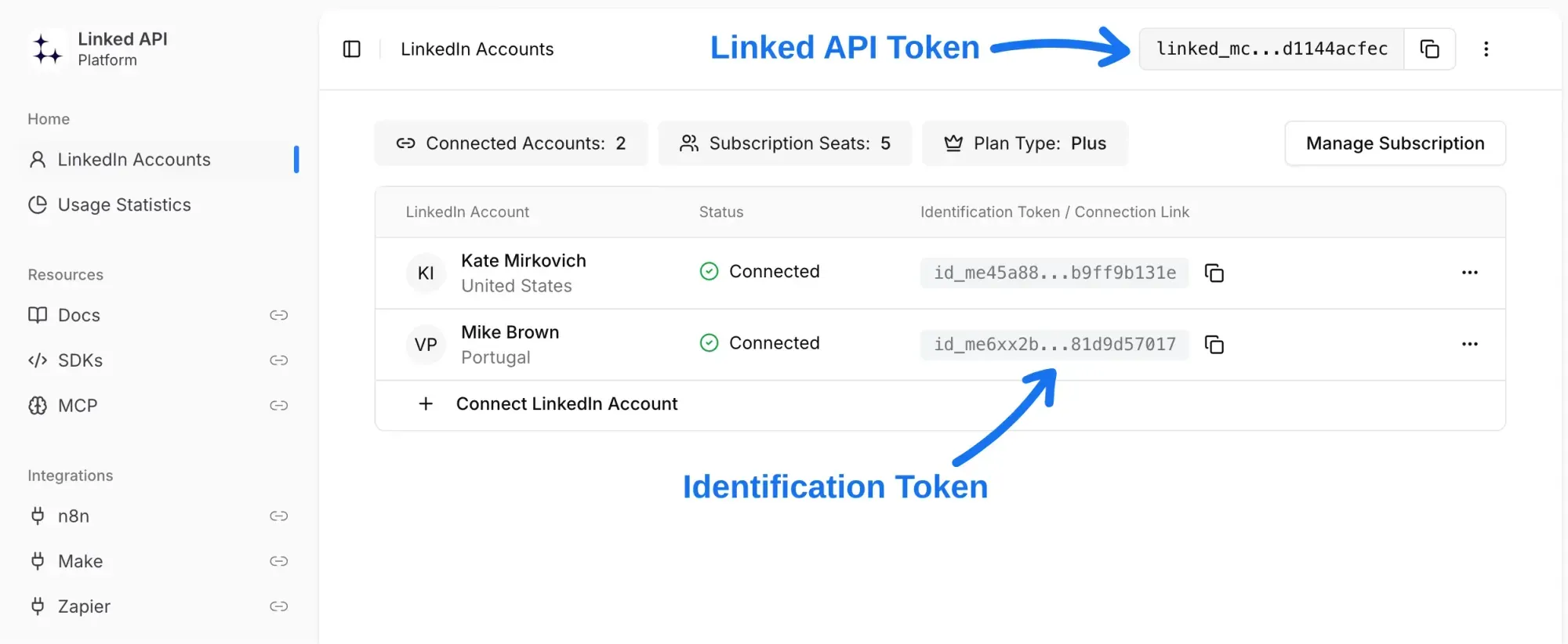
To authorize your requests, you need to initialize the SDK with 2 tokens:
import LinkedApi from "@linkedapi/node";

const linkedapi = new LinkedApi({
  linkedApiToken: "your-linked-api-token",
  identificationToken: "your-identification-token",
});linkedApiToken– your main token that enables overall Linked API access.identificationToken– unique token specific to each managed LinkedIn account.
You can obtain these tokens through our platform, as demonstrated below:
Admin API
To manage your subscription, accounts, and limits programmatically, use the separate LinkedApiAdmin class. It requires only the linkedApiToken:
import { LinkedApiAdmin } from '@linkedapi/node';

const admin = new LinkedApiAdmin({
  linkedApiToken: 'your-linked-api-token',
});

const status = await admin.subscription.getStatus();
const { accounts } = await admin.accounts.getAll();Every admin endpoint, with its call in the Node and Python tabs, is in the Admin API.
Multiple LinkedIn accounts
If you need to manage multiple LinkedIn accounts, simply initialize a separate SDK instance for each account's identification token.
import LinkedApi from "@linkedapi/node";

const firstLinkedInAccount = new LinkedApi({
  linkedApiToken: "your-linked-api-token",
  identificationToken: "your-first-identification-token",
});

const secondLinkedInAccount = new LinkedApi({
  linkedApiToken: "your-linked-api-token",
  identificationToken: "your-second-identification-token",
});