
Working hours
This page explains how per-account working hours affect your API requests, what the off-hours policies do, and how to handle a workflow that is parked until the window reopens.
In the SDKs working hours show up in two places: when the policy rejects a request, execute() throws LinkedApiError with the type outsideWorkingHours; when it parks one, execute() and status() return pendingReason set to outsideWorkingHours.
In the CLI working hours show up in two places: when the policy rejects a request, the command exits with code 1 and writes the outsideWorkingHours error to stderr; when it parks one, the command waits, and linkedin workflow status <id> shows a message with the time the window opens.
What working hours are
Each connected LinkedIn account can carry a weekly activity window – the hours during which Linked API is allowed to act on it. A LinkedIn account that is active around the clock looks like a user who never sleeps, which is one of the strongest automation signals there is. Giving an account a human-shaped schedule removes that signal without costing you any throughput inside the window.
Working hours are configured per account in our platform, next to the account limits. There is no API for changing them – they are an account-owner decision, not a per-request one.
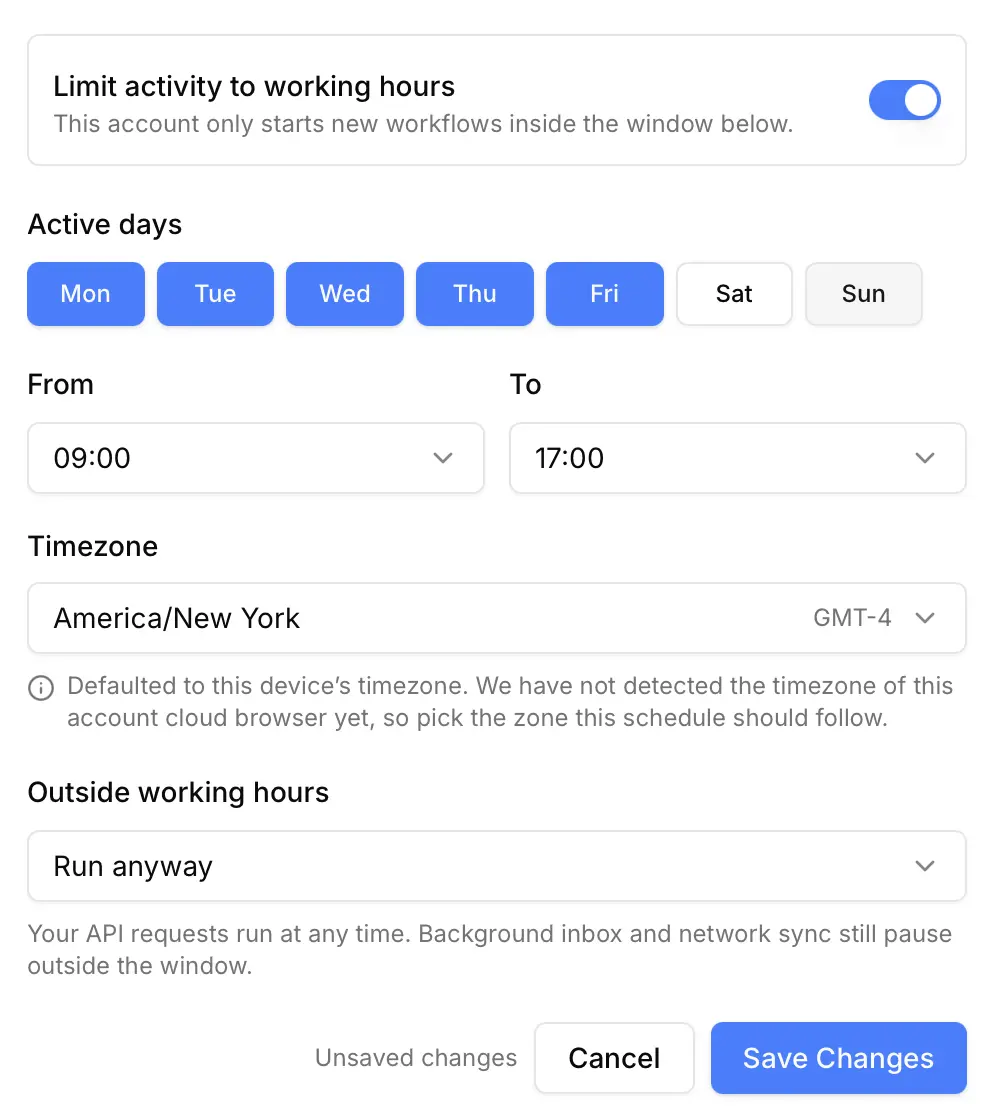
The window is stored with an explicit timezone, so it follows the account's local wall clock across daylight-saving changes rather than drifting by an hour twice a year.
| Setting | Meaning |
|---|---|
| Days | Which weekdays the account is active on. |
| Time range | Start and end of the daily window, in the account's timezone. |
| Timezone | The zone the window is expressed in. Defaults to the timezone of the device you configure it from. |
| Outside working hours | What happens to requests that arrive outside the window – see below. |
An account with no window configured is never gated. If you have never touched this setting, nothing about your integration changes.
Off-hours policies
The policy decides what happens to a request that arrives outside the window. It is the Outside working hours selector in the screenshot above.
Queue until the window opens
The workflow is accepted and parked. It starts automatically when the window reopens – you do not need to resubmit it. This is the default for newly connected accounts.
Reject with an error
The request fails immediately with the outsideWorkingHours error and nothing is queued.
{
  "success": false,
  "error": {
    "type": "outsideWorkingHours",
    "message": "This LinkedIn account is outside its configured working hours."
  }
}
In the SDKs execute() throws LinkedApiError with the type outsideWorkingHours.
The CLI writes {"error": "outsideWorkingHours", "message": "..."} to stderr and exits with code 1.
Run anyway
Your API requests run at any time – the window is not enforced for them.
Note that this applies to your requests only. Work Linked API schedules for itself – inbox and network synchronisation – stays inside the window under every policy, and the cloud browser behind the account is released outside the window under every policy too. That is where the account-safety and infrastructure benefits of the schedule come from.
Telling a parked workflow from a queued one
Every response describing a workflow that has not started yet carries a pendingReason. It appears both in the response to POST /workflows and in the workflow result response.
In the SDKs it is pendingReason (Python pending_reason) on what execute() and status() return.
The CLI does not print pendingReason: linkedin workflow status <id> prints the status and the message, and for a parked workflow the message names the time the window opens.
{
  "success": true,
  "result": {
    "workflowId": "wf-64835e7c-a0gc-40ae-8338-108f02sSe643",
    "workflowStatus": "pending",
    "pendingReason": "outsideWorkingHours",
    "message": "This workflow is scheduled and will start when the account working hours open at Mon, Aug 10, 09:00 (Europe/Berlin)."
  }
}| Value | Meaning |
|---|---|
queued | Waiting its turn behind other work on the same account. Minutes, typically. |
outsideWorkingHours | Parked until the account working hours reopen. Can be the next working day. |
null | The workflow is not pending. |
This distinction matters for polling. A queued workflow is worth polling every few seconds. An outsideWorkingHours one will not move until the window reopens, so polling it in a tight loop achieves nothing – back off until the time named in message, or surface that time to your user.
When a parked workflow expires
A parked workflow does not wait forever. If it is still pending 7 days after it was first parked, and the window has opened at least once in that time without the workflow being started, it fails with a dedicated error:
{
  "success": true,
  "result": {
    "workflowStatus": "failed",
    "failure": {
      "reason": "workingHoursWaitExpired",
      "message": "This workflow remained pending for 7 days after it was first parked by the account working hours, and was not started."
    }
  }
}
A workflow that expires this way never entered the running state, so it emits the workflow.created and workflow.completed webhook events but no workflow.started.
This is worth watching if you combine a narrow window with a high request volume: an account is only able to run one workflow at a time, so a window of a couple of hours per week puts a hard ceiling on how much work can drain through it.
Seeing the current state
The account list in the platform shows each account's schedule underneath its connection status, and marks the ones that are outside their window right now – so you can tell at a glance why nothing is starting for an account.
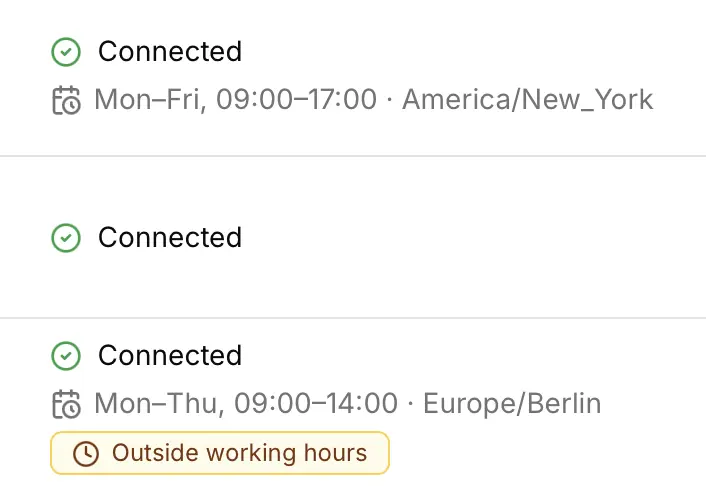
An account with no schedule line carries no window at all and is never gated.