
Linked API vs PhantomBuster (2026): Features, Pricing, and Safety Compared
Linked API vs PhantomBuster is a choice between two different shapes of LinkedIn automation. Linked API is a programmable LinkedIn automation API: you compose workflows from primitives, and the execution layer – a dedicated cloud browser per account, human pacing, enforced limits – is built in. PhantomBuster is a no-code catalog of ready-made cloud automations ("Phantoms") for LinkedIn and 15+ other platforms, which you configure, schedule, and meter by execution time.
The short version. The safety difference is structural: Linked API runs your account in its own dedicated cloud browser that behaves like a person, with pacing and per-action limits enforced by the platform; PhantomBuster runs Phantoms from its cloud on a session cookie you supply, with published limits that are recommendations you configure and divide across Phantoms yourself. Beyond safety, Linked API covers two jobs: embed LinkedIn automation into your own product through 55+ composable actions, or run it out of the box – a ready-made skill lets an AI agent build and run the workflows for you. PhantomBuster fits sales and growth teams who prefer configuring template automations in a UI, across many platforms. Pick by the job, not the brand.
Pick in 10 seconds
Choose Linked API if…
- You are building LinkedIn automation into a product, backend, or agent workflow: 55+ composable actions behind a REST API, Node/Python SDKs, a shell CLI, an MCP server, and packaged agent skills.
- You want the safety layer run for you: a dedicated cloud browser per account, sequential human-paced execution, and per-action limits the platform enforces.
- You want automation working out of the box without assembling it: install a ready-made skill (
npx @linkedapi/skills) and ask your AI agent in plain language – nothing to configure, schedule, or chain by hand.
Choose PhantomBuster if…
- You want no-code, ready-made automations: 100+ Phantoms and workflows you configure in a UI – around 40 for LinkedIn and 13 for Sales Navigator – instead of writing code.
- You need built-in email enrichment: finding professional email addresses from LinkedIn searches and profiles is a core, metered feature.
- Your team prospects across many platforms at once – Google, Instagram, Facebook, X, YouTube and more – not just LinkedIn.
Linked API vs PhantomBuster at a glance
| Linked API | PhantomBuster | |
|---|---|---|
| What it is | Dedicated LinkedIn automation API | No-code catalog of cloud automations for 15+ platforms |
| Model | Workflows from 55+ actions – composed in your code or by your AI agent; the platform executes them | You configure and schedule ready-made Phantoms; chains come as pre-made Workflows |
| Entry price | From $49/mo per seat, billed annually ($69 month-to-month) | Start plan €56/mo billed annually, €69 month-to-month (per PhantomBuster's pricing page, in EUR) |
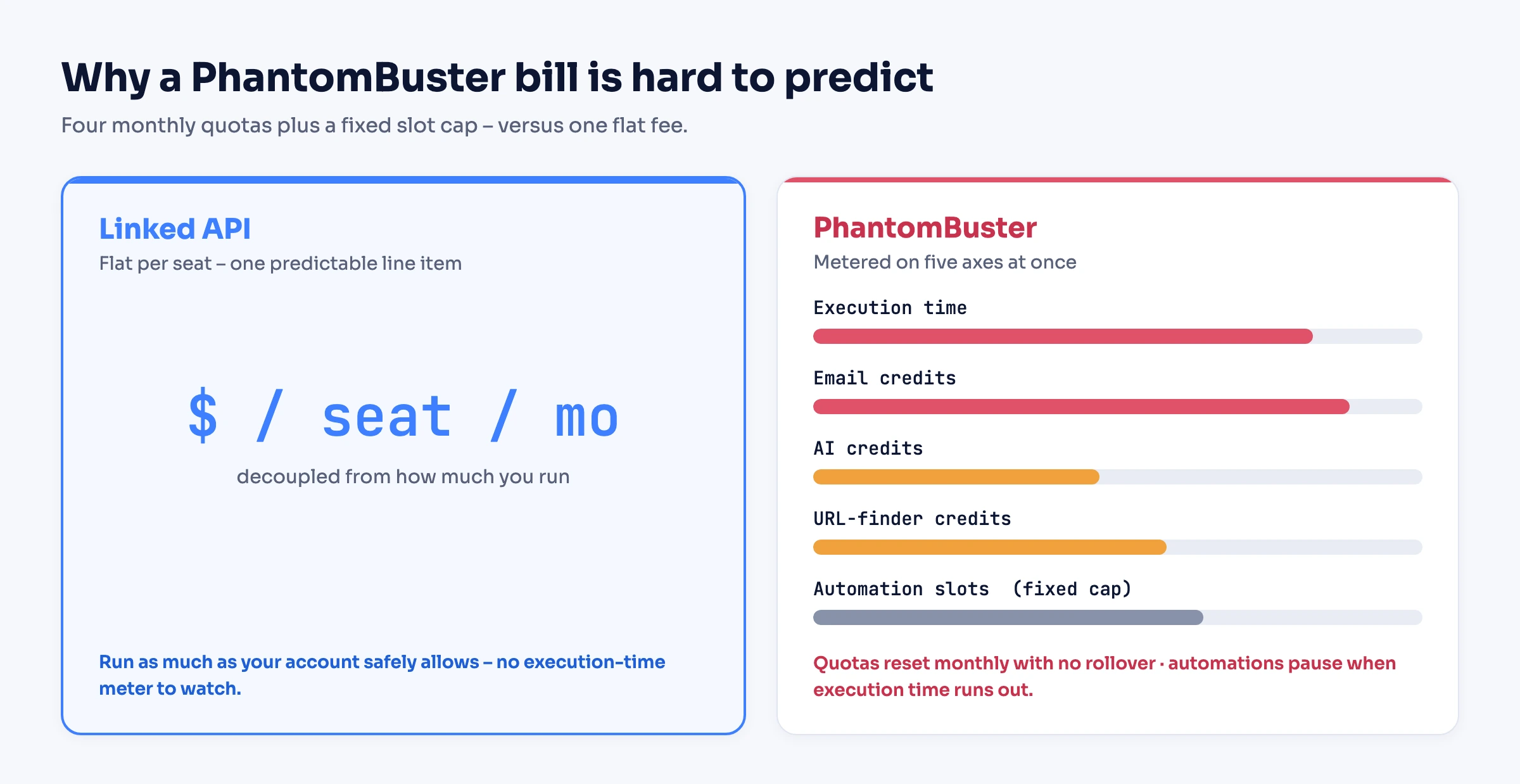
| Pricing model | Flat per seat, no usage metering | Metered: monthly quotas for execution hours and email/AI/URL-finder credits, plus a fixed cap on automation slots |
| LinkedIn connection | Connect once; your account then runs in its own personal cloud browser – no cookie to handle | Your li_at session cookie + user agent, via browser extension or manual paste |
| Safety model | Real browser session behaving like a person – requests come from LinkedIn's own pages; enforced per-action limits | Runs from PhantomBuster's cloud on your cookie; published limits are recommendations you configure per Phantom |
| Public API | LinkedIn actions as API calls, returning structured JSON | Account control – launches and monitors Phantoms; no LinkedIn action endpoints |
| Free trial | 7 days | 14 days |
| Best for | Developers, products, AI agents going deep on LinkedIn | Sales and growth teams prospecting no-code across many platforms |
Shopping a full list of alternatives instead of a head-to-head? See the 10 best PhantomBuster alternatives.
Does PhantomBuster have an API?
Yes, on every plan – but it is an API to your PhantomBuster account, not to LinkedIn. By its own description it "gives you control over your account" (PhantomBuster's docs): you launch and stop Phantoms, monitor their runs, fetch their output, and manage scripts, authenticating with an API key. A LinkedIn action – a connection request, a message – still happens only by launching the Phantom that performs it; there is no endpoint that acts on LinkedIn directly. Its hosted MCP server wraps "a curated subset" of the same account API, and a custom-scripts SDK lets you write your own Phantoms in JavaScript.
That is the practical line between the two: PhantomBuster's API orchestrates finished automations, while Linked API's actions are the LinkedIn operations themselves, each returning structured JSON to your code.
What are you actually buying: an API or a catalog?
Linked API sells you primitives – and two first-class ways to use them. Automation is expressed as workflows – actions chained with then, iterated with doFor blocks – and the platform executes them sequentially in a dedicated cloud browser, returning structured JSON. The embedding route: if you can describe a LinkedIn workflow, you can build it into your product through the API and SDKs; there is no fixed menu. The out-of-the-box route: hand a ready-made agent skill to an AI agent, and it composes and runs those same workflows from a plain-language ask – nothing to wire up or maintain.
PhantomBuster sells you finished units. "Phantoms are individual automations. Each Phantom performs one task" (PhantomBuster's pricing FAQ) – its store lists around 40 LinkedIn and 13 Sales Navigator Phantoms, from search export and profile scraping to auto-connect, message sending, and post engagement. Multi-step sequences come as Workflows, which are "ready-made chains of Phantoms" with "predefined launch patterns that are automatically optimized and can't be fully customized" (PhantomBuster's docs). Its public API sits at that same layer: it controls Phantoms rather than exposing LinkedIn actions.
Coverage differs in both directions:
- First-class in Linked API, not in PhantomBuster: LinkedIn actions as direct API calls from your backend (send a message, fetch a profile, react, comment – each returning JSON), free-form workflow composition with conditional chains, and account analytics – no SSI or dashboard-performance automation appears in PhantomBuster's LinkedIn catalog.
- Native in PhantomBuster, not in Linked API: group surfaces (member export and messaging), event guest export and inviting, poll-voter export, Recruiter profile scraping, and AI copywriting Phantoms for messages and comments.
- Both offer: MCP servers for AI assistants, Sales Navigator coverage, and no-code integrations – n8n and Make on both sides, with PhantomBuster adding Zapier and HubSpot-native sync.
What does account safety look like on each?
Both products automate real member accounts, and neither is an official LinkedIn product. The difference is what LinkedIn's servers see and where the safety engineering lives.
What LinkedIn's servers see
Linked API – a dedicated browser per account:
- Each seat is a cloud browser dedicated to that account, matched to your device profile, where every action fully emulates a real user – real pages, real clicks, human pauses.
- The session lives inside that browser; there is no cookie to extract, paste, or keep alive.
PhantomBuster – your cookie in their cloud:
- Phantoms authenticate with a LinkedIn session cookie and user agent you supply – via its browser extension, or "by copying your li_at session cookie and user agent from your browser's Developer Tools" (PhantomBuster's help center).
- Its automations run from PhantomBuster's infrastructure, and its own docs note they "may operate from a different location than where you're actually based", which "can trigger login alerts"; built-in proxies exist in five fixed regions, though PhantomBuster does not recommend proxies for LinkedIn by default.
- Your real browsing and its cloud runs act on the same session, and the accounting is yours: "If you run multiple Phantoms on the same LinkedIn account, LinkedIn sees the combined activity" (PhantomBuster's help center).
Where the safety engineering lives
Linked API – in the platform:
- Workflows execute one at a time at realistic speed – a simple visit-and-like takes around 20 seconds by design.
- You configure per-action limits once; an action that would exceed them returns a
limitExceedederror instead of executing. Our limits guide covers sensible values.
PhantomBuster – mostly in your configuration:
- Its documentation is detailed – per-action daily limit tables by account type, warm-up advice, and recovery steps after a restriction – but the numbers are framed as "starting guidelines, not guarantees" (PhantomBuster's help center).
- Applying them is your job: you set volumes in each Phantom's Behavior settings, schedule launch frequency "based on rate limits", and when several Phantoms share one account you "divide the recommended limit by the number of Phantoms" yourself. One exception: Auto Connect invitation limits are enforced dynamically by the product.
- Its own FAQ acknowledges the residual risk plainly: restrictions can occur "below published thresholds" when Phantoms stack, manual and automated activity mix, or volume resumes after a quiet period.
Neither model is free of risk – automating a real account never is. The honest framing: on Linked API the safety engineering is the platform's job end to end; on PhantomBuster it is shared – the platform documents limits in unusual detail and enforces them for Auto Connect, and you configure everything else.
How does Linked API pricing compare with PhantomBuster?
| Plan | Price | What it includes |
|---|---|---|
| Linked API – Core | $49/mo per seat billed annually; $69 month-to-month | Unlimited workflow execution within the per-action limits you configure; one seat = one LinkedIn account |
| PhantomBuster – Start | €56/mo billed annually; €69 month-to-month | 20 h execution time, 5 automation slots, 500 email + 10k AI + 1k URL-finder credits per month |
| PhantomBuster – Grow | €128/mo billed annually; €159 month-to-month | 80 h execution, 15 slots, 2,500 email + 30k AI + 10k URL-finder credits |
| PhantomBuster – Scale | €352/mo billed annually; €439 month-to-month | 300 h execution, 50 slots, 10,000 email + 90k AI + 20k URL-finder credits |
PhantomBuster prices are shown in EUR; its pricing page localizes currency by region.
The units mean different things. A Linked API seat is one LinkedIn account with its own dedicated cloud browser; cost tracks the number of accounts you automate, and each runs unmetered. A PhantomBuster plan is a pool of metered resources shared by a workspace – "execution time is the total monthly time your automations can run", and when it runs out "your automations will pause until your execution time resets or you upgrade your plan", with no automatic overage charges (PhantomBuster's pricing FAQ). Slots count every Phantom kept on the dashboard, "including ones that are inactive or have never been launched", a Workflow "can occupy up to 3 slots", and Workflows run background tasks that consume execution time outside working hours (PhantomBuster's help center). The models meter differently: a PhantomBuster workspace can connect many LinkedIn accounts, but they all draw from that one shared, capped pool of hours and credits, so more accounts means a thinner slice per account; a Linked API seat is one account with its own browser and no metering on how much it runs. Both let you start free – a 7-day trial on Linked API, a 14-day trial on PhantomBuster.
Frequently Asked Questions (FAQ)
They expose different layers. PhantomBuster's API, by its own description, "gives you control over your account" – it launches and stops Phantoms, monitors runs, and fetches their output; LinkedIn behavior itself stays inside the packaged Phantoms. Linked API exposes the LinkedIn actions themselves: your backend calls send message, fetch profile, connect, react and receives structured JSON, so the automation logic lives in your code rather than in a launched job.
No. PhantomBuster authenticates with your LinkedIn session cookie (li_at) and user agent, supplied through its browser extension or pasted from your browser's developer tools, and expired sessions stop runs until you reconnect. Linked API connects the account once and maintains the session inside its own personal cloud browser, with no cookie handling on your side.
On different LinkedIn accounts, yes – for example PhantomBuster for cross-platform scraping and enrichment on one account, Linked API automating outreach from another, or Linked API's actions consuming lead lists a Phantom exported. On the same account, be careful: PhantomBuster's own docs note that LinkedIn sees combined activity across everything driving a session, so two automation tools sharing one account undermine each other's pacing.
Lead data moves easily; the automation logic is rebuilt. Export your existing lead lists from Phantoms (they output spreadsheets), and feed the LinkedIn URLs straight into Linked API actions as parameters. Each Phantom's job then maps to a workflow you compose once – a search-export Phantom becomes a search action with doFor chains, an auto-connect Phantom becomes sendConnectionRequest with a note, follow-ups become message actions triggered on acceptance. The account runs in its own personal cloud browser with no cookie to paste, and the practical path is piloting one account on Linked API while PhantomBuster keeps running the rest – just not both tools on the same account at once.
Mostly no – with one exception. Its published limit tables are explicitly "starting guidelines, not guarantees"; you configure volumes per Phantom and divide limits when several share an account. The exception is Auto Connect, whose invitation limits the product enforces dynamically. Linked API enforces limits across every action: you set them once, the platform paces each workflow like a human, and any action that would exceed a limit returns limitExceeded instead of executing.
Automating LinkedIn for your team, product, or AI agent? Start with Linked API – flat per-seat pricing from $49/mo, billed annually, with a 7-day free trial – and use it both ways: build it into your product with the REST API and Node/Python SDKs and the shell CLI, or get automations out of the box through the MCP server, the AI-agent-friendly CLI (Claude Code, Cursor, Codex), and ready-made agent skills (npx @linkedapi/skills).
Facts verified July 24, 2026 – PhantomBuster prices, quotes, and feature coverage checked against its live pricing page, Phantom store, and Help Center on that date; prices as displayed in EUR. Its public API re-checked against PhantomBuster's live developer docs on September 17, 2026.