
Linked API vs Dripify (2026): Features, Pricing, and Safety Compared
Linked API vs Dripify is a choice between two shapes of LinkedIn automation. Linked API is a programmable LinkedIn automation API: you compose workflows from primitives and run them from your own code or an AI agent, with the execution layer – a dedicated cloud browser per account, human pacing, enforced limits – built in. Dripify is a no-code tool for LinkedIn and email drip campaigns: you assemble a fixed sequence of steps in a visual builder and it runs in Dripify's cloud.
The short version. Both are cloud tools that automate your own account and let you set daily activity limits; they differ in how you connect and how the pacing is enforced. Linked API connects your account into its own dedicated cloud browser that behaves like a person – a real browser on LinkedIn's own pages, and Linked API never stores your password – and enforces the daily limits you set. Dripify instead takes your LinkedIn password and uses it to obtain your session cookies, then drives your account through those (a newer, optional Chrome extension lets you connect without entering the password in Dripify). Beyond safety, Linked API covers two jobs: embed LinkedIn automation into your own product through 55+ composable actions, or run it out of the box – a ready-made skill lets an AI agent build and run the workflows for you. Dripify fits sales, founder, and recruiting teams who want a ready-made drip-campaign builder with a built-in inbox and analytics, no code involved. Pick by the job, not the brand.
Pick in 10 seconds
Choose Linked API if…
- You need automation that is not a fixed campaign: compose 55+ actions – search, fetch profiles and companies, connect, message, react, post – into any logic, branching on real profile data or your CRM.
- You want a real developer surface: a REST API, Node/Python SDKs, and a shell CLI to embed LinkedIn automation in your product – or a ready-made skill an AI agent runs out of the box. Dripify's public API and its new MCP server report on campaigns and upload leads – neither has endpoints that act on LinkedIn.
- You want predictable cost: flat per-seat pricing with no usage metering, and per-action limits enforced in a dedicated cloud browser.
Choose Dripify if…
- You want a ready-made, no-code drip-campaign builder: assemble a sequence from 15+ actions and conditions in a visual editor, with nothing to code.
- You need the campaign extras built in: sequence templates, a unified reply inbox, analytics dashboards, and team management, plus an email channel alongside LinkedIn.
- A standard drip campaign is exactly the job – you are not trying to build automation into your own product or branch on custom logic.
Linked API vs Dripify at a glance
| Linked API | Dripify | |
|---|---|---|
| What it is | Programmable LinkedIn automation API | No-code LinkedIn + email drip-campaign tool |
| Model | Compose 55+ actions into any workflow – from your code or an AI agent | Assemble a fixed sequence of steps in a visual campaign builder |
| Developer surface | REST API, Node/Python SDKs, shell CLI, MCP server, agent skills | Reporting API and an MCP server (Pro and Advanced) over campaigns, leads and teams, read-only apart from uploading leads; no endpoints that act on LinkedIn; plus Zapier, Make and outbound webhooks |
| Channels | LinkedIn, including Sales Navigator | LinkedIn and email |
| Account connection | Your own personal cloud browser – Linked API never stores your password | You give Dripify your LinkedIn password, which it uses to obtain your session cookies – or connect through its optional Chrome extension without entering the password in Dripify |
| Entry price | From $49/mo per seat, billed annually ($69 month-to-month) | Basic $39/user/mo billed annually ($59 month-to-month), per Dripify's pricing page |
| Pricing model | Flat per seat, no usage metering | Per user/seat, tiered (Basic / Pro / Advanced / Enterprise) |
| Safety model | Dedicated cloud browser behaving like a person; per-action limits you configure and the platform enforces | Cloud execution with daily activity limits you set, optionally auto-adjusted on Advanced |
| Free trial | 7 days | 7 days |
| Best for | Building automation into a product or AI-agent workflow | Ready-made no-code drip campaigns |
Shopping a full list rather than a head-to-head? See the best Dripify alternatives.
Does Dripify have an API?
Yes – since September 2026, and it is a reporting API. On the Pro and Advanced plans, Dripify's public API reads your campaigns, lead lists, campaign statistics, leads, teams, and members, and its one write path uploads leads into a campaign. Requests authenticate with an API key and are capped at 60 a minute and 5,000 a day (Dripify's API reference).
Dripify has since added an MCP server on the same plans: an AI assistant can view your campaigns and lead lists, look up leads in your Dripify account and upload up to 1,000 LinkedIn profiles to a campaign (Dripify's help center). Like the API, it does not send messages or invitations.
What neither has endpoints for is acting on LinkedIn: neither can send a connection request or a message, and Dripify lists "sending LinkedIn messages through the API" among capabilities still to come (Dripify's help center). Its other integrations are Zapier, Make, and outbound webhooks. So it answers "what are my Dripify campaigns doing?" rather than "make LinkedIn do this from my code" – which is the job Linked API's actions and SDKs are built for.
Programmable API or a fixed campaign builder?
This is the distinction that decides the choice. Linked API gives you primitives – search, fetch profiles and companies, connect, message, react, comment, post – and you compose them into whatever logic you want, branching on any data rather than a preset checklist. Filter on a real profile field, pull data from your CRM mid-flow, trigger from your app:
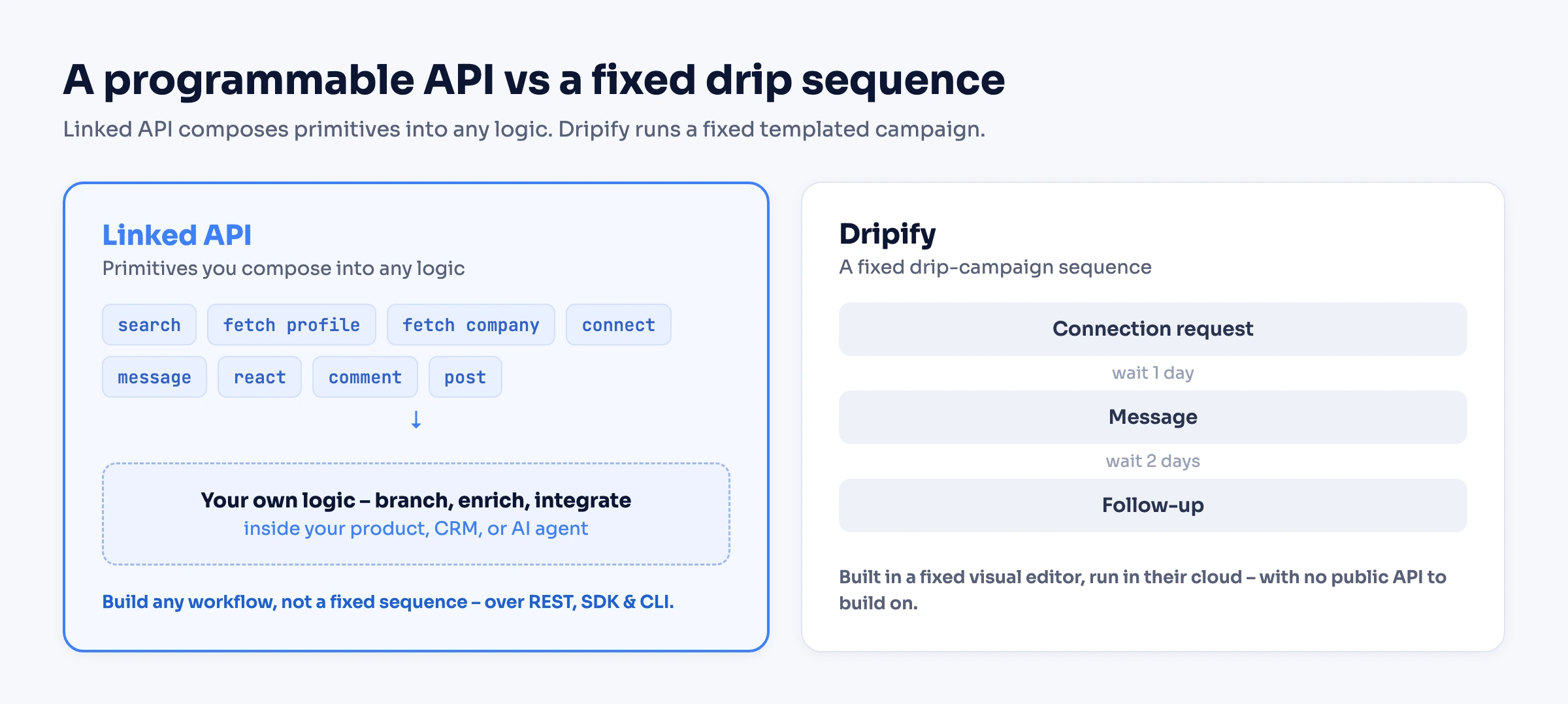
Dripify is a different shape: a closed no-code UI where you arrange a fixed sequence of steps – its help center describes building campaigns "by selecting automated LinkedIn actions, delays, and conditions" (Dripify's help center) – that runs in Dripify's cloud. It does offer branching, but from a fixed set of four predefined conditions (connected, message viewed, email available, open profile), each "a one-time action that checks the status at a specific moment" (Dripify's docs). It reaches its edge the moment your logic needs a field those conditions do not cover, or you want the automation to live inside your own product.
Concretely, the primitive model looks like this:
import LinkedApi from '@linkedapi/node';

const linkedapi = new LinkedApi({
  linkedApiToken: process.env.LINKED_API_TOKEN,
  identificationToken: process.env.IDENTIFICATION_TOKEN,
});

const search = await linkedapi.searchPeople.execute({
  term: 'head of growth',
  filter: { locations: ['United States'] },
});
const { data: people } = await linkedapi.searchPeople.result(search.workflowId);

for (const person of people ?? []) {
  // Branch on a real profile field - your rule, not a fixed template
  const profile = await linkedapi.fetchPerson.execute({ personUrl: person.publicUrl });
  const { data } = await linkedapi.fetchPerson.result(profile.workflowId);
  if (!data || (data.followersCount ?? 0) < 1000) continue;

  const req = await linkedapi.sendConnectionRequest.execute({
    personUrl: person.publicUrl,
    note: `Hi ${person.name.split(' ')[0]}, loved your growth work, let's connect.`,
  });
  await linkedapi.sendConnectionRequest.result(req.workflowId);
}And this is not something you can bolt onto Dripify. Its reporting API reads campaign data but has no endpoint that acts on LinkedIn, and its other integrations are Zapier, Make, and outbound webhooks – "native integrations and modern webhooks let you easily connect Dripify with all the software your team already uses" (Dripify's integrations page). Those webhooks are data-out only: Dripify's own docs state they "can transfer lead's data ONLY … not … message content and other data", fire on a fixed event set (invite sent, message sent, reply), allow "only one condition per webhook integration", and are available on the Pro tier and up. Together they are useful for reporting on campaigns and piping leads into a CRM; neither is a surface for building LinkedIn automation on.
Use Linked API's primitives two ways, both first-class: build them into your product through the REST API, SDKs, and CLI, or hand a ready-made agent skill to an AI agent that composes and runs the same workflows from a plain-language ask.
What does account safety look like on each?
Both products automate your own LinkedIn account from the cloud, both let you set daily activity limits, and both are unofficial – neither is a LinkedIn product. Two differences matter: how each connects to your account, and how limits are enforced.
How each connects. Linked API connects the account into its own personal cloud browser – a real browser loading LinkedIn's own pages – and never stores your LinkedIn password. Dripify works the other way around: its onboarding step is titled "Enter Your LinkedIn Account Credentials", and it stores that password encrypted (Dripify's help center) to obtain your LinkedIn session cookies and drive your account through them. A newer, optional Chrome extension lets you connect without entering your password in Dripify (Dripify's help center). The difference in one line: your account lives in a real browser that stays yours, versus your password and session cookies held on Dripify's side.
How limits are enforced. Linked API runs each action in a dedicated cloud browser where it behaves like a person on the real pages – a simple visit-and-like takes around 20 seconds by design – and executes workflows sequentially at human pace. You configure per-action limits once, and any action that would exceed one returns a limitExceeded error instead of running; our limits guide covers sensible values. Dripify also lets you set daily limits per action type, runs "in the cloud" with "random delays to make sure your LinkedIn activity looks manual" (Dripify's safety page), and on its Advanced plan adds an optional "activity control" feature that auto-adjusts your connecting and messaging limits. Those are daily caps Dripify applies, rather than a per-action gate enforced in a dedicated browser as each action runs.
Neither model is free of risk – automating a real account never is. The honest framing: Linked API runs your account in its own real personal cloud browser and enforces limits per action, while Dripify holds your password and the session cookies it derives from it (unless you connect through its optional extension instead), applying daily caps from its side, with optional auto-adjust on its top tier.
How does Linked API pricing compare with Dripify?
| Plan | Price | Notes |
|---|---|---|
| Linked API – Core | $49/mo per seat billed annually; $69 month-to-month | Unlimited workflow execution within the limits you configure |
| Dripify – Basic | $39/user/mo billed annually; $59 month-to-month | One drip campaign; no webhooks |
| Dripify – Pro | $59/user/mo billed annually; $79 month-to-month | Unlimited campaigns, dedicated inbox, CSV export, webhooks, reporting API |
| Dripify – Advanced | $79/user/mo billed annually; $99 month-to-month | Multi-team management, advanced protection, step analytics |
Dripify prices are per user/seat as displayed on its pricing page; both tools bill per seat and offer a 7-day free trial.
The seats hold different things. A Linked API seat is one LinkedIn account driven by a full API, SDKs, and CLI, with no metering on how much you run. A Dripify seat is a campaign builder for one user; its programmatic surface – webhooks and a reporting API – unlocks at Pro ($59/user annual) and even then reads and pushes campaign data out rather than letting you build. At entry, Dripify's Basic ($39/user annual) sits just below Linked API's Core ($49/seat annual), and Basic is capped at a single campaign with webhooks unavailable until Pro. The seat prices are close; what each seat carries – a developer surface or a no-code builder – is the substantive difference.
Frequently Asked Questions (FAQ)
No – they solve different problems. Dripify's API, on the Pro and Advanced plans, reads campaigns, leads, and statistics and can upload leads into a campaign; its webhooks are outbound notifications that "can transfer lead's data ONLY" (not message content) and fire on a fixed set of events (Dripify's help center). Between them you can report on your Dripify campaigns and push leads into your CRM, but neither makes LinkedIn do anything – there is no endpoint to send a connection request or a message. Linked API is the inverse – an inbound control surface for LinkedIn itself: your code calls send message, fetch profile, search, connect and gets structured JSON back. If you need to trigger and compose LinkedIn actions from your own stack rather than read campaign data, a reporting API is not a substitute.
The lead data moves; the campaign is rebuilt as code or an agent workflow. Export your leads from Dripify (CSV export is available on Pro and up) and feed the LinkedIn URLs into Linked API actions as parameters. Each campaign step maps to an action – a connection request with a note, a follow-up message, a profile view – chained with then and iterated with doFor, so the same sequence becomes a workflow the platform runs for you, with the branching logic a fixed template could not express. The account runs in its own personal cloud browser, and piloting one account while Dripify runs the rest is the low-risk path.
Both automate your own account from the cloud with human-like pacing and configurable daily limits, and both are unofficial tools that carry the risk any LinkedIn automation does. Two differences: Linked API runs your account in its own personal cloud browser and enforces the per-action limits you configure, while Dripify holds your LinkedIn password and the session cookies it derives from it (unless you connect through its optional extension instead), applying daily caps (auto-adjusted by activity control on its top tier). Accounts that behave like people are the ones that keep working – on either tool, conservative limits matter more than the brand.
Automating LinkedIn for your team, product, or AI agent? Start with Linked API – flat per-seat pricing from $49/mo, billed annually, with a 7-day free trial – and use it both ways: build it into your product with the REST API and Node/Python SDKs and the shell CLI, or get automations out of the box through the MCP server, the AI-agent-friendly CLI (Claude Code, Cursor, Codex), and ready-made agent skills (npx @linkedapi/skills).
Facts verified July 24, 2026 – Dripify prices, quotes, and feature coverage checked against its live pricing page, features pages, and help center on that date; its public API re-checked against Dripify's live API reference and help center on September 17, 2026; its MCP server and optional Chrome-extension connection checked against its help center on October 5, 2026.