
Making requests
This page explains how to make requests to Linked API, including available endpoints, authorization process, and response structure.
With the SDKs you do not build these requests yourself: create the client once with both tokens, as shown in Authorization, and call its methods – each one makes a request described here. The Methods index lists them.
With the CLI you do not build these requests yourself: linkedin setup saves both tokens once, as shown in Authorization, and every command makes a request described here. The command list lists them.
Endpoints
https://api.linkedapi.io/workflows – for executing workflows.
https://api.linkedapi.io/signals – for managing signals (coming soon).
https://api.linkedapi.io/signals/poll – for polling signal events (coming soon).
https://api.linkedapi.io/inbox/poll – for polling the inbox.
https://api.linkedapi.io/network/poll – for polling network events.
https://api.linkedapi.io/stats/actions – for checking API usage statistics.
https://api.linkedapi.io/account – for checking your tokens.
https://api.linkedapi.io/admin/* – for managing your account.
Authorization
Requests to all endpoints except the Admin API must include 2 authorization headers:
linked-api-token– your main token that enables overall Linked API access.identification-token– unique token specific to each managed LinkedIn account.
You can obtain these tokens through our platform, as demonstrated below:
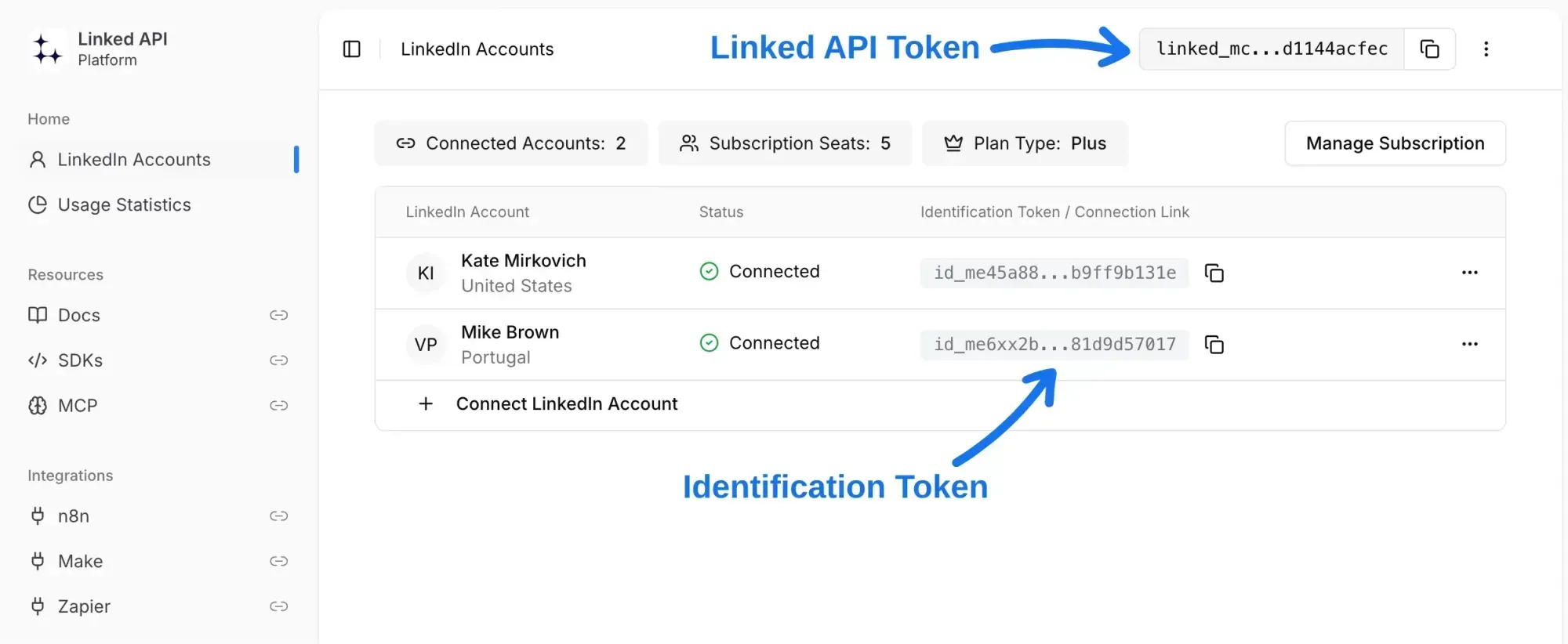
Send both tokens as headers with every request:
In the SDKs you pass both tokens once, when you create the client, and every call sends them:
In the CLI, linkedin setup asks for both tokens once and saves them as an account, and every command sends them. Admin commands send only the Linked API token.
linked-api-token: your-linked-api-token
identification-token: your-identification-tokenThe Admin API has its own client, created with the Linked API token only.
Checking your tokens
GET /account returns the name and LinkedIn profile URL of the account the identification token belongs to. It runs no workflow, so it is the quickest way to check that both tokens work. Invalid or missing tokens return the errors any request can return.
curl https://api.linkedapi.io/account \
  -H "linked-api-token: your-linked-api-token" \
-H "identification-token: your-identification-token"The SDK method returns the account in data and throws LinkedApiError when the request fails.
linkedin setup checks the tokens this way and saves the account under its LinkedIn name; linkedin account update checks new tokens the same way.
{
  "success": true,
  "result": {
    "name": "John Doe",
    "url": "https://www.linkedin.com/in/john-doe"
  }
}
Response structure
All responses in Linked API have the following structure:
- For successful requests:
{
  "success": true,
  "result": { /* Endpoint specific result */ }
}- For requests with errors:
{
  "success": false,
  "error": { /* Common or endpoint specific error */ }
}