
LinkedIn Sales Navigator API: Access, Documentation and Alternatives (2026)
Sales Navigator holds the search filters, lead lists, and account data your team actually works from, and sooner or later someone asks whether the LinkedIn Sales Navigator API can drive all of it from code. The answer that circulates online is a muddle: some pages walk you through applying for access, others say applications are closed, and a few manage both on the same page. This guide states what the official API is, who can actually use it, and what the remaining routes give you.
The short version. LinkedIn does run an official Sales Navigator API – the Sales Navigator Application Platform, with three service families – but its own documentation says LinkedIn is not currently accepting new partners, adding that it reviews onboarding capacity periodically and will update the page if that changes. So the practical question is which of four situations you are in: you are already an approved partner; your CRM vendor already ships an approved integration; you need a one-off extraction, where an export tool beats any API; or you need repeatable automation on a Sales Navigator seat you own, which is where an account-based platform like Linked API fits.
Is there an official LinkedIn Sales Navigator API?
Yes, and it is a real product with real documentation: the Sales Navigator Application Platform (SNAP). It is also gated. LinkedIn's SNAP documentation states plainly:
"We are not currently accepting new partners for access to the LinkedIn Sales Navigator API. We periodically review our onboarding capacity and will update this page if availability changes."
That second sentence matters. This is a current state, not a permanent one, and any page telling you the programme is simply "closed" is as wrong as one walking you through an application form.
SNAP is organised into three service families:
| Service family | What it does | Shape |
|---|---|---|
| Display Services | UI modules embedded in your application via iframe or JavaScript SDK: view profiles and accounts, see recent activity and posts, connect and send messages including InMail, plus the Profile Associations API for photos and profile links | Embedded interface |
| Analytics Services | Bulk export API for activities performed by sales teams, plus seat-holder metadata such as daily Social Selling Index, total connections, and total leads saved | Bulk data export |
| Sync Services | APIs built on top of CRM Sync, using matches between CRM records and LinkedIn to enable data-integrity workflows and CRM UI experiences | CRM integration |
One distinction gets blurred constantly, so it is worth being precise. Display Services does let a message or InMail be sent – but by a seller acting inside an embedded UI module in your application. That is not a raw messaging endpoint, and it is not an automated outbound API. If you read "the Sales Navigator API can send messages" somewhere and pictured a POST request in a nightly job, that is not what is on offer.
Use of these APIs is governed by the LinkedIn SNAP Terms of Use unless you have executed a separate signed partnership agreement.
On a seat you own, the same search-and-read jobs run from a plain-language ask. Here an AI agent works your Sales Navigator search:
Used Linked API: nv_search_people, nv_fetch_person
- position "VP of Sales", United Kingdom, Software Development, 2nd-degree only, up to 25 – 25 leads
- current position and company for each lead
25 leads at 23 companies – two companies have two VPs of Sales each. Nothing was sent. The first rows:
| Lead | Current position | Company | Location | Degree |
|---|---|---|---|---|
| Hannah W. | VP of Sales, EMEA | Ledgerline | London, England | 2nd |
| Raj P. | VP Sales | Northgate Analytics | Manchester, England | 2nd |
| Chloe B. | Vice President of Sales | Brightwell Software | Edinburgh, Scotland | 2nd |
the list goes to your CRM or sheet; nothing was sent to anyone
How to get Sales Navigator API access
There is no application to file today. SNAP partner onboarding is paused – LinkedIn's own documentation, quoted above, says it is not currently accepting new partners and will update that page if capacity changes. If your CRM already ships a SNAP integration, you get the official surfaces through it with no access request at all. For every other case, Sales Navigator API access means acting on a seat you own: a Sales Navigator subscription on that seat plus an account-based platform that exposes its actions programmatically, which is the route the rest of this guide describes.
Where the Sales Navigator API documentation lives
The official documentation is on Microsoft Learn, not on linkedin.com: learn.microsoft.com/en-us/linkedin/sales holds the Display, Analytics and Sync service references, the SNAP Terms of Use and the onboarding notice. For the account-based route, the Sales Navigator actions are documented alongside the standard ones – start with nv.searchPeople and nv.sendMessage – with the same surface available from the CLI and as LinkedIn Sales Navigator MCP tools.
Which route fits your situation
Most guides route everyone through "apply to become a partner". That is the least likely path to be relevant to you. Find your row first.
| Your situation | The right route | What you get |
|---|---|---|
| You are an approved SNAP partner | The official Sales Navigator APIs | Display, Analytics, and Sync services under your partnership agreement. Nothing here beats them. |
| Your CRM already ships a SNAP integration | Your CRM vendor's existing feature | Sales Navigator data inside the CRM you already pay for, with no development work at all |
| You need a one-off extraction | An export tool or a dataset | A CSV of a saved search, or bulk records with no owned seat |
| You need repeatable automation on a seat you own | An account-based automation platform | Search, fetch, message, and conversation sync as programmable primitives on your own seat |
What each route actually gives you
If you are an approved SNAP partner
Use the official APIs and stop reading. You have Display Services for embedded LinkedIn surfaces, Analytics Services for bulk activity export, and Sync Services on top of CRM Sync, all under a signed agreement. No third-party route competes with sanctioned access on a supported contract.
If your CRM already ships a SNAP integration
This is the situation nearly every guide omits, and it covers far more readers than partnership does. You do not need to become a SNAP partner to benefit from SNAP – you need a vendor who already is one. Major CRM platforms ship Sales Navigator integrations built on exactly these services, which is what Sync Services exists for.
Before you write any code, check whether the integration you want already exists in your CRM's marketplace. Building an account-based workflow to replicate a feature your CRM already ships is wasted effort.
If you need a one-off extraction
If what you actually need is a spreadsheet of one saved search, an export tool is the right answer and an API is overkill. Sales Navigator does not export leads or accounts to CSV or XLS natively, which is precisely why this tool category exists. Our Sales Navigator export guide compares the options.
The trade-off is that you get a snapshot. There is no workflow, nothing to trigger, and nothing to act on.
If you need repeatable automation on a seat you own
This is the route for teams building Sales Navigator behaviour into a product, backend, or CRM of their own: search, open a lead, send a message, sync the conversation, then poll for the reply, all executed on a Sales Navigator seat you already pay for.
More than one product serves this. Unipile covers the same ground on capability, per its own product documentation – search, sending, replies, inbox and conversation sync, and webhooks – so this is not a question of who can do it. The difference is architectural: Linked API drives your own seat through a dedicated real browser session with pacing and per-action limits enforced by the platform, while a reverse-engineered client constructs wire-level requests against LinkedIn's private interface and, per Unipile's own API documentation, its GA v1 leaves pacing to the caller while its v2 beta adds enforced rate limits – a structurally higher-risk position for the account, not a matter of configuration. The full side-by-side is in Linked API vs Unipile.
Neither model eliminates risk; automating a real account never does. Neither product is affiliated with, endorsed by, or sponsored by LinkedIn – Unipile states this plainly on its own site, and the same is true of Linked API. What differs is where the safety engineering lives: on Linked API it is the platform's job end to end, in a cloud browser that loads LinkedIn's own pages at a human pace.
Two ways to run it
Both routes below are first-class. Pick the one that matches how you work, not how much you want to build.
Build it in – REST, Node and Python SDKs, CLI
Compose the primitives yourself and embed them in your product. nvSearchPeople returns each person's hashedUrl, which is the durable key you pass to nvFetchPerson:
const workflow = await linkedapi.nvSearchPeople.execute({
  term: "Head of Engineering",
  limit: 10,
  filter: {
    locations: ["San Francisco"],
    industries: ["Software Development"],
  },
});

const { data, errors } = await linkedapi.nvSearchPeople.result(workflow.workflowId);

if (errors && errors.length > 0) {
  errors.forEach((error) => console.warn(`${error.type}: ${error.message}`));
}

if (data) {
  for (const person of data) {
    const detail = await linkedapi.nvFetchPerson.execute({
      personHashedUrl: person.hashedUrl,
    });
    const result = await linkedapi.nvFetchPerson.result(detail.workflowId);

    if (result.data) {
      console.log(result.data.name, result.data.position, result.data.companyName);
    }
  }
}The same primitives are available over the REST API and the shell CLI – navigator person search, navigator person fetch, navigator message send. Outreach itself is a separate job with its own rules; the messaging flow is covered in How to Automate LinkedIn Messages.
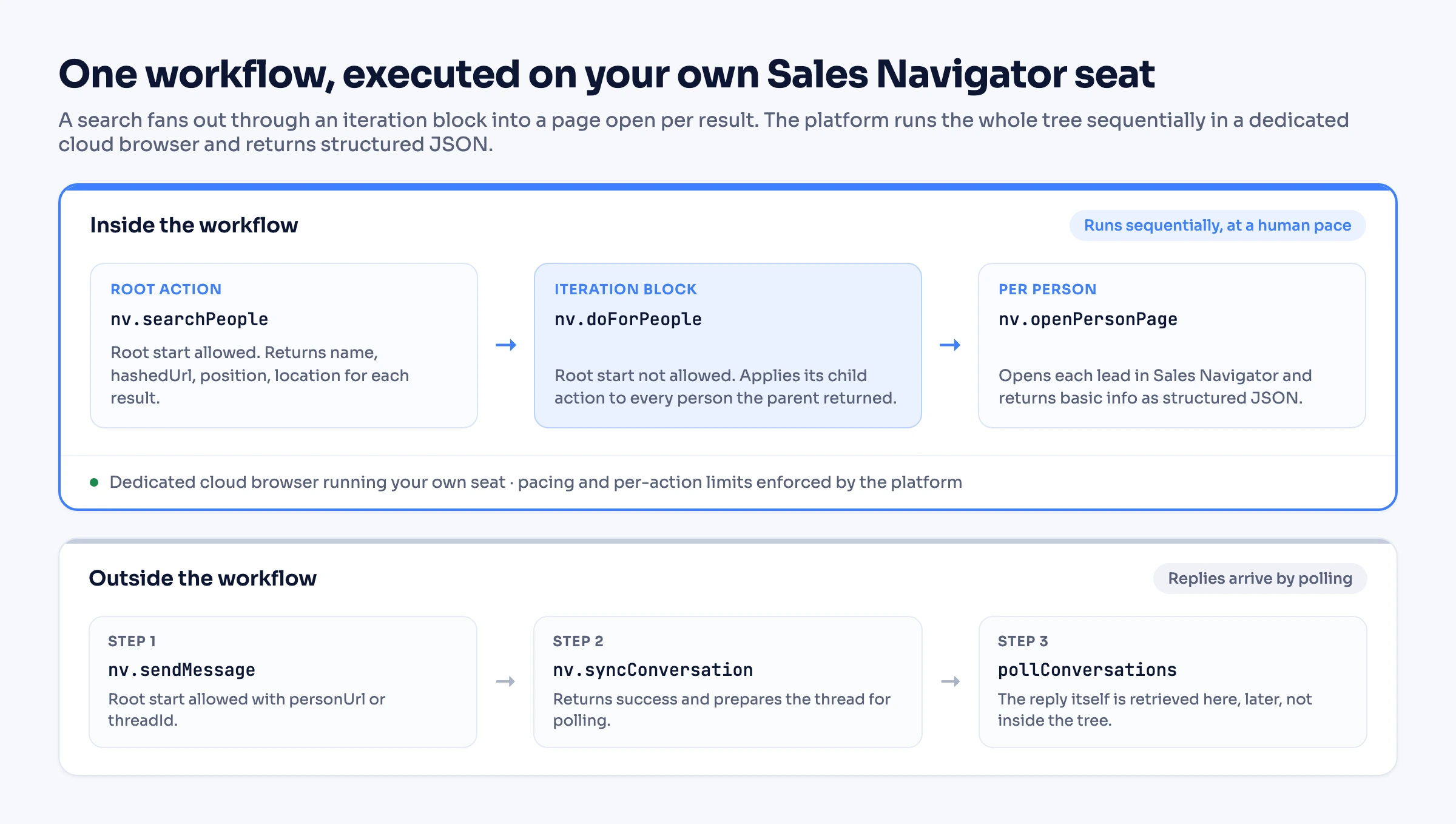
Composed as a single workflow, nv.searchPeople fans out through an nv.doForPeople block into an nv.openPersonPage per result, and the platform runs the whole tree sequentially on your seat. Replies are handled separately: send the message, sync the conversation, then poll for the reply later.
Run it out of the box – MCP, the AI-agent-friendly CLI, ready-made skills
If you would rather not build the integration at all, an AI agent can do it for you. Connect the MCP server – its LinkedIn Sales Navigator MCP tools cover search, messaging and inbox sync on a Plus seat – or point an agent at the CLI from Claude Code, Cursor, or Codex, or install ready-made skills with npx @linkedapi/skills. You describe the job in plain language – "find heads of engineering at Series B software companies in San Francisco and summarise their recent activity" – and the agent composes and runs the same workflows. Nothing to wire, no blocks to drag.
When another route is the better choice
- You need one spreadsheet, once. Use an export tool. An API is a worse answer to a question that ends when the CSV downloads.
- You need bulk records and own no Sales Navigator seat. A dataset provider is the honest fit. Account-based routes require a seat, because they work through it.
- You want Sales Navigator surfaces inside a CRM UI. If an approved SNAP integration exists for your CRM, it will beat anything you assemble, and it comes with vendor support.
- You are already an approved partner. Use what you have.
Frequently Asked Questions (FAQ)
Not at the moment. LinkedIn's SNAP documentation says it is not currently accepting new partners. Third-party guides that walk you through an application flow are describing a process that is not open, though LinkedIn does say it will update the page if capacity changes, so the state is worth re-checking rather than assuming permanence.
Build it on a seat you own
If the official API is not open to you and a CSV is not enough, Linked API runs Sales Navigator workflows on your own seat through a dedicated cloud browser, with pacing and limits enforced by the platform. Embed it through the REST API, SDKs, and CLI, or skip the build entirely and let an agent run it through MCP or ready-made skills. Pricing is flat per seat, from $49 per month billed annually – see pricing.
Facts verified 29 July 2026 – SNAP service descriptions and partner-availability wording checked against LinkedIn's official documentation, and competitor capability claims checked against their live pages, on that date.