
LinkedIn Sales Navigator Cost in 2026: Pricing by Plan
Sales Navigator is priced per licence, and the published number is only half the decision. The other half is which tier that licence should be, and whether a given person on your team needs one at all.
The short version. Sales Navigator starts at US$119.99 per licence per month, or US$1,079.88 per year, for Core. Advanced starts at US$159.99 per month or US$1,799.88 per year. Advanced Plus has no published price and is quoted per customer. Core and Advanced give you the same search and InMail allocation – what the step up buys is buyer intelligence, warm-path tooling and team administration. And the annual discount is uneven: LinkedIn takes 25% off Core but only about 6% off Advanced, which makes the gap between the two tiers wider on annual billing than on monthly.
How much does LinkedIn Sales Navigator cost in 2026?
Per LinkedIn's compare-plans page, in US dollars:
| Plan | Monthly, per licence | Annual, per licence | Effective monthly on annual | LinkedIn's "best for" |
|---|---|---|---|---|
| Core | US$119.99 | US$1,079.88 | US$89.99 | Individual sellers |
| Advanced | US$159.99 | US$1,799.88 | US$149.99 | Sales teams |
| Advanced Plus | Contact sales | Contact sales | – | Sales teams using integrated CRM |
Both published tiers say "starts at", and pricing is per licence rather than per company, so a five-person team on Core is five times the number above.
LinkedIn attaches a caveat to those figures worth reading before you build a budget on them: "prices listed above are estimates and may exclude Value-Added Tax (VAT), Goods & Services Tax (GST), and/or promotional discounts. Pricing is subject to change. Slight variations may occur across device types."
Does annual billing actually save you money?
Yes, but by very different amounts depending on which tier you are on. LinkedIn states both discounts itself: "a 25% savings with annual billing" on Core, and "a 6% savings with annual billing" on Advanced.
The arithmetic behind those two numbers:
| Plan | 12 months at the monthly rate | Annual rate | Saving | Discount |
|---|---|---|---|---|
| Core | US$1,439.88 | US$1,079.88 | US$360.00 | 25.0% |
| Advanced | US$1,919.88 | US$1,799.88 | US$120.00 | 6.25% |
The consequence is the part that changes a decision. Because Core gets four times the discount rate Advanced does, the price gap between the two tiers is not constant – it widens when you commit annually:
- Paying monthly, Advanced costs US$480 more per licence per year than Core.
- Paying annually, Advanced costs US$720 more per licence per year than Core.
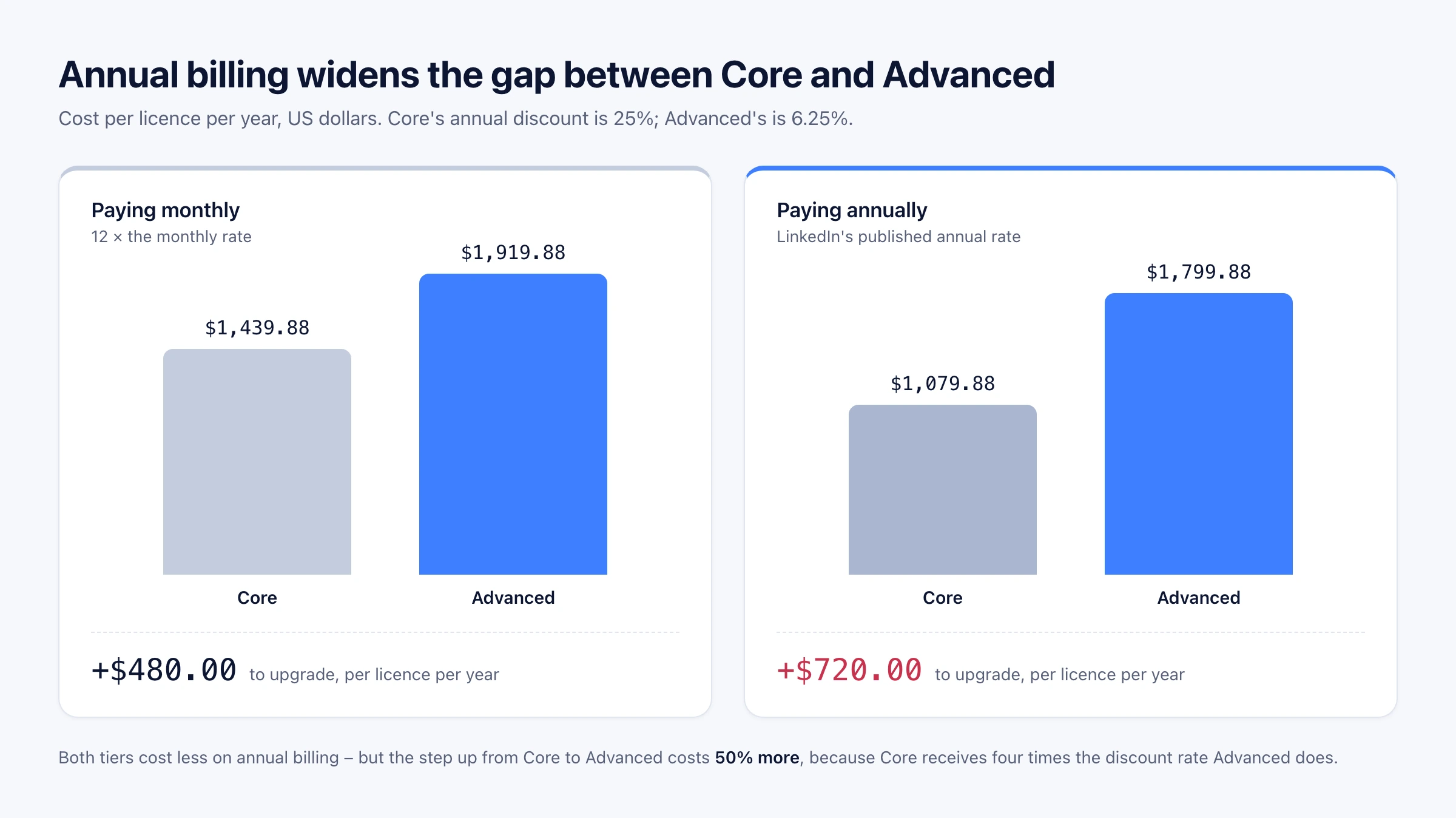
Nothing reverses here – annual Advanced is still cheaper than monthly Advanced. But the upgrade itself gets 50% more expensive under annual billing, so if you are sizing a team where some people need Advanced and some do not, price the mix on the billing basis you will actually use, not on the monthly rate.
What the Core → Advanced step actually buys
Not more search. Core and Advanced carry an identical search-and-reach allocation: the same 50+ advanced search filters, the same 50 InMail per month, and the same Relationship Explorer, Relationship Map and Alerts.
What the step adds is buyer intelligence, engagement tooling, and the machinery a team needs to run seats together.
| Capability | Core | Advanced | Advanced Plus |
|---|---|---|---|
| Advanced Search Filters | ✓ | ✓ | ✓ |
| InMail | 50/month | 50/month | 50/month |
| Relationship Explorer | ✓ | ✓ | ✓ |
| Relationship Map | ✓ | ✓ | ✓ |
| Alerts | ✓ | ✓ | ✓ |
| Account IQ & Lead IQ | – | ✓ | ✓ |
| Message Assist (public beta) | – | ✓ | ✓ |
| TeamLink | – | ✓ | ✓ |
| Smart Links | – | ✓ | ✓ |
| Buyer Intent | – | ✓ | ✓ |
| Team seat management & centralized billing | – | ✓ | ✓ |
| Team reporting | – | ✓ | ✓ |
| Manage your book of business | – | ✓ | ✓ |
| Dedicated account team & tailored training\* | – | ✓ | ✓ |
| Advanced CRM Integrations | – | – | ✓ |
| Lead/Contact Creation | – | – | ✓ |
| CRM Embedded Experiences and Profiles | – | – | ✓ |
\* LinkedIn footnotes this row as "if purchased through a sales representative".
So the question to ask about the extra US$720 a year is not "do we need better search" – you already have the same search on Core. It is whether these five things are worth it to the individual seller: knowing which accounts are already showing interest (Buyer Intent), AI-written account and lead research (Account IQ and Lead IQ), warm introduction paths through colleagues' connections (TeamLink), trackable content links (Smart Links), and drafted outreach (Message Assist) – plus, for the manager, seat administration and team reporting.
LinkedIn's own framing matches: Core is for "individual sellers who want to find high-quality leads and build client relationships", Advanced for "sales teams that need AI-powered lead and account research, actionable insights, and collaboration tools".
How Advanced Plus pricing works
Advanced Plus has no list price. LinkedIn quotes it per customer, and the variables it names are team size, CRM integration requirements, and onboarding and training.
What you get for the quote is narrower than the tier name suggests. In LinkedIn's own comparison matrix, exactly three capabilities separate Advanced Plus from Advanced, and all three are CRM:
- Advanced CRM Integrations – keeping the CRM current from Sales Navigator.
- Lead/Contact Creation – writing leads and accounts into the CRM.
- CRM Embedded Experiences and Profiles – LinkedIn surfaces rendered inside the CRM.
That makes the decision unusually clean. If real CRM synchronisation is the thing you need, request the quote. If it is not, Advanced already contains everything else Advanced Plus does, and there is nothing else in the tier to buy.
Published estimates for the quote do not agree with each other, which is a reason to treat all of them as indicative: GigRadar puts Advanced Plus at roughly US$1,300–1,600 per seat per year, while Factors states US$1,600 and up. Neither is LinkedIn, and LinkedIn does not publish a figure.
Which accounts actually need a Sales Navigator licence?
Before choosing a tier, it is worth asking whether a particular person needs a licence at all – and the answer turns on one rule that decides more budget than any tier comparison.
A Sales Navigator licence attaches to a user, not to a task. You cannot detach the ordinary parts of someone's work to shrink their subscription. If a seller needs advanced filters, saved lead and account lists, Sales Navigator's 50-a-month InMail allocation, alerts, or any other Sales Navigator surface for any part of their job, they need a licence, and moving the rest of their work elsewhere does not reduce what you pay for them.
Where the rule pays off is the account that never touches those surfaces at all.
| The work | Sales Navigator status |
|---|---|
| Advanced-filter and saved-search prospecting | Nav-exclusive – needs a licence |
| Saved lead and account lists, book of business | Nav-exclusive – needs a licence |
| InMail at 50 a month | The allocation is Nav-exclusive – Premium Business includes 15 a month |
| Buyer Intent, Account IQ, Lead IQ, TeamLink, Smart Links | Nav-exclusive – needs a licence, on Advanced or above |
| CRM sync of Sales Navigator data | Nav-exclusive – needs Advanced Plus |
| Standard LinkedIn people and company search | Not Nav-exclusive by itself |
| Profile, company and post data | Not Nav-exclusive by itself |
| Connection requests and ordinary messages | Not Nav-exclusive by itself |
Read the right-hand column carefully: "not Nav-exclusive by itself" is not the same as "free". It means only that this work does not require Sales Navigator. An account that does some of it alongside Nav-exclusive work still needs a licence.
The case where this genuinely saves money is narrower and specific: an account whose workflow never needs a Nav-exclusive capability – a research or data-collection account, an operations account feeding a CRM, an account behind a product feature – can run standard LinkedIn work on no Sales Navigator subscription at all.
Two honest qualifications. Standard LinkedIn search is meaningfully narrower than Sales Navigator search, not an equivalent with a different label: our own standard people search exposes eight filter fields – first name, last name, position, locations, industries, current companies, previous companies and schools – against the 50+ filters LinkedIn markets Sales Navigator on. And a licence does not lift every ceiling: LinkedIn says a paid plan increases the number of profile searches and views, but the connection-invite cap is unchanged – see search query limits and the 2026 connection limits guide.
When Sales Navigator is the right purchase
The eligibility question above is about whether an account needs a licence. This one is different: given that the work needs doing, when is Sales Navigator itself the better tool than any alternative, ours included?
- A person is doing the searching. Sales Navigator's filter interface, saved searches, and lead and account lists are built for a human working a pipeline interactively. No API is a better experience for that job.
- You want warm paths, not just names. TeamLink surfaces which colleague can introduce you. That mapping is proprietary to LinkedIn and cannot be reconstructed from outside.
- You want LinkedIn's own account research. Account IQ and Lead IQ summarise accounts and leads inside the product, with LinkedIn's data behind them.
- You want buying signals. Buyer Intent reflects activity LinkedIn observes and does not expose anywhere else.
- Your requirement is CRM synchronisation. Advanced Plus, or an approved SNAP integration through your CRM vendor, will beat anything you assemble – see our Sales Navigator API guide.
- You need one spreadsheet, once. An export tool is the right answer, not a subscription decision at all. Our Sales Navigator export guide compares the routes.
- You need bulk records with email addresses or phone numbers. Sales Navigator does not provide those, and neither do we. A dataset provider is the honest fit.
Getting more out of a licence you already pay for
If you are paying for licences, the cost per seat is fixed but the output is not – it is capped by how many hours a person can spend in the interface. Sales Navigator work can also run programmatically on the same licence you already own, which is where Linked API fits.
This does not replace the subscription and cannot: Sales Navigator actions run through your seat, so the seat has to exist. What changes is that searching, opening a lead, retrieving a company's employees or decision makers, sending a message and syncing the conversation become composable steps you can run on a schedule or from inside your own product.
There are two first-class ways to reach it, and neither is a lesser version of the other.
Build it in. Compose the primitives yourself through the REST API, Node and Python SDKs, and the shell CLI, and embed them in your product, backend or CRM. The full action set, including which actions are Sales Navigator-only, is in the actions overview.
Get it out of the box. Connect the MCP server, point an AI agent at the CLI from Claude Code, Cursor or Codex, or install ready-made skills with npx @linkedapi/skills. You describe the job in plain language and the agent composes and runs the same workflow. Nothing to wire, no blocks to drag.
Both run on a dedicated cloud browser against your own account, at a human pace, with per-action limits enforced by the platform. Pricing is flat per seat, from $49 per month billed annually.
One limit worth stating plainly, because it decides whether this fits at all: Sales Navigator result types carry no email address and no phone number. If contact data is what you need, this is not the route.
Frequently Asked Questions (FAQ)
There is a free trial, and LinkedIn asks for payment information up front. Its stated terms are that you can "cancel for any reason before your Sales Navigator trial ends to avoid being charged", and that it sends "an email reminder seven (7) days before your free trial expires".
Not necessarily. LinkedIn describes its published figures as estimates that "may exclude Value-Added Tax (VAT), Goods & Services Tax (GST), and/or promotional discounts", adds that pricing is subject to change, and notes that "slight variations may occur across device types". Both published tiers are also quoted as "starts at" prices.
Those are two different answers. It does not raise the connection-invite ceiling – that cap is the same whether you pay or not, and the current figures are in the 2026 connection limits guide. It does increase search access: LinkedIn's commercial use limit page says you can upgrade to Premium Business, Recruiter Lite or Sales Navigator "to increase the number of profile searches and views", while adding on the same page that "we are not able to display the exact number of searches or views you have left". So the allowance goes up, and LinkedIn does not publish what it goes up to. What Sales Navigator does publish is how much one search returns: "up to 2,500 lead results across 100 pages or 1,000 account results across 40 pages", per LinkedIn Help. Our own breakdown sits in search query limits and search results limits.
Price the tier, then price the seat
Sales Navigator's list price is the easy part: US$119.99 or US$159.99 per licence per month, less 25% or 6% respectively if you commit for a year. The decisions that actually move the bill are which of your people need a Nav-exclusive capability at all, and whether the seats you keep are producing everything they could.
If the answer to the second one is no, Linked API runs Sales Navigator workflows on the licences you already own – built into your own product through the REST API, SDKs and CLI, or run out of the box by an agent through MCP, the CLI or ready-made skills. Flat per seat, from $49 per month billed annually.
Facts verified 10 August 2026 – Sales Navigator prices, plan features, trial terms and Premium comparison checked against LinkedIn's live pages, and third-party Advanced Plus estimates checked against their live pages, on that date.