
LinkedIn Social Selling Index (SSI): What It Is, How to Check It, and Whether It Still Matters
The Social Selling Index is the one score LinkedIn keeps about how you use LinkedIn – and most people have never looked at it, while the people who have tend to overrate what it means. Both are mistakes worth fixing: SSI is free to check, genuinely informative about your activity, and – per LinkedIn's own current messaging – not the sales KPI it was once marketed as. This guide covers what the SSI measures, how to check it, what a good score actually is, and how to track it over time instead of glancing at it once.
The short version. The Social Selling Index is LinkedIn's 0–100 score of your social-selling activity, built from four components worth 25 points each: your professional brand, finding the right people, engaging with insights, and building relationships. Check it free at linkedin.com/sales/ssi (you must be logged in); it updates daily. There is no current official target: LinkedIn's dated guidance from 2017 called anything above 70 high and below 30 weak, but today's dashboard labels no threshold – your industry and network percentile ranks, and your trend, are the more useful signal. LinkedIn itself now downplays SSI's link to sales outcomes, so treat it as a directional activity metric: worth tracking as a trend (which you can automate), not worshipping as a KPI.
What is the LinkedIn Social Selling Index?
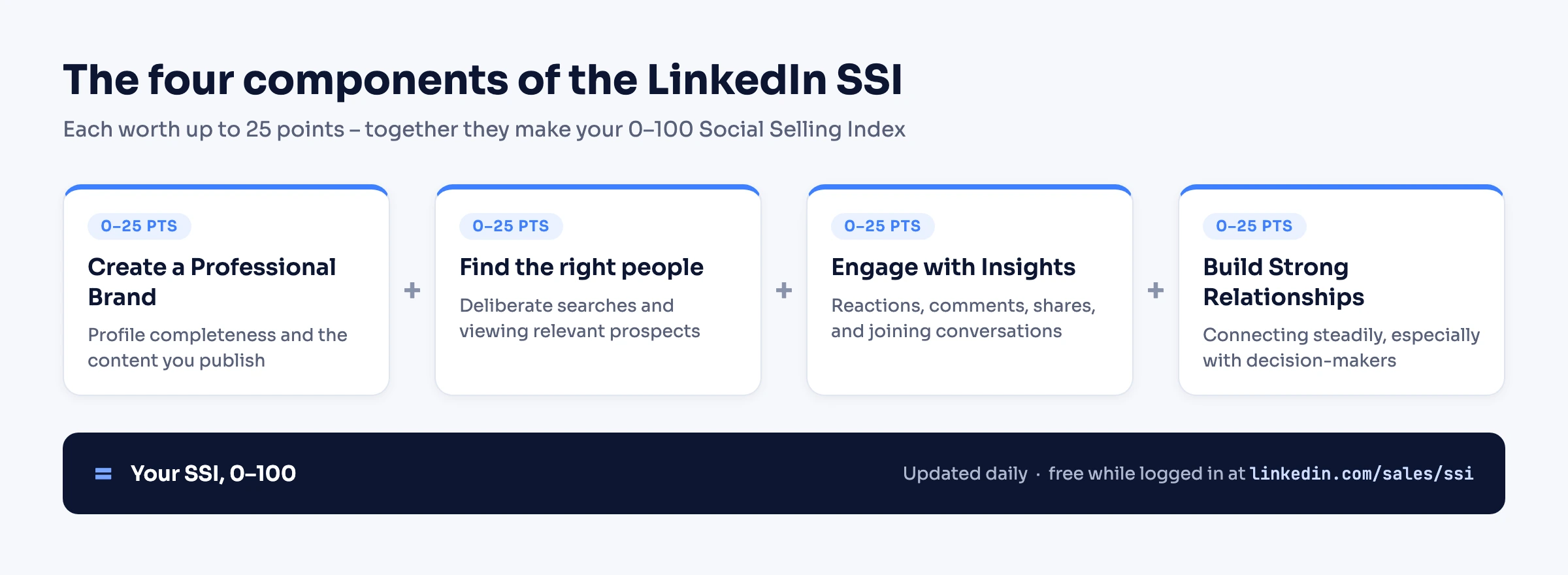
The Social Selling Index (SSI) is a 0–100 score that LinkedIn computes daily from your activity, as a measure of how well you practice what it calls social selling. Per LinkedIn's official tip sheet, the score has four components:
- Create a Professional Brand – how complete and content-rich your presence is.
- Find the right people – how deliberately you search for and view relevant prospects.
- Engage with Insights – how much you share, react, comment, and join conversations.
- Build Strong Relationships – how consistently you connect, especially with decision-makers.
The scoring is officially documented on LinkedIn's social selling page: "Each of the above elements is assigned a value between one and 25, and the sum of all four elements results in a total SSI score between 0–100." The same tip sheet notes the index "measures the four social selling activities as they take place on Sales Navigator and LinkedIn.com" – so Sales Navigator actions like advanced searches and saved leads feed the score alongside ordinary LinkedIn activity.
SSI started as a Sales Navigator metric; LinkedIn opened it to every member for free on August 3, 2015, and its learning-center materials describe daily SSI updates, which matches the dashboard's own wording.
How to check your SSI score
Go to linkedin.com/sales/ssi while logged in to LinkedIn – the page is free for every member but shows a login wall if you are signed out, which is why the URL sometimes looks "broken" when shared.
The dashboard shows more than the headline number, and the extras are the interesting part:
- Your total SSI score (0–100) and the four component sub-scores (up to 25 each), so you can see which pillar is dragging.
- Your Industry SSI rank – the percentile you occupy among people in your industry.
- Your Network SSI rank – the same percentile within your own network.
- Your movement over the last week.
The percentile ranks matter more than the raw score, because they answer the question a raw number cannot: high or low compared to whom?
What is a good SSI score?
The honest answer has two layers, and most guides get one of them wrong.
LinkedIn's dated official guidance did set thresholds. In a January 18, 2017 Sales Blog post, LinkedIn wrote that "a high SSI is typically anything above 70" and that "a less-than-stellar SSI would be anything below 30." Its official Achieving Social Selling Success infographic draws the same lines: SSI leaders above 70, laggards below 30. This is where the "70+" benchmark you see everywhere comes from – it is genuinely LinkedIn's number, just an old one.
Today, there is no current official target. The modern SSI dashboard labels no threshold, and LinkedIn's current pages set none. Third-party guides embellish beyond the official numbers – higher "thought leader" bars, claimed platform-wide averages – but none of that comes from LinkedIn.
So the useful present-day yardstick is relative and temporal rather than absolute: where you sit in your industry and network percentile ranks, and whether your score is trending up as you invest in LinkedIn. A 55 in the top 5% of your industry is a better signal than a 72 in the bottom half of it.
Does SSI still matter in 2026?
This is the question the classic SSI guides have not caught up with, because the primary source changed underneath them.
LinkedIn's main SSI page is now titled "From Social Selling Index (SSI) to AI", and it argues for moving past the score – "less scoring, more selling" – conceding outright that "a high SSI score doesn't always represent the efficacy of a sales person or correlate with measurable sales outcomes." That is LinkedIn, on its own flagship SSI page, telling you not to treat SSI as a performance metric.
At the same time, LinkedIn still publishes the classic numbers on its social selling page, from internal research dating back to roughly 2014–2016: "Social selling leaders create 45% more opportunities than peers with lower SSI," "social selling leaders are 51% more likely to reach quota," and "78% of social sellers outsell peers who don't use social media." Read those for what they are – LinkedIn's own marketing research about correlation between activity and outcomes, not proof that raising the score raises revenue.
The fair verdict: SSI is a directional activity metric. It tells you whether you (or a team) are consistently present on LinkedIn – completing profiles, searching deliberately, engaging, connecting. That makes it useful as a trend line and a team-hygiene signal, and useless as a quota predictor – by LinkedIn's own admission. If consistent LinkedIn presence is part of how you sell, SSI is a cheap proxy for whether the presence is actually happening.
How to improve your LinkedIn SSI score
Each component responds to a specific kind of activity. The table covers what feeds each pillar and the highest-leverage moves – and where a pillar is automatable, the linked guide goes deeper:
| Component (official name) | What feeds it | What moves it |
|---|---|---|
| Create a Professional Brand | Profile completeness, content you publish | Complete every profile section; post consistently – automating your posting keeps the cadence without the willpower |
| Find the right people | Deliberate searches and prospect views | Search with intent instead of browsing – Boolean search makes each search count; Sales Navigator searches feed this too |
| Engage with Insights | Reactions, comments, shares, group activity | Comment substantively on prospects' posts; share with a point of view; messaging that gets replies beats broadcasting |
| Build Strong Relationships | Connections made, especially decision-makers | Connect steadily with relevant people, not in bursts – the connection-request guide covers doing it at a human pace |
Two honest notes. First, because Sales Navigator-only actions (advanced searches, saved leads, prospecting views) officially count toward the score, Navigator users tend to score higher by construction – LinkedIn publishes no boost percentage, and any specific figure you see circulating is a third-party estimate. Second, the fastest way to a higher SSI is simply doing the four activities regularly for a few weeks; the score updates daily, so effort shows up quickly.
Who can see your SSI score?
By default, only you. Your SSI is not displayed on your profile, not visible to your connections, and LinkedIn documents no direct effect of your SSI on how your profile or posts rank in feeds or search.
There is one documented exception: Sales Navigator team contracts. LinkedIn's data-privacy help page for Sales Navigator states: "Your Social Selling Index (SSI) score will be made available to your admin and other members of your team." If your company runs Sales Navigator with team seats, your admin and teammates can see your score – worth knowing before you assume it is fully private.
Track your SSI over time (the part worth automating)
A score you glance at once is trivia. The signal is the trend – is your score climbing while you invest in LinkedIn, and are your industry and network percentiles moving? The ranking guides reviewed in July 2026 do not show how to do that programmatically, and it is the one part that genuinely benefits from automation.
Linked API – a flexible LinkedIn automation API you can embed in your own product, backend, CRM, or workflow, running every action on your own account through a human-paced cloud browser – has two dedicated actions for exactly this, documented under retrieving SSI and performance. retrieveSSI returns your score plus both percentile ranks (ssi, industryTop, networkTop), and retrievePerformance adds your dashboard analytics: followersCount, postViewsLast7Days, profileViewsLast90Days, searchAppearancesPreviousWeek. A weekly cron that appends one CSV row gives you a chart LinkedIn itself never shows – your SSI and reach over months, next to your actual outreach activity:
import LinkedApi from '@linkedapi/node';
import { appendFileSync } from 'fs';

const linkedapi = new LinkedApi({
  linkedApiToken: process.env.LINKED_API_TOKEN,
  identificationToken: process.env.IDENTIFICATION_TOKEN,
});

const ssiWorkflow = await linkedapi.retrieveSSI.execute();
const { data: ssi } = await linkedapi.retrieveSSI.result(ssiWorkflow.workflowId);

const perfWorkflow = await linkedapi.retrievePerformance.execute();
const { data: perf } = await linkedapi.retrievePerformance.result(perfWorkflow.workflowId);

appendFileSync(
  'ssi-history.csv',
  [
    new Date().toISOString().slice(0, 10),
    ssi.ssi, ssi.industryTop, ssi.networkTop,
    perf.followersCount, perf.postViewsLast7Days,
    perf.profileViewsLast90Days, perf.searchAppearancesPreviousWeek,
  ].join(',') + '\n',
);The same numbers are one command in the shell CLI – easy to pipe into whatever you already use:
linkedin stats ssi --json
linkedin stats performance --json
One constraint to be clear about: both actions return data for the connected account only – there is no org-wide endpoint that reads a whole team's scores. A team SSI dashboard means each member's own LinkedIn account is connected, one seat per connected account on the flat per-seat plan, with the tracker running the same pull per account. And for AI-first workflows the whole loop works out of the box: an agent wired up through the MCP server, the AI-agent-friendly CLI, or the ready-made skills can check the weekly numbers and report the movement in plain language – nothing to build or maintain.
Frequently Asked Questions (FAQ)
LinkedIn's dated guidance from 2017 called anything above 70 a high SSI and anything below 30 weak, and that is where the common "70+" benchmark comes from. Today's dashboard labels no threshold, and LinkedIn's current pages set no target – so use the relative signals instead: your industry and network percentile ranks, and whether your score is trending up.
Daily. LinkedIn's learning-center materials reference daily SSI updates, and the dashboard carries the same wording – so changes in your activity show up within a day or so, which is what makes the score practical to track as a trend.
By default, no – it is not on your profile and your connections cannot see it. The documented exception is Sales Navigator team contracts: LinkedIn's data-privacy help page states your SSI score "will be made available to your admin and other members of your team."
Yes. SSI has been free for every LinkedIn member since August 3, 2015, when LinkedIn opened what was previously a Sales Navigator metric to everyone. You just need to be logged in when you open linkedin.com/sales/ssi.
LinkedIn documents no direct ranking effect from SSI on your feed reach or search visibility. The overlap is indirect: the activities that raise SSI – posting, engaging, connecting – are the same ones that grow reach on their own. Treat SSI as a reflection of that activity, not a lever on distribution.
Want the trend, not a one-off glance? Start with Linked API – flat per-seat pricing from $49/mo, billed annually – and pull retrieveSSI and retrievePerformance on a schedule through the full surface set: the REST API and Node/Python SDKs, the shell CLI, the MCP server, the AI-agent-friendly CLI (Claude Code, Cursor, Codex), and ready-made agent skills (npx @linkedapi/skills) – on your own account and at a human pace.