
LinkedIn InMail: What It Is, How Credits Work, and When to Use It
LinkedIn InMail is the feature everyone has received and few people fully understand: the paid message that lands in your inbox from someone you never connected with. The mechanics behind it – who can send it, what a credit actually costs, when you get one back – are documented by LinkedIn across half a dozen help pages that almost nobody reads in full. This guide pulls the whole picture together, verified against those pages, and adds the part LinkedIn doesn't cover: when spending an InMail credit is actually the right move.
The short version. InMail is LinkedIn's paid direct message to people you are not connected to – free accounts can't send it. Each paid plan gets monthly credits: Premium Career 5, Premium Business 15, Sales Navigator Core 50, Recruiter Lite 30, accumulating up to plan-specific caps (15 / 45 / 150 / 120). A credit comes back if the recipient accepts, declines, or replies within 90 days – as a rule, only a message that stays unanswered costs you. Subjects run up to 200 characters, the body up to 2,000. There is no unlimited-InMail plan, and outside Recruiter there is no way to buy extra credits – but anyone, including free members, can message Open Profile Premium members at no cost. And before spending a credit: a connection request costs nothing and is usually the better first move.
What is InMail on LinkedIn?
Per LinkedIn's InMail Messages help page, "InMail messages is a premium feature, and it allows you to directly message another LinkedIn member that you're not connected to." That one sentence carries the two defining constraints: it is paid, and it is for strangers – people outside your first-degree network whom you could otherwise only reach after they accept a connection request.
The free-account boundary is explicit on the same page: "If you have a Basic (free) account, then you can only directly message LinkedIn members that you're connected to." Free members can still reply to any InMail they receive, and can message Open Profile members without paying anything.
Two more facts from the same page that most guides skip:
- Credit pools are siloed. "Premium InMail message credits can't be used to send InMail messages on Sales Navigator or LinkedIn Recruiter" – each product has its own bucket.
- Some people are unreachable by design. Members who have turned off InMail in their message preferences can't be InMailed at all, at any price.
How many InMail credits do you get per plan?
Credits are the currency of InMail. The Premium and Sales Navigator allowances are documented on LinkedIn's credits and renewal page, and the Recruiter figures on its Recruiter help pages:
| Plan | Credits per month | Max accumulation | Can you buy extra? |
|---|---|---|---|
| Premium Career | 5 | 15 | No |
| Premium Business | 15 | 45 | No |
| Sales Navigator (all tiers) | 50 | 150 | No |
| Recruiter Lite | 30 | 120 | Packs of 10, max 70 per seat |
| Recruiter | 150 per license | – | Yes |
Unused credits roll forward until you hit your plan's accumulation cap – note the caps are plan-specific, not one universal multiplier. New credits arrive "every month, on the first day of your billing cycle." For Sales Navigator there is one wrinkle worth knowing: LinkedIn's own pages currently describe the renewal day differently – the Sales Navigator credits page says credits arrive "the first day of each month (in UTC time)," while the general credits page says the last day of the month. Treat the Sales Navigator page as the authority for Sales Navigator.
To see your balance: Me icon → Premium features → See all features → expand the InMail section – "Credits available" is shown there, per the view-credits help page.
The credit-back rule (and the mechanics that surprise people)
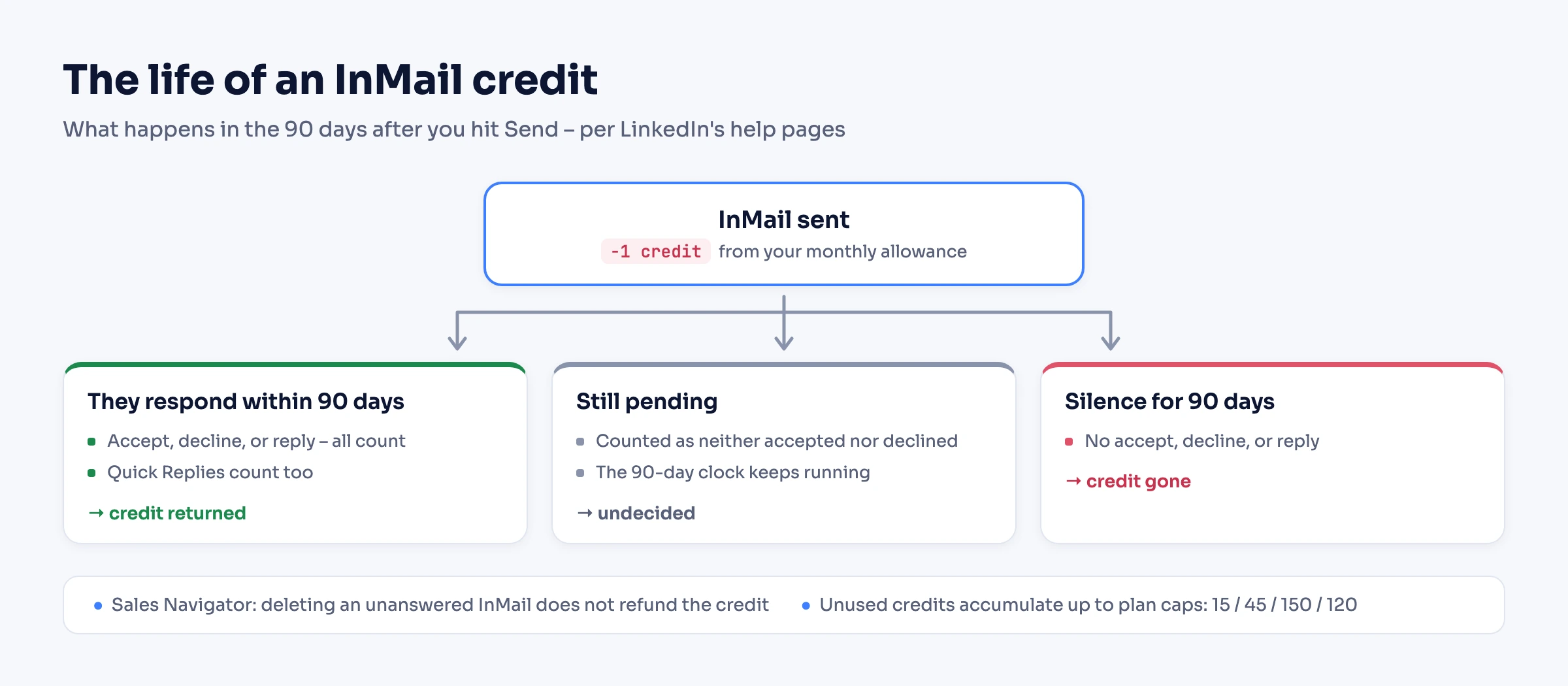
The most misunderstood part of InMail is that sending one doesn't necessarily spend a credit for good. LinkedIn's rule, quoted from the credits page: "Every InMail message that is accepted/declined or responded to directly within 90 days of it being sent is credited back." Quick Replies count as a response, and on Sales Navigator even "Not interested" and auto-replies qualify. Meanwhile, "a pending InMail message isn't counted as either accepted or declined" – it sits in limbo.
So as a rule, only a message that stays unanswered for 90 days costs you – with one documented exception: on Sales Navigator, deleting an InMail that never got a response does not refund the credit. Well-targeted InMail is close to self-funding; ignored InMail quietly drains the balance.
Can you send a second InMail before they reply?
This is where the products genuinely differ, and flattening them into one rule (as most guides do) gets it wrong:
- Premium: no – per the credits page, you can't send another InMail to the same person until they respond to the first.
- Sales Navigator: yes – a second InMail before any response is allowed, and it costs another credit.
- Recruiter: a built-in cooldown – 24 hours before re-messaging the same candidate, unless they reply sooner.
Three more mechanics worth knowing before you budget around credits: Sales Navigator rollover credits "must be used within 90 days"; credits are forfeited if you cancel or switch plans ("your InMail credits won't be transferred"); and Recruiter Lite's purchase option has a skimming gotcha – the balance is hard-capped at 120 per seat at billing renewal, so per LinkedIn's own example, a recruiter holding 115 credits receives only 5 of their 30 monthly credits, and the remaining 25 are "skipped and be non-recoverable."
How much does InMail cost?
There is no standalone per-InMail price – InMail only comes bundled with a paid plan. For Premium, LinkedIn states "it's not possible to purchase additional InMail message credits outside of the monthly allotment" (send-InMail page), and for Sales Navigator, "at this time, you can't purchase additional InMail credits" (credits page). Only the Recruiter products sell extra credits, in packs of 10 for Recruiter Lite, with the price shown only at checkout.
So the real question is which plan's monthly grant you are paying for – 5 on Premium Career, 15 on Premium Business, 50 on Sales Navigator, 30 on Recruiter Lite. LinkedIn's plan prices vary by billing period, region, and signup cohort (a consumer price change has been rolling out through 2026), and are displayed at LinkedIn's own checkout rather than on a public price list – so check there. Two things soften the arithmetic regardless of the sticker: credits roll over within your cap, and answered InMail comes back free.
InMail character limits (and how to send one)
Per the current Send an InMail help page: the subject line takes "up to 200 characters" and the body "up to 2000 characters." (Many guides still cite a 1,900-character body – the current help page says 2,000.) The subject is optional.
Sending one is unglamorous: open the person's profile → More → Message [Name] → add a subject if you want one → write → Send. On mobile, the Message button on their profile does the same. If the compose box opens without any credit warning, either you are connected (a regular free message), or the recipient has Open Profile enabled – see below.
InMail vs connection request vs email: when to spend a credit
InMail's pitch is response rates. LinkedIn's own sales-solutions page claims InMail gets "a 10-25% hit rate when it comes to soliciting a response from potential clients -- 300% higher than emails with the exact same content" (LinkedIn's number, from an undated page live as of 2026). Its Talent Blog study of tens of millions of recruiter InMails (May 2022) is more actionable:
| Finding | Effect on response rate |
|---|---|
| Keep it under 400 characters | +22% vs the average InMail |
| Personalize – don't bulk-send | +15% vs bulk InMails |
| Don't send on Friday or Saturday | −4% / −8% vs other days |
The honest decision framework, though, starts before the credit. A connection request is free, and once accepted, messaging is free forever – for most steady prospecting it is the better first move, and automating that flow scales it. Email wins when you already have the address: no credit, no character ceiling, your own tooling. InMail earns its credit in two situations: you can't wait for an acceptance (a closing candidate, a time-boxed deal), or connecting is unrealistic (a far-out-of-network executive). What to actually write – openers, follow-ups, cadence – is craft, not mechanics: the cold outreach guide covers it.
Free InMail: the Open Profile exception
One carve-out makes "InMail is paid-only" slightly false in practice. Premium members can enable Open Profile, which per LinkedIn's help page allows "anyone on LinkedIn to contact a Premium member for free, even if they're not in the sender's network" – no credit consumed, and the sender doesn't even need a paid plan. If a Premium member's profile shows the Message button open to you without a credit prompt, that is usually why.
The volume is not unlimited: LinkedIn limits the number of Open Profile messages you can send in a given period, without publishing a number. For outbound prospecting, Open Profile members are the cheapest people on LinkedIn to reach – worth identifying deliberately.
Sending InMail from your own system (in brief)
Everything above is manual. If InMail is part of an outreach flow you run in code – a recruiting pipeline, a sales sequence in your own CRM – Linked API, a flexible LinkedIn automation API you can embed in your own product, backend, or workflow, sends InMail programmatically on your own account through a human-paced cloud browser. One scope note, stated precisely: Linked API automates Sales Navigator InMail only, via the nvSendMessage action, and it requires a Sales Navigator seat on the connected account – it does not send Premium or Recruiter InMail. The API contract is also stricter than the LinkedIn compose box: subject up to 80 characters and text up to 1,900 via the API, versus 200 and 2,000 in the UI – budget copy for the tighter limits when the same message runs both ways.
The full flow – the connect-or-InMail branching loop, reading replies, monitoring the inbox, with working TypeScript and Python – lives in How to Automate LinkedIn Messages, and the nvSendMessage reference has the exact contract. The action is available across all Linked API surfaces, enumerated below.
Frequently Asked Questions (FAQ)
A regular message is free but only works between 1st-degree connections. InMail is a paid-plan feature that reaches members you are not connected to, spends a credit per send (refunded if they respond within 90 days), and supports a subject line. If you are already connected to someone, LinkedIn simply sends a regular message – no credit involved. Which of the two applies depends on the degree of connection between you.
Premium Career gets 5, Premium Business 15, Sales Navigator 50, and Recruiter Lite 30 per month, per LinkedIn's help pages. Unused credits accumulate up to plan-specific caps: 15, 45, 150, and 120 respectively. There is no plan with unlimited InMail.
They roll over up to your plan's accumulation cap (15/45/150/120). On Sales Navigator, rolled-over credits must be used within 90 days. Credits are also forfeited if you cancel or change your subscription type – LinkedIn states they won't be transferred.
The recipient has to act on your message within 90 days: accepting, declining, or replying all return the credit – Quick Replies count, and on Sales Navigator even "Not interested" qualifies. A message that stays pending returns nothing, and on Sales Navigator deleting an unanswered InMail forfeits the credit.
No – sending InMail requires a paid plan. Free members can, however, reply to any InMail they receive, and can message Premium members who have Open Profile enabled at no cost, since Open Profile lets anyone on LinkedIn contact that member for free.
On the Recruiter products, yes: up to 1,000 InMails per day per seat, with a 200-InMail cap in a new seat's first week, per LinkedIn's Recruiter help. Premium and Sales Navigator have no published daily InMail cap – the monthly credit allowance is the effective limit.
The channel itself is not – credits, opt-outs, and the credit-back-on-response mechanic are all designed to make irrelevant InMail expensive and relevant InMail sustainable. Any individual InMail can still be unwanted, which is exactly why recipients can decline it or switch off InMail entirely. Judge the sender and the message, not the mechanism.
Running outreach on your own account, at any scale? Start with Linked API – flat per-seat pricing from $49/mo, billed annually – with Sales Navigator InMail and every other action across the full surface set: the REST API and Node/Python SDKs, the shell CLI, the MCP server, the AI-agent-friendly CLI (Claude Code, Cursor, Codex), and ready-made agent skills (npx @linkedapi/skills) – on your own account and at a human pace.