
8 Best HeyReach Alternatives in 2026 (Compared by Use Case)
HeyReach is a managed cloud platform for running LinkedIn outreach across many sender accounts at once – campaigns, rotation, a unified inbox, and an API, MCP server and CLI on every paid tier. It is very good at that job. People look for an alternative when their work stops fitting the shape it is built around, or when they want the LinkedIn half of a pipeline to live inside their own system instead. This guide matches each use case to the right tool, honestly, including the several places where HeyReach is still the better buy.
The short version. HeyReach is campaign-first: the campaign is its primary orchestration unit, and campaign state lives in HeyReach. If that fits your motion it is hard to beat, especially at agency scale. Linked API is the alternative for the opposite case – LinkedIn retrieval and actions as composable primitives with no campaign object at all, so the workflow stays in your own product, backend or CRM, or in an AI agent's plan, and each account runs in its own dedicated cloud browser with a controlled fingerprint. Note that HeyReach also ships an API, webhooks, an MCP server and a CLI on its entry tier, so this is not a contest over who has an API – it is about what the automation is organised around. If a campaign builder is what you actually want, route by the job instead: Expandi for managed multi-account outreach with dedicated IPs, Skylead for high volume from one seat, Waalaxy for the cheapest start, Dripify for simple drips, La Growth Machine for multichannel across LinkedIn, email, calls and X, lemlist when email leads, and Unipile for a unified messaging developer API.
Pick your alternative in 30 seconds
| Tool | Best for | Channels | What the automation is organised around | Pricing model |
|---|---|---|---|---|
| HeyReach (baseline) | Agencies running many sender accounts | LinkedIn (+ email via Instantly/Smartlead) | Campaigns and adjacent objects; no-code UI plus API, webhooks, MCP, CLI | Per sender, then flat agency tiers |
| Linked API | Building LinkedIn into your product, or handing it to an AI agent | LinkedIn (no email) | LinkedIn primitives, no required campaign object; API, SDKs, CLI, MCP, skills plus n8n, Make and Zapier | Flat per seat |
| Expandi | Managed multi-account outreach with dedicated IPs | LinkedIn + email | No-code UI + Open API that schedules actions into its campaigns | Per account |
| Skylead | High-volume LinkedIn + email in one seat | LinkedIn + email | No-code UI | Per seat |
| Waalaxy | Easy, affordable outreach | LinkedIn + email | No-code UI (API = list/campaign listing and prospect import) | Per user, plan quotas and feature credits |
| Dripify | Simple LinkedIn drip campaigns | LinkedIn + email | No-code UI + reporting API | Per user |
| La Growth Machine | Multichannel across LinkedIn, email, calls and X | LinkedIn + email + calls + X | No-code UI + API and integrations | Per seat |
| lemlist | When email is your main channel | Email + LinkedIn | No-code UI + API | Per seat |
| Unipile | A unified messaging and email developer API | LinkedIn + email + more | API | Per account |
Prices and tiers change often. HeyReach's figures below were checked against its own pricing page on the date in the footer; for the other tools, check each vendor for current numbers.
Why teams look for a HeyReach alternative
Three reasons hold up, and all three come from HeyReach's own materials rather than from anyone's opinion.
- The campaign is the primary orchestration unit. Campaigns are what HeyReach is built around, with lists, senders, schedules, inbox and analytics as the objects arranged near them. Work that is not shaped like a campaign has to be bent into one, and the state of your workflow lives in HeyReach rather than in your system.
- Proxies become your responsibility exactly where you scale. The entry plan gives each sender a dedicated residential proxy. The Agency and Unlimited plans ask you to bring your own proxies – HeyReach frames it as "increased control, security, and scalability by using your established IP addresses." The tier you buy to grow into is the tier where infrastructure work moves back onto you.
- The isolation HeyReach documents is at the network layer. Its public pages describe proxy and IP isolation per sender. They do not describe browser-profile or fingerprint isolation. That is a statement about what is documented, not about what happens internally – but it matters, and the section on account safety below explains why the two layers are not interchangeable.
What does not belong on this list, though you will find it on other comparison pages: HeyReach's per-sender pricing is not a flaw you escape by moving to us, because Linked API is priced per seat too. And its lack of a built-in email sender is not a weakness relative to us either – HeyReach at least reaches email through native integrations and ships enrichment credits, while Linked API has no email at all.
The 8 best HeyReach alternatives
1. Linked API – best for building LinkedIn into your own product or agent
Linked API is not a campaign tool, and that is the point. It exposes LinkedIn as composable primitives – search, fetch person, company and post data, connect, message, react, comment – which you assemble into whatever workflow you need. There is no campaign object to create, because the state of the workflow lives in your system or in an agent's plan.
Two first-class ways to reach it. Build it in through the REST API, Node and Python SDKs, and the shell CLI, embedded in your product, backend or CRM. Or get it out of the box: connect the MCP server, point an agent at the CLI from Claude Code, Cursor or Codex, or install ready-made skills with npx @linkedapi/skills, then describe the job in plain language. If you would rather not touch either, the n8n and Make integrations cover the no-code route.
Every account runs in its own dedicated cloud browser on LinkedIn's own pages at a human pace, with per-action limits the platform enforces, and Linked API never stores your password. Flat per seat from $49 per month billed annually, with a 7-day free trial, and the full surface is available on every plan.
Not for you if you want a ready-made campaign builder, sender rotation across a pool, a unified inbox, or agency client management. Linked API offers none of those, and it returns no email addresses or phone numbers.
2. Expandi – best for managed multi-account outreach with dedicated IPs
The closest same-category match to HeyReach: cloud multi-account outreach with a dedicated country-specific IP per account and an automatic warm-up that ramps a new account gradually. What it calls its safety architecture is a dedicated country-based IP per account, automatic warm-up and fine-tuned daily limit ranges – measures at the network and pacing layers rather than the browser layer. How it connects to your account, and how that compares to a dedicated cloud browser, is covered in Linked API vs Expandi.
3. Skylead – best for high-volume LinkedIn plus email in one seat
One plan bundling LinkedIn automation, cold email, an email finder, conditional smart sequences and a unified inbox. Built for volume from a single seat rather than for orchestrating many senders. Treat its limit-related marketing carefully and check current behaviour before you plan around it.
4. Waalaxy – best for the easiest, cheapest start
The fastest path from nothing to a running sequence: a clean builder and LinkedIn and email steps. Pricing is per user with plan quotas and feature credits. Its API is genuinely narrow – it lists campaigns and lists and imports prospects into them, rather than exposing LinkedIn actions. More detail in Waalaxy alternatives.
5. Dripify – best for simple LinkedIn drip campaigns
Multi-step drip sequences with a reply inbox and a shallow learning curve. An outreach product rather than a data tool. See Dripify alternatives and Linked API vs Dripify.
6. La Growth Machine – best for true multichannel
LinkedIn, email, calls and X in one sequence, with enrichment, CRM workflows, a unified inbox and its own API and integrations. If the reason you are leaving HeyReach is that LinkedIn alone is not the whole motion, this covers more channels natively than anything else here.
7. lemlist – best when email is your main channel
Multichannel sequences where cold email leads and LinkedIn steps support it, with deliverability tooling around it. For teams whose primary channel is email rather than LinkedIn.
8. Unipile – best for a unified messaging and email developer API
The honest API peer on this list. Unipile is a developer API spanning LinkedIn, email and other messaging channels, so it is not another campaign UI. The difference from Linked API is architectural rather than one of ambition: Unipile constructs wire-level requests against LinkedIn's private endpoints, while Linked API drives a real browser session on LinkedIn's own pages. The side-by-side is in Linked API vs Unipile.
Also worth a look if an autonomous AI SDR is specifically what you want: Salesforge runs cold email and LinkedIn with its own agent, though its platform pricing, agent and email-infrastructure add-ons are billed separately.
Does HeyReach have an API?
Yes – and a broad one. HeyReach ships API and webhooks, an MCP server and a CLI on its entry Growth tier (the CLI launched in June 2026, per HeyReach's announcement), and those surfaces reach well beyond starting campaigns: lead and list operations, inbox and reply handling, message sending, reporting. An AI agent can drive HeyReach, and HeyReach's own material describes agents coordinating it alongside a CRM, enrichment tools, n8n or Make and Slack. So what does a LinkedIn API add? Not the existence of an API – a lot of comparison pages get this wrong. Both products expose an API, an MCP server and a CLI. Both can send a connection request and a message. Neither "has an API" and neither "is agent-capable" is the difference.
The difference is the object model.
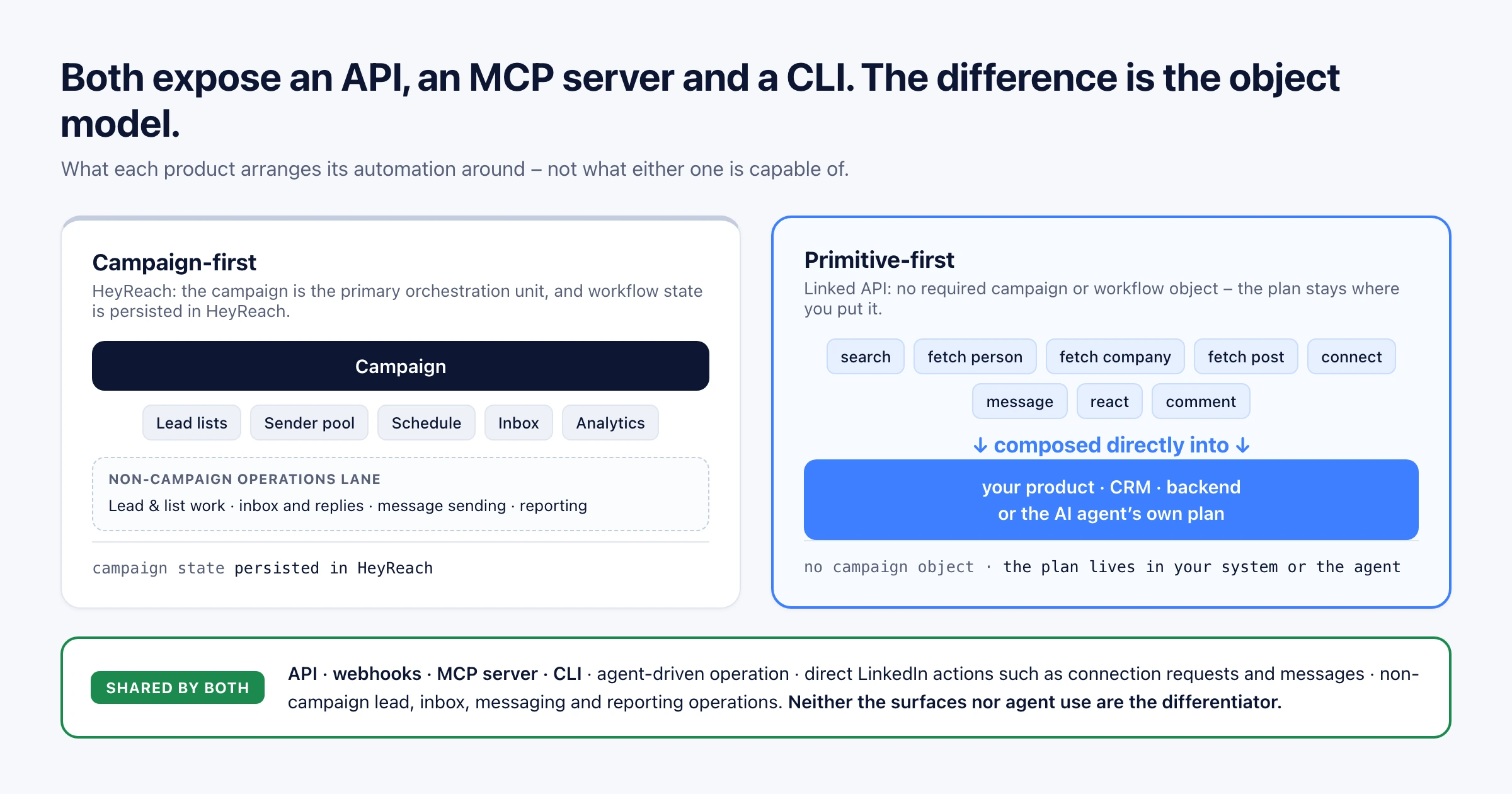
For HeyReach, the campaign is the primary orchestration unit. You can reach plenty of operations outside a campaign, but the product is arranged around campaigns, and the state of a running motion is persisted in HeyReach. For Linked API, there is no required campaign or workflow object at all. The LinkedIn leg is exposed as general retrieval and action primitives, and the plan that ties them together stays where you put it – in your backend, your CRM, or the agent's own plan.
That is what "integration-first and agent-first" means in practice. An agent can be the central cross-system orchestrator with either product. With HeyReach, the LinkedIn part of that plan is expressed through campaigns and the objects around them. With Linked API, the agent's plan simply is the LinkedIn workflow, without being translated into a vendor-owned campaign first.
Which one is right depends entirely on whether a campaign is a useful container for your work or an obstacle to it.
When HeyReach is still the right tool
This section is not a formality. HeyReach wins several of these outright.
- Ready-made multi-account agency campaigns. Managed sender rotation, a unified inbox and campaign analytics out of the box. Linked API makes no claim here at all – there is no campaign UI, no rotation across a sender pool, no shared inbox and no agency client management.
- Anything involving email. HeyReach ships enrichment credits on every tier and reaches multichannel through native Instantly and Smartlead integrations. Linked API has no email capability whatsoever – no sending, no enrichment, no addresses in results.
- Agency-scale economics. HeyReach's Agency tier is $999 a month for 25 senders, and Unlimited is $2,999 a month for an unlimited number. At 25 seats, Linked API at $49 each is $1,225 a month. Past roughly twenty seats, HeyReach is simply the cheaper buy, and it keeps getting cheaper per sender as you grow.
- Whitelabel you do not have to negotiate. It is published and included on the Agency tier. Ours is available, but as negotiated enterprise terms rather than a listed feature.
- You do not want to think about architecture. If the campaign model fits your motion, adopting it is faster than composing anything yourself.
If you are a fifty-seat outreach agency, stop here and use HeyReach. The rest of this page is written for the developer or small team putting LinkedIn inside their own product, backend or agent.
Account safety applies to every tool here
Automating a real LinkedIn account carries risk with any product on this page, including ours. What differs is which layer of isolation each vendor documents.
Linked API runs each account in its own dedicated cloud browser with a controlled device fingerprint. The profile sets the user agent and platform, adds noise to canvas and audio, masks fonts, battery and WebRTC, and derives timezone, geolocation and localization from the account's proxy IP so the fingerprint matches the location it claims rather than the operator's machine. It loads LinkedIn's own pages at a human pace, with per-action limits enforced by the platform, and Linked API never stores your password.
HeyReach documents isolation at the network layer: a dedicated residential proxy per sender on its entry plan, and your own proxies on Agency and Unlimited. Its pricing page also states that campaigns keep each sender "within their daily limits and safe usage levels."
Those are different layers, and one does not substitute for the other. A proxy governs where traffic appears to originate. A browser profile governs what the session looks like and how it behaves – the device it claims to be, and whether that claim stays consistent over time. An account can sit behind a perfectly clean residential IP and still look automated at the browser layer.
Read that as a comparison of what each vendor publishes, not as a claim about anyone's internal engineering. See how to scrape LinkedIn for how the routes differ on risk, and understanding LinkedIn limits for what the platform enforces regardless of tool.
Frequently Asked Questions (FAQ)
It depends on the job you are replacing. For managed multi-account outreach with dedicated IPs, Expandi. For high volume from one seat, Skylead. For the cheapest start, Waalaxy. For simple drips, Dripify. For genuine multichannel, La Growth Machine. For email-led sequences, lemlist. For a unified messaging developer API, Unipile. For building LinkedIn into your own product or handing it to an AI agent, Linked API.
Yes, and a capable one. HeyReach ships an API with webhooks, an MCP server and a CLI on every paid tier including entry-level Growth, covering campaign control plus lead and list operations, inbox and reply handling, message sending and reporting. The difference from a general LinkedIn API is not existence but what the surfaces are arranged around – campaigns and their adjacent objects, rather than LinkedIn primitives you compose yourself.
Per its own pricing page, Growth is $79 per sender per month, or $63 per seat monthly billed yearly at $756. Agency is $999 a month for 25 senders, or $799 monthly billed yearly at $9,590, with a 25 or 50 sender option. Unlimited is $2,999 a month, or $2,399 monthly billed yearly at $28,790. Billing runs monthly, quarterly at ten percent off, or yearly at twenty percent off.
There is no built-in email sender. HeyReach executes multichannel through its native Instantly and Smartlead integrations, and every tier includes enrichment credits for finding verified email addresses inside the product.
Waalaxy, which has the lowest paid entry point of the tools here (from around €19/mo billed annually; its Freemium plan runs no automation). For a single builder rather than a sender pool, Linked API at $49 per month billed annually is below HeyReach's per-sender Growth rate.
No tool removes the risk of automating a real account, so compare architectures rather than adjectives. Expandi and HeyReach both document their isolation at the network layer – Expandi lists a dedicated country-based IP per account, automatic warm-up and daily limit ranges as its safety architecture, and HeyReach a dedicated residential proxy per sender on its entry plan. Linked API works at a different layer: a dedicated cloud browser per account with a controlled fingerprint, loading LinkedIn's own pages at a human pace with per-action limits enforced by the platform, and it never stores your password. A clean IP does not stop a session looking automated at the browser layer, which is why the two are not interchangeable. See how to scrape LinkedIn for the wider risk picture.
Waalaxy is the cheaper, simpler starting point, with narrower depth. Expandi is the closest same-category competitor, with a dedicated IP per account, automatic warm-up and daily limit ranges. Dripify is the simplest drip builder and the least suited to running many senders. HeyReach beats all three at multi-account agency scale, which is the job it is built for. Deeper comparisons live in Waalaxy alternatives and Dripify alternatives.
Two on this list are developer-shaped rather than campaign-shaped: Unipile, a unified messaging and email API across several channels, and Linked API, which exposes LinkedIn retrieval and actions as primitives with no campaign object. Note that HeyReach also has an API, MCP server and CLI, so this is a question of which model fits, not of who offers programmatic access.
Yes, and with more than one tool here. Both HeyReach and Linked API ship an MCP server, both let an agent act on LinkedIn, and both can take part in a wider plan alongside a CRM, enrichment tools or a workflow runner. The difference is how the LinkedIn leg of that plan is represented: through HeyReach campaigns and the objects around them, or as composable primitives with no required campaign container. Linked API's MCP server, agent-friendly CLI and ready-made skills take the second route.
Build it in, or hand it to an agent
Either product can sit inside a larger automated plan, and either can be driven by an agent. The question is whether you want the LinkedIn leg expressed as campaigns or as primitives. If HeyReach's campaign model fits your motion, use it – especially at agency scale, where its flat tiers are hard to beat. If you would rather keep the LinkedIn workflow in your own system without a campaign object in the middle, Linked API runs on your own account through a dedicated cloud browser, reachable through the REST API, SDKs and CLI or out of the box via MCP, the CLI and skills. The data side is covered in the LinkedIn scraper API guide. Flat per seat, from $49 per month billed annually, with a 7-day free trial.
Facts verified 10 August 2026 – HeyReach pricing, plan contents, proxy provision and developer surfaces checked against its live pricing page on that date; Expandi's stated safety architecture checked against its live site; other vendors' pricing models checked against their live pages. HeyReach's API, MCP server and CLI, and Dripify's and Expandi's API surfaces, re-checked against their live documentation on 17 September 2026.