
How to Scrape LinkedIn in 2026 Without Getting Banned (and Is It Legal?)
Yes, you can extract data from LinkedIn, and scraping public LinkedIn data is not a federal crime in the US. But that one fact hides two more: aggressive extraction can get your account permanently restricted, and how you store or sell the data can expose you – and your buyers – to privacy law. This guide gives you the real methods ranked by risk, how bans actually happen, and the legal picture, in plain terms.
The short version. Public profile and activity data is extractable. Personal contact details (emails, phone numbers) are not, and chasing them is where most trouble starts. The durable approach is to operate on your own authenticated account with human-like pacing, or use consented data – not to point a headless bot at LinkedIn and hope.
What you can actually extract from LinkedIn
Before picking a method, be clear about what is realistically available. Most of LinkedIn's value sits in data the platform shows publicly. The data it hides – private contact details – is exactly the data that creates legal risk.
| Data | Public? | Realistic to extract | Notes |
|---|---|---|---|
| Name, headline, role, location | Yes | Yes | Visible on public profiles, even logged out |
| Work history, education, skills | Mostly | Yes | Privacy-dependent – scrape a full profile |
| Posts, reactions, comments | Yes | Yes | Engagement data for social selling – scrape posts and engagers |
| Company info, employees | Yes | Yes | Headcount, industry, decision-makers – scrape a company |
| Job postings | Yes | Yes | Public listings, salary when shown – scrape jobs |
| Your own connections | Private to you | Yes | You can export your own network |
| Personal email, phone | No | No (not directly) | LinkedIn does not expose these; harvesting them is the highest-risk move |
The line that matters: profile and activity data is fair to extract; personal contact data is not. Any tool that promises to "scrape verified emails straight from LinkedIn" is either guessing or pulling from a separate database – and that distinction matters legally, as we will see.
The 5 ways to scrape LinkedIn, ranked by risk
There is no single "LinkedIn scraper." There are five common approaches, and they trade off scale against the risk to your account.
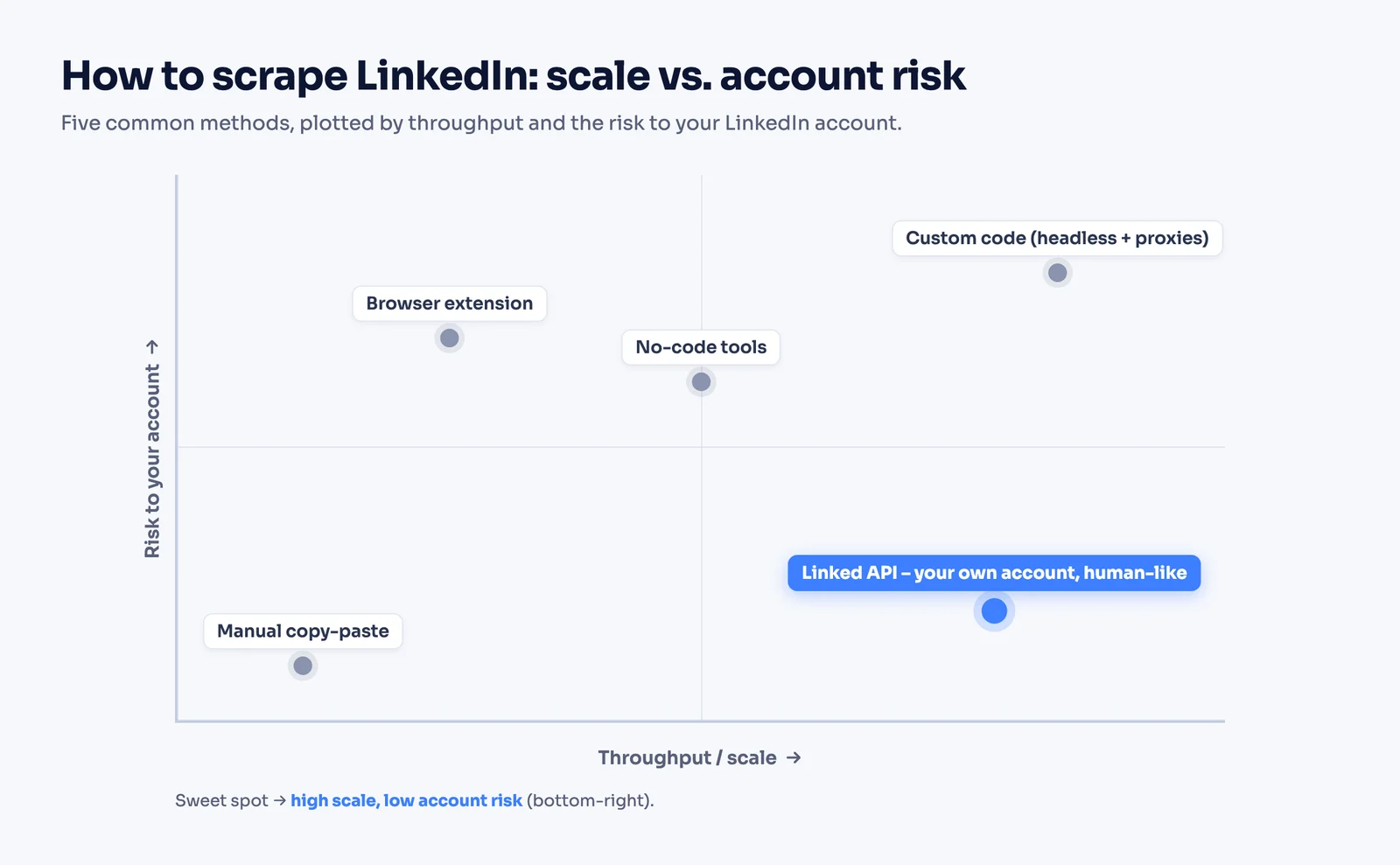
| Method | Typical scale | Account-ban risk | Legal exposure | Best for |
|---|---|---|---|---|
| Manual copy-paste | A few/day | None | Low | One-off lookups |
| Browser extension | 50–100/day | High | Medium | Small lists, non-technical users |
| No-code tools | Hundreds/day | High | Medium | Sales ops without engineers |
| Custom code (headless + proxies) | High, until it breaks | Very high | High | Engineers who want full control |
| API on your own account | Hundreds to thousands/day | Low–moderate | Medium | Products and repeatable pipelines |
Manual copy-paste. Slow, free, zero risk. Fine for a handful of profiles. Useless at scale.
Browser extensions. A Chrome extension reads the page you are looking at and dumps it to a sheet. Easy to start, but it acts on your logged-in account at machine speed, which is easy for LinkedIn to flag. Good for tens of profiles, not thousands.
No-code tools. PhantomBuster, Evaboot, and similar SaaS run cloud automations on your account. More throughput than an extension, same core risk: it is still your account doing the actions, so account safety depends entirely on how conservatively the tool paces itself.
Custom code. Python with Selenium, Playwright, or a headless browser plus rotating proxies. Maximum control, maximum maintenance, and the highest ban risk – which brings us to why this path is harder than it looks.
API on your own account. A managed service drives a real browser session for your account with human-like timing and built-in limits, and returns structured JSON. This is the sweet spot for anything ongoing or product-facing, and it is where Linked API sits – see our LinkedIn scraper API guide for how that model works.
Why DIY headless scraping breaks
Most engineers try the custom-code route first, then abandon it. Here is what they run into:
- The login wall. LinkedIn shows only a few public profiles before forcing authentication. Once you log in to get past it, every request is tied to a real account that can be restricted.
- Fingerprinting. LinkedIn profiles your TLS handshake, headers, timing, and browser fingerprint. Datacenter proxies and vanilla headless browsers are trivially detectable, so you end up paying for residential proxies and stealth patches.
- Fragile selectors. The DOM changes constantly. Your parser breaks, silently returns empty fields, and you maintain it forever.
- Permanent bans. Account restrictions on LinkedIn escalate fast and are rarely reversed. A burned account is gone, along with its connections and history.
None of this means scraping is dead. It means brute force is dead. The methods that survive are the ones that behave like a human.
How LinkedIn detects scraping (and how accounts get banned)
Bans are not random. LinkedIn watches a handful of signals, and you can stay clear of all of them.
- Request velocity. Hundreds of profile views in an hour is not human. Real users pause, scroll, and get distracted.
- Behavioral patterns. Identical timing between actions, no mouse movement, perfectly sequential browsing – all classic automation tells.
- Fingerprint and IP reputation. Headless browsers, datacenter IPs, and mismatched geolocation raise the score.
- The "log in to continue" wall. Hitting it repeatedly while logged out is a strong scraping signal.
When the score crosses a threshold, accounts move through a ladder: a soft warning, then a temporary restriction (search and profile views blocked for a stretch), then a permanent ban. New accounts get the least slack, so warm them up over weeks rather than firing on day one.
Safe volume is a range, not a number
You will see "500 profiles a day is safe" thrown around. Ignore single numbers. Safe volume depends on account age, your Social Selling Index, whether you have Sales Navigator, and how human-like your pacing is.
| Account state | Rough safe ceiling | Approach |
|---|---|---|
| New or cold | 20–50 actions/day | Ramp slowly over 3–4 weeks |
| Established, human-like pacing | A few hundred actions/day | Spread across the day, with pauses |
| Aggressive headless + proxies | You will likely be flagged | Not recommended |
For the real, account-specific picture, see our guides on the LinkedIn connection limit and understanding LinkedIn limits.
Stop signals. If you see a CAPTCHA, a forced re-login, an "unusual activity" notice, or a sudden drop in results, stop immediately and let the account rest. Pushing through is how a temporary restriction becomes a permanent one.
Is scraping LinkedIn legal? The three layers
This is where almost every other guide gets it wrong. "Scraping public data is legal, hiQ said so" is half a sentence. Legality is not one test – it is three separate layers, and clearing one does not clear the next. 1. US computer-access law (the CFAA). In hiQ Labs v. LinkedIn (9th Cir. 2022), the Ninth Circuit affirmed a preliminary injunction, finding hiQ had raised serious questions that scraping publicly available data likely does not violate the Computer Fraud and Abuse Act. The arc matters: an injunction in 2017, affirmed in 2019, vacated by the Supreme Court in 2021 after Van Buren v. United States, then reaffirmed in 2022. So scraping public data is not a federal hacking crime. That is the layer most articles stop at.
2. Privacy law (GDPR / CCPA). "Public" does not mean "free to use." If your dataset includes personal data of EU or California residents, privacy law applies regardless of where you found it. You need a lawful basis – for B2B prospecting that is usually legitimate interest – and data subjects keep rights over their data. Personal emails and phone numbers are the hot zone; collecting them without consent is the fastest way into trouble.
3. Enforcement reality. LinkedIn does not just win cases, it makes examples. It has permanently banned and sued operations that used fake profiles, pushed data brokers like Apollo and Seamless to remove company pages, and in 2025 sued Proxycurl (Nubela) – whose LinkedIn data API then shut down entirely. For a 2026 reader, that suit, not hiQ, is the live warning shot.
This is not legal advice. It is the mental model to bring to your own counsel: pass all three, or you are carrying the risk.
The honest takeaway: public data is collectible, but how you use it is what gets people sued. Stay on public, business-relevant data; keep a lawful basis; and never harvest personal contact details from LinkedIn directly.
The durable approach: automate your own account like a human
Strip away the noise and the safe path is consistent across all three legal layers and the detection signals:
- Use your own authenticated account. No fake profiles, no bought accounts. Fake-profile operations are exactly who LinkedIn bans and sues.
- Behave like a human. Pace actions, add real delays, run sequentially, and stay inside your account's limits.
- Stick to public, business data. Profiles, companies, posts, your own connections. Get personal contact data from consented enrichment sources, not by scraping it off LinkedIn.
This is precisely what Linked API is built to do. It runs your account in a cloud browser that emulates a real LinkedIn user, so requests are not instant – a simple action takes seconds, a heavy one minutes – and workflows run sequentially, never in parallel, mirroring how a person actually browses. When an action would exceed a configured limit, it returns a limitExceeded error instead of pushing your account over the edge.
To be clear about what that does and does not buy you: it is not a guarantee against restriction. What it buys you is account safety and clean, structured data without maintaining a scraper.
In practice that means two calls rather than a scraper: a people search that returns matching profiles as structured data, and a profile fetch that returns experience, skills and recent posts in one request. Neither involves HTML parsing, selectors, or a session file you have to keep alive.
Working code for both calls lives in our guide to building a LinkedIn scraper in Python, which also compares this route against the open-source libraries and a DIY Playwright script line for line. The SDK reference has the TypeScript equivalents.
Which method should you use?
- A few profiles, occasionally. Copy-paste or a browser extension. No need for anything heavier.
- A non-technical sales team. A no-code tool, paced conservatively. Compare options in our best LinkedIn automation tools roundup.
- A product or a repeatable data pipeline. An API on your own account. Predictable, structured, and account-safe at scale.
- Personal emails and phone numbers. Not from LinkedIn. Use a consented B2B enrichment provider and keep a lawful basis.
Frequently Asked Questions (FAQ)
Scraping publicly available data likely does not violate the CFAA in the US — in hiQ v. LinkedIn the Ninth Circuit affirmed a preliminary injunction on that basis. That settles the criminal-law question only: GDPR and CCPA still apply if the data touches personal information, and LinkedIn enforces against extraction operations directly, as the Proxycurl suit showed. Public does not mean unrestricted.
There is no universal number. A new account should stay around 20–50 actions a day and ramp up over weeks; an established account with human-like pacing can handle a few hundred. Limits depend on account age, SSI, and subscription. See our limits guide.
Yes. LinkedIn escalates from warnings to temporary restrictions to permanent bans, and permanent bans are rarely reversed. Human-like pacing on your own account is the main defense.
Only the limited public pages LinkedIn shows before the login wall. No account is involved, so nothing can be restricted, but it is the hardest route technically and it still falls under privacy law.
LinkedIn detects automation through behavioral patterns, request velocity, and fingerprinting regardless of how it is driven. The mitigation is not hiding – it is behaving like a real user on a real account, which is how a managed API approach works.
Scraping pulls data from LinkedIn's interface. Enrichment matches a name or domain against a separate, ideally consented, database. Verified emails come from enrichment, not from LinkedIn directly.
For public, business-relevant data with a lawful basis (legitimate interest for B2B), generally yes. For personal contact data gathered without consent, you are exposed under GDPR and CCPA. Keep records of your basis and honor deletion requests.
Operate your own authenticated account with human-like pacing and conservative limits, stick to public business data, and source contact details from consented providers. That clears the detection signals and keeps you on the right side of all three legal layers.
Want structured LinkedIn data without running a scraper or risking your account? Start with Linked API – it drives your own account safely and returns clean JSON for people, companies, posts, and connections.