
LinkedIn API Access: What Standard Developer Access Gets You
LinkedIn API access begins the same way for everyone: you arrive at the developer portal with a specific job in mind, create an application, open the Products tab, and find the list of things you can switch on is far shorter than expected. This guide covers exactly what standard developer access grants, how to set it up, and what to do about the jobs it does not cover.
The short version. Only a small set of LinkedIn products can be enabled without review, and every one of them is scoped to the member who authenticates: reading that member's own name, headline, photo and primary email through Sign in with LinkedIn, and posting or commenting as that member through Share on LinkedIn. Verified on LinkedIn adds a self-serve Development tier for testing. There is no endpoint a standard developer account can call to search for arbitrary people, look up another member by profile URL, send ordinary member-to-member messages, or read a member's inbox. For those jobs you drive an account you already own, which is what Linked API does.
What you can enable self-serve today
LinkedIn states the rule plainly in its access documentation:
"Most permissions and partner programs require explicit approval from LinkedIn. Open Permissions are the only permissions that are available to all developers without special approval."
These are the Open Permissions, added through the Products tab on your own application:
| Product | Permission | What it grants |
|---|---|---|
| Sign in with LinkedIn using OpenID Connect | profile | Member Auth: Retrieve authenticated member's name, headline, and photo. |
| Sign in with LinkedIn using OpenID Connect | email | Member Auth: Retrieve authenticated member's primary email address. |
| Share on LinkedIn | w_member_social | Member Auth: Post, comment and like posts on behalf of an authenticated member. |
One more route is self-serve and often missed. Verified on LinkedIn offers a Development tier you can enable immediately, restricted to admin accounts and intended for testing, plus a Lite tier you request self-serve for consenting members, per LinkedIn's Verified API documentation. Its endpoints take their own scopes: /identityMe requires r_profile_basicinfo, and /verificationReport requires r_verify_details, with the older r_verify still accepted.
Read the pattern rather than the list. Every self-serve permission acts on the member who just signed in. You get their details because they authenticated, and you publish as them because they authorised it. Nothing in this set reaches outward to other members.
How to get self-serve LinkedIn API access
The self-serve path is short, and most of the friction is in details that are easy to get wrong.
- Create an application in the LinkedIn Developer Portal. You will be asked to associate it with a LinkedIn Page, so have one ready or create it first – an application cannot exist without it.
- Enable your products on the application's Products tab. Sign in with LinkedIn using OpenID Connect and Share on LinkedIn appear immediately. Verified on LinkedIn is requested from the same tab: accept the terms and the Development tier is provisioned automatically, while Lite is a self-serve request. Anything reviewed shows an application flow instead of a switch.
- Configure your redirect URL on the Auth tab. It must match byte for byte what your application sends, including the scheme and any trailing path, per LinkedIn's 3-legged OAuth flow. A mismatch fails the authorisation request rather than degrading.
- Request only the scopes your enabled products grant. A scope your application has not been granted is rejected outright, so a request that mixes granted and ungranted scopes returns nothing at all.
- Send the member through the authorisation flow, exchange the returned code for an access token, and make your first call as that member.
How do I get a LinkedIn API key?
LinkedIn does call it an API key – but it is not what authenticates your calls, and that mismatch is why this step stalls. The 3-legged OAuth documentation names the credentials in one line:
"Each application is assigned a unique Client ID (Consumer key/API key) and Client Secret."
So the Client ID is the API key, and it sits with the Client Secret on your application's Auth tab. Neither goes in a request header. You exchange them, plus the member's consent, for an OAuth bearer access token, and that token is what authenticates every call – Authorization: Bearer {token}. People searching for a LinkedIn API key usually want the second thing and find the first.
Three lifespans decide your architecture, and all three come from the same page:
| Credential | Lifespan | What it means for you |
|---|---|---|
| Authorization code | 30 minutes, "must be used immediately" | Exchange it in the same request cycle, never queue it |
| Access token | 60 days – "all access tokens are issued with a 60-day lifespan" | Nothing you build runs unattended past that window |
| Refresh | Repeat the browser authorization flow | Can be silent – if the member is still logged in to LinkedIn and their token has not expired, "the authorization screen is bypassed" |
The consequence is the part that surprises people. LinkedIn states that "to protect members' data, LinkedIn does not generate long-lived access tokens", and that "programmatic refresh tokens are available for a limited set of partners". A standard application therefore has to send the member back through the browser authorization flow – often invisibly, while their session is alive and the token has not lapsed, but always through the browser. Only approved partners get a server-side refresh token. For a feature a member clicks, that is fine. For a backend job that runs every night, it is a standing dependency on a live member session.
Is the LinkedIn API free?
Yes, today – and LinkedIn says so in writing while reserving the right to change it. Section 8.2 of the API Terms of Use is one sentence:
"The APIs are currently provided for free, but LinkedIn reserves the right to charge for the APIs in the future."
The catch is that price was never the barrier. Creating an application and switching on the Open Permissions costs nothing, and everything past that set is not priced but applied for, per LinkedIn's Getting Access documentation:
- Marketing – Advertising API access "must be approved", requested through the Developer Portal.
- Sales – the Sales Navigator endpoints require approval as a SNAP partner.
- Talent – Recruiter System Connect, Apply Connect and Premium Job Posting go through the talent-partner application.
- Compliance – "listed for reference purposes only. Access is closed and may not be requested."
So the question behind the question – can I pay to unlock people search, profile lookup or messaging? – answers itself. Cost is not the gate. Approval is, and Compliance is closed at any price.
That is why searching for LinkedIn API pricing returns so little: the APIs that are free are the ones you can have, and the ones you want are not sold. A price appears only on the account-based route – Linked API is flat per seat from $49/mo billed annually, with no per-lead or per-credit metering.
Where the LinkedIn API documentation lives
Not on linkedin.com, which is why searching the site for it comes up short. LinkedIn's developer documentation is published on Microsoft Learn, under learn.microsoft.com/en-us/linkedin.
| What you want | Where it is |
|---|---|
| The permissions table and what needs approval | Getting Access |
| OAuth flows, credentials, token lifetimes | Authorization Code Flow |
| A token for manual testing | The Developer Portal's token generator |
| Your app's live scopes | The Auth tab in the Developer Portal – it "will show current scopes available" |
Read the Auth tab as the source of truth over any document, including this one: the docs describe what exists, while the tab shows what your application was actually granted.
What standard developer access does not reach
Four jobs come up constantly, and none of them is reachable this way:
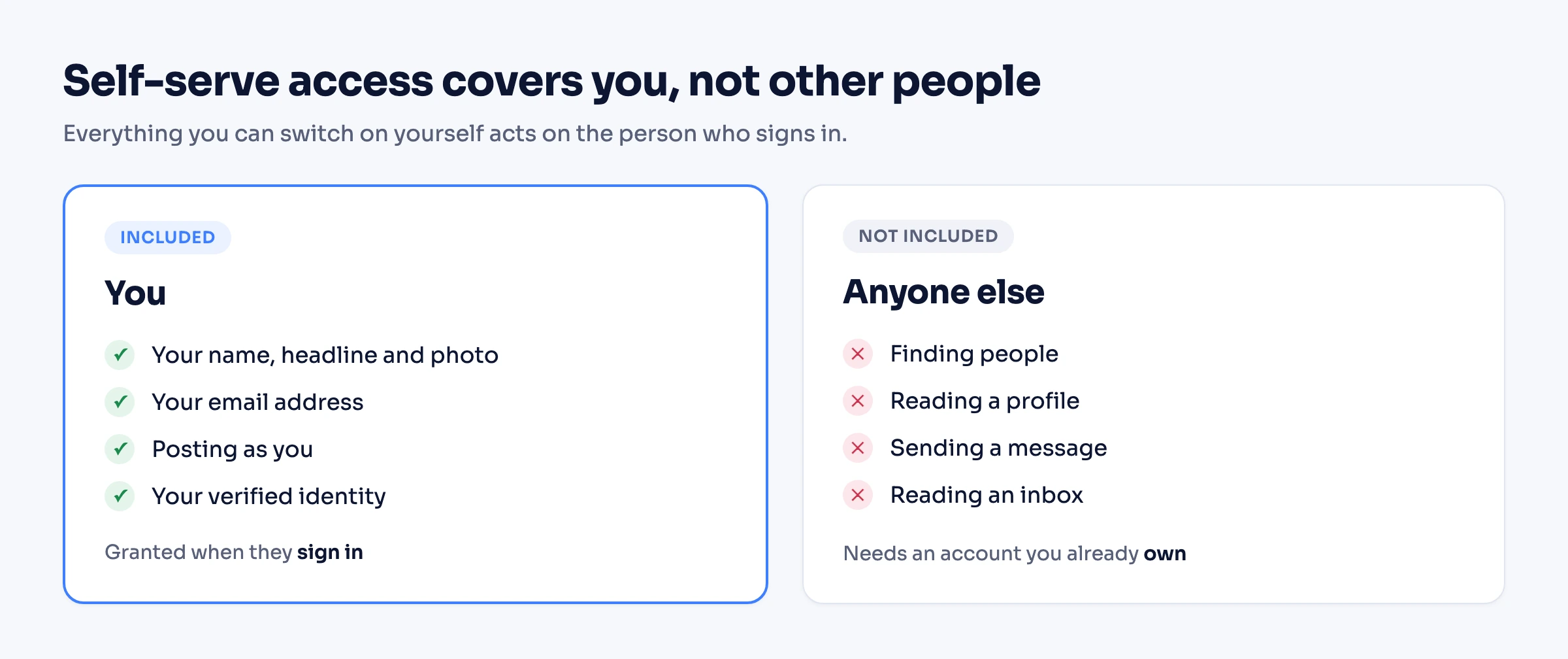
Some of these capabilities do exist inside narrowly scoped reviewed and partner integrations, which are bound to a product context rather than exposed as general-purpose endpoints and are approval-gated. If you work in Sales Navigator, that picture is covered in our Sales Navigator API guide.
The practical position is simpler than the documentation makes it look: for these four jobs there is nothing a standard developer account can switch on.
Official API or unofficial API: what people actually mean
"Unofficial LinkedIn API" is a search term rather than a product category, and it covers several architectures that behave nothing alike. The distinction that decides your risk is not official versus unofficial – it is whose account acts, and what the tool holds on your behalf.
| Route | Whose account acts | What it holds | Reaches beyond the signed-in member? |
|---|---|---|---|
| LinkedIn self-serve products | The member who authenticated | An access token you obtained with their consent | No – that is the design |
| Wire-level clients | Whatever account you point it at | Private-endpoint requests, reverse-engineered | Yes, outside anything LinkedIn documents |
| Credential tools | An account you own | Your password, used to obtain your session cookies | Yes |
| Cookie tools | An account you own | Your li_at session cookie | Yes |
| Linked API | An account you own | A real, dedicated cloud browser working on LinkedIn's own pages at a human pace | Yes |
Linked API never stores your password. No route eliminates automation risk. What each tool holds on your behalf, however, is a fact you can check before you commit.
Approved partner programs are a separate case again: they are official, and some of them do reach past the signed-in member – but they are entered by application, as the permissions table above shows.
What to build on instead
The alternative is to work through an account you already have. The member is you or your team, the account is one you own, and the primitives are exposed programmatically. Both routes below are first-class – pick by how you want to work, not by how much you want to build.
Build it in – REST, Node and Python SDKs, CLI
Compose the primitives and embed them in your product. A search returns each person's publicUrl, which you pass straight into a fetch:
import { LinkedApi } from '@linkedapi/node';

const linkedapi = new LinkedApi({
  linkedApiToken: 'your-linked-api-token',
  identificationToken: 'your-identification-token',
});

const workflow = await linkedapi.searchPeople.execute({
  term: "Head of Engineering",
  limit: 10,
  filter: {
    locations: ["San Francisco"],
    industries: ["Software Development"],
  },
});

const { data, errors } = await linkedapi.searchPeople.result(workflow.workflowId);

if (errors?.length) {
  errors.forEach((error) => console.warn(`${error.type}: ${error.message}`));
}

if (data) {
  for (const person of data) {
    const detail = await linkedapi.fetchPerson.execute({ personUrl: person.publicUrl });
    const result = await linkedapi.fetchPerson.result(detail.workflowId);

    if (result.data) {
      console.log(result.data.name, result.data.headline, result.data.location);
    }
  }
}The same primitives cover the other three jobs. Messaging is sendMessage, and the inbox is a two-step pattern rather than a single read: syncInbox starts monitoring, then pollInbox retrieves what has arrived since. The same operations run from the shell as linkedin person search, linkedin person fetch, linkedin message send, linkedin inbox sync and linkedin inbox get.
Each job has its own guide with the depth this page deliberately skips: people search, profile data, and messaging and inbox.
Run it out of the box – MCP, the AI-agent-friendly CLI, ready-made skills
If you would rather not build the integration at all, an AI agent can do it. Connect the MCP server, point an agent at the CLI from Claude Code, Cursor or Codex, or install ready-made skills with npx @linkedapi/skills. You describe the job in plain language and the agent composes and runs the same workflows. Nothing to wire, no flows to configure.
How to use the LinkedIn API with Python
Two different things answer to "LinkedIn API in Python", and the split is the same one that runs through this whole page. LinkedIn publishes an official Python client for its REST products, linkedin-api-python-client; it changes the syntax, not the scope – the same self-serve permissions and the same approval gates apply, so it will not search people or read another member's profile. For those jobs the Python route is the account-based one: install the Linked API SDK, pass the two tokens from your dashboard, and call the same primitives shown in the search-then-fetch example above.
from linkedapi import LinkedApi, LinkedApiConfig, FetchPersonParams

linkedapi = LinkedApi(
    LinkedApiConfig(
        linked_api_token="your-linked-api-token",
        identification_token="your-identification-token",
    )
)

workflow = linkedapi.fetch_person.execute(
    FetchPersonParams(person_url="https://www.linkedin.com/in/example")
)
result = linkedapi.fetch_person.result(workflow.workflow_id)
print(result.data.name if result.data else result.errors)
pip install linkedapi is the whole setup. Every action follows the same execute then result shape, and the Python SDK reference lists each one with its parameters; for scraping-specific Python patterns see the LinkedIn scraper in Python guide.
When the self-serve products are the right answer
Reach for LinkedIn's own products, not an alternative, when the job actually matches what they do:
- You need members to sign in. Sign in with LinkedIn using OpenID Connect is built for exactly this, and nothing else should be used for authentication.
- You need to publish as the member who authorised you. Share on LinkedIn covers posting, commenting and liking on their behalf.
- You need identity verification signals. Verified on LinkedIn is the route, starting on the Development tier.
The account-based route earns its place when the job reaches beyond the authenticated member – reading data about other people, or acting continuously rather than at the moment someone clicks a button.
Frequently Asked Questions (FAQ)
The Open Permissions – profile and email through Sign in with LinkedIn using OpenID Connect, and w_member_social through Share on LinkedIn – plus Verified on LinkedIn, whose Development tier is provisioned automatically on accepting the terms and whose Lite tier is a self-serve request. Every one of these acts on the member who authenticated.
Create an application in the Developer Portal and associate it with a LinkedIn Page, enable your products on the Products tab, set the redirect URL on the Auth tab so it matches your application exactly, request only the scopes your enabled products grant, then send the member through the authorisation flow and exchange the code for a token.
There is no general-purpose people-search endpoint available to a standard developer account. Search capabilities exist inside narrowly scoped reviewed and partner integrations tied to a product context, not as an open endpoint. The alternative is to run the search through an account you own.
No. The self-serve permissions return the authenticated member's own details, not other members'. Reading another member's profile from a URL is not something a standard developer account can enable, which is why account-based routes exist.
Yes for now: section 8.2 of LinkedIn's API Terms of Use states that "the APIs are currently provided for free, but LinkedIn reserves the right to charge for the APIs in the future". Price was never the barrier, though – everything beyond the Open Permissions is gated by approval rather than payment, with Marketing needing Advertising API approval, Sales needing SNAP partner status, Talent going through the partner application, and Compliance "closed and may not be requested". You cannot pay to unlock people search, profile lookup or member-to-member messaging.
LinkedIn calls your Client ID the API key, but it is not what authenticates a call. The Client ID and Client Secret sit on your application's Auth tab, and you exchange them plus the member's consent for an OAuth bearer access token, which is what the API actually accepts. Access tokens carry a 60-day lifespan, and programmatic refresh tokens go only to a limited set of partners, so a standard application repeats the browser authorization flow – silently while the member is still logged in and the token has not expired.
On Microsoft Learn, not on linkedin.com – learn.microsoft.com/en-us/linkedin holds the permissions table, the OAuth flows and each partner program's space. Your application's Auth tab in the Developer Portal shows the scopes actually granted to you, which is the figure to trust over any document.
Two, with the distinction that runs through this page: LinkedIn's official linkedin-api-python-client wraps its REST products under the same approval gates, so it cannot search people or read other members' profiles; the Linked API Python SDK (pip install linkedapi) exposes the account-based primitives – search, fetch, message – on an account you own.
Not as an official product, and the phrase covers two different things: wire-level clients that call LinkedIn's private endpoints directly, and account-driven services that operate an account you already own. The useful question is not whether a route is official but whose account acts and what the tool holds on your behalf.
An account-based API that drives a LinkedIn account you already own. Linked API exposes people search, profile fetch, messaging and inbox as programmable primitives through the REST API, Node and Python SDKs and the CLI, or out of the box through MCP, the AI-agent-friendly CLI and ready-made skills.
Build on the account you already have
If the self-serve products cover your job, use them. If your job needs to reach past the member who signed in, Linked API runs those operations on an account you own, through a dedicated cloud browser at a human pace. Embed it through the REST API, SDKs and CLI, or skip the build and let an agent run it through MCP or ready-made skills. Pricing is flat per seat – see pricing.
Facts verified 24 August 2026 – LinkedIn permission names, product availability, endpoint scopes, credential terminology and token lifespans checked against LinkedIn's official developer and help documentation on that date.