
LinkedIn Cold Outreach: 7 Strategies and Message Templates (2026)
LinkedIn cold outreach works when every message gives one specific, true reason to reply – and fails when it is the same note sent to everyone. This guide covers the seven strategies that make the difference, from profile research to follow-ups, and ends with cold message templates you can adapt.
You send 50 connection requests per week. Maybe 10 people accept. Two respond. Zero meetings booked. The problem isn't LinkedIn – it's your approach. Generic spray-and-pray outreach gets weak response rates, and sales teams track vanity metrics (messages sent) instead of what matters: meetings booked and deals closed.
The short version. Research each prospect before you write, warm them up with a visit or a genuine comment before you ask to connect, reach out when something just happened in their world, and follow up a few times with something new each time. Measure acceptance, reply and meeting rates from your own first batches instead of trusting benchmark numbers, and change one thing at a time. An AI agent or your own code can do the research and draft each message; you approve what goes out.
Here is the research-and-draft step for one week's new connections, run by an AI agent on your own LinkedIn account through Linked API:
Used Linked API: get_network, fetch_person, sync_conversation, get_inbox
- invitations accepted in the last 7 days – 8 people
- current role, company and posts from the last 30 days
- each conversation loaded once
- the messages with each person – 1 has already written to you
8 people accepted: 1 has already written to you – answer that instead of a template; 5 first messages drafted; 2 skipped with nothing true to fill the brackets. Nothing has been sent. Three of the 8:
| Person | What the agent read | Draft or status |
|---|---|---|
| Sarah K. | Head of Sales Ops at a logistics software company; a post on data quality as the real forecasting bottleneck | "Thanks for connecting, Sarah. Your post on data quality being the real forecasting bottleneck stuck with me. We help sales ops teams fix that. Is it on your list this quarter, or already solved?" |
| Mike D. | Wrote to you on Tuesday: "Thanks – what does your team do exactly?" | Reply to his question, not a template |
| Anna L. | VP Sales; no posts in the last 30 days and little on the profile | SKIP – no true detail for the brackets |
nothing goes out until you approve; before each follow-up the agent checks for a reply again
Why Most LinkedIn Cold Outreach Fails
LinkedIn cold outreach has a failure rate problem. But the failure modes are predictable – and fixable.
Failure Mode #1: Generic Messaging
Most outreach still looks like this: "Hi [Name], I help [Industry] companies with [Generic Value Prop]. Let's connect!"
Prospects see through templated messages instantly. They know you sent the same note to 50 other people. There's no reason to respond – you haven't shown genuine interest in their specific situation.
Failure Mode #2: Single-Touch Approach
Most salespeople send one connection request, maybe one follow-up, then move on. They're giving up right when the prospect is starting to recognize their name.
The psychology is simple: familiarity breeds trust. One cold message from a stranger triggers skepticism. A few useful touchpoints over a couple of weeks build recognition and credibility.
Failure Mode #3: Poor Timing
Timing isn't just about day of week or time of day. It's about relevance windows. When someone just published a post about a challenge you solve, they're thinking about that problem right now. That's your window.
Sending a connection request three weeks later? The moment has passed. The attention has moved on.
Failure Mode #4: Vanity Metrics Focus
Here's the real problem: most teams track vanity metrics like "connection requests sent," and far fewer track "meetings booked per 100 requests."
You optimize what you measure. If you're tracking volume (requests sent, messages delivered, profile views), you'll optimize for volume. You'll send more generic messages to more people.
If you track outcomes (acceptance rate, response rate, meeting rate), you'll optimize for quality. You'll personalize more, test more, and improve conversion at each stage.
The Real Problem: Spray-and-Pray Thinking
All four failure modes stem from the same root cause: treating LinkedIn outreach as a numbers game instead of a relationship-building process.
Spray-and-pray assumes more volume means more results. It's tempting arithmetic but a broken strategy: generic messages burn through your prospect list without building any recognition.
Data-driven outreach flips the model: fewer, better-researched messages, each measured, so you learn what converts for your audience. The rest of this guide shows you how to make that shift.
The Data-Driven Approach: What It Means
Data-driven outreach isn't about having fancy analytics dashboards (though those help). It's about making decisions based on what actually converts for your audience, not what sounds good in a LinkedIn post.
Here's what changes when you go data-driven:
1. You Track Full-Funnel Conversion Rates
Instead of tracking "messages sent," you track the complete funnel:
- Connection requests sent → Accepted (acceptance rate)
- Accepted → Responded (response rate)
- Responded → Meeting booked (meeting rate)
- Meeting → Deal created (deal conversion)
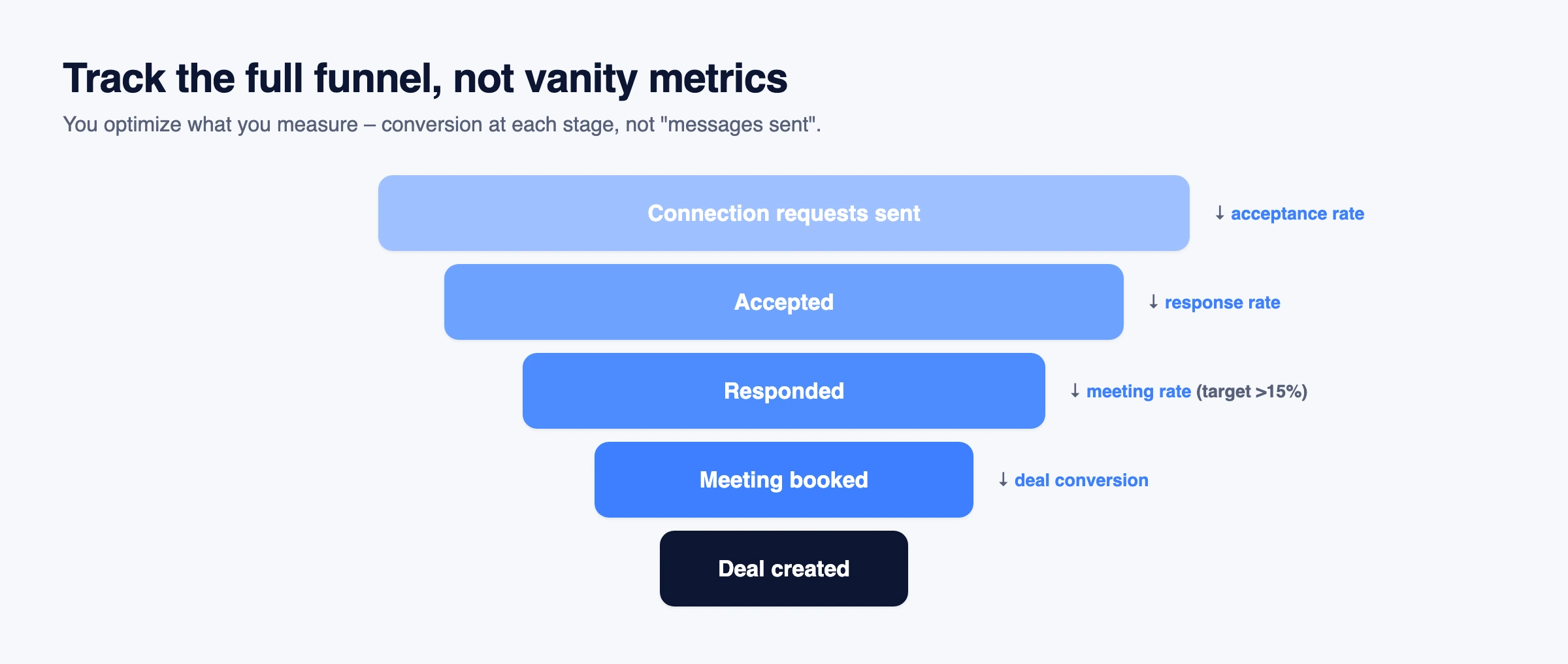
Now you can see exactly where prospects drop off. If your acceptance rate is 50% but your response rate is 5%, you know the problem: your first message after connecting isn't compelling.
Fix the bottleneck, measure the improvement, repeat.
2. You A/B Test Everything
Anecdotal advice says "be conversational" or "lead with value." Data-driven teams test it.
- Does a conversational tone or professional tone work better for C-level prospects in fintech?
- Does asking a question or offering a resource get more responses?
- Does a short connection note (50 characters) or detailed note (200 characters) perform better?
You don't guess. You test with 50 prospects per variant, measure the results, and scale what wins.
3. You Use Behavioral Data for Personalization
Generic personalization:
Hi {{Name}}, I see you work at {{Company}}...
Data-driven personalization:
Hi Sarah, saw your recent post about AI adoption in sales ops – your point about data quality resonated with our experience at...
The difference? You're using real behavioral data (recent posts, job changes, content engagement) to show genuine relevance, not just filling in template variables.
4. You Optimize Continuously
Data-driven outreach isn't "set it and forget it." You run weekly reviews:
- What's the current acceptance rate?
- What's the response rate?
- What's the meeting conversion?
- Which message variants are winning?
- Where are prospects dropping off?
Take your baseline from your own first 100 requests, not from someone else's benchmark – audiences, offers and seniority levels differ too much for a universal target to mean anything. Then adjust targeting, messaging or timing one at a time and compare against that baseline.
Why this beats spray-and-pray: Spray-and-pray is static. You send the same template to everyone, hoping volume compensates for low conversion. Data-driven outreach improves every week, because each change is measured against the last.
Strategy #1: Start with Deep Profile Research
📈 A note does not guarantee more accepts. In Belkins' 2026 study of 11.5 million connection requests – observational campaign data – 25.3% of requests with a note were accepted against 27.6% without one, while campaigns with a note saw more replies (8.2% vs 5.3%).
Why Deep Research Works
When you reference specific details from someone's profile – a recent post, a shared interest, a mutual connection – you trigger reciprocity (you invested time researching them) and relevance (you understand their world). Generic templates signal the opposite: "I sent this to 100 people." Prospects ignore that instantly.
How to Implement
You don't need 30 minutes per prospect. You need the right data points: recent posts, job changes, shared interests, mutual connections. Then reference specific insights, not just topics.
Weak: "Hi Sarah, I saw your recent post about sales automation."
Strong: "Hi Sarah, saw your post about AI in sales ops – your point about data quality being the real bottleneck resonated."
The second example proves you actually read the post and understood the nuance. More notes like it, by scenario and all under 200 characters, are in LinkedIn connection request message examples.
Scaling with Automation
Use Linked API's Fetch Person method to pull profile data automatically (recent posts, job changes, your connection degree), store it in your CRM with dynamic variables, and generate personalized connection notes:
Hi {{FirstName}}, saw your recent post about {{PostTopic}} – {{ContextualComment}}. I work with {{CompanyType}} companies on similar challenges. Would love to connect.
Automation handles data collection. You control message quality and relevance – and if a variable comes back empty, send the request without a note rather than with a generic one.
Strategy #2: Multi-Touch Warming Before Pitching
Why Multi-Touch Warming Works
Single-touch outreach triggers skepticism: "Who is this person?" Multi-touch warming triggers recognition: "I've seen this name before. They engaged with my content."
The psychology: mere exposure effect – repeated exposure increases liking and trust over time. When someone sees your name three times before you ask to connect (profile visit, post like, comment), you're not a stranger anymore. Recognition lowers resistance.
How to Implement
A typical warming sequence: 4-5 low-stakes touchpoints over 1-2 weeks:
- Visit their profile (Day 1) – appears in their viewer list and may notify them, planting your name. This only works if your profile viewing options show your name rather than private mode
- Like their recent post (48h later) – reinforces your name
- Comment on their post (optional, 48h later) – adds value, positions you as knowledgeable
- Send personalized connection request (2-3 days later) – reference the post in your note
- Send value-add message after acceptance (2-3 days later) – don't pitch immediately
Automating with Linked API
Build workflows using n8n, Make, or Zapier:
- Visit Profile → delay 48h
- Like Post → delay 48-72h
- Send Connection Request → wait for acceptance
- Send Message after 2-3 days (value-add, not pitch)
For the connection-request mechanics in code – send, check acceptance, and withdraw stale invites – see How to Automate LinkedIn Connection Requests; for the message-and-read-reply flow, see How to Automate LinkedIn Messages. This guide owns the strategy – what to say and when; those own the mechanics.
Strategy #3: Personalize Your Offer Based on Company-Specific Needs
Real personalization isn't about mentioning someone's LinkedIn post. It's about demonstrating you understand what your product solves for their specific company based on their actual situation, workflows, and friction points.
Why Offer Personalization Works
Generic pitch:
Our tool helps sales teams automate LinkedIn outreach.
Personalized offer (example for DevOps SaaS):
I noticed your team uses Happy CRM for inbound lead management. We help teams like yours generate automated lead files from LinkedIn outreach and push them directly to S3 buckets for automatic Happy CRM import – cutting manual CSV uploads from 2 hours/week to zero.
The difference? The second example shows you understand their specific workflow (Happy CRM → S3 import), identify a real friction point (manual CSV uploads), and explain exactly how your product fits their situation. This approach works regardless of industry – the key is demonstrating you understand their specific challenges.
How to Implement Offer Personalization at Scale
Step 1: Identify data points relevant to YOUR product and industry
What data you need depends entirely on what you sell and who you sell to. There's no universal "tech stack" checklist – it's specific to your value proposition.
Examples:
- DevOps SaaS tool → CRM used, automation tools, integration stack, current data flows
- Agricultural equipment → hectares owned, crop types, geographic region, existing machinery
- Real estate services → property portfolio size, geographic focus, recent transactions
- HR software → company size, hiring velocity, ATS used, remote/hybrid policies
The pattern: identify data that reveals specific friction points your product solves.
Step 2: Map your product's value to their specific situation
Create personalization templates based on the data points you identified in Step 1:
Example: If prospect uses Happy CRM:
I noticed your team uses Happy CRM for inbound leads. We help teams automate LinkedIn outreach lead export → S3 bucket integration → automatic Happy CRM import. Eliminates the manual CSV upload step entirely. Relevant for your workflow?
Example: If prospect uses Salesforce + Zapier:
Saw you're running Salesforce with Zapier. We plug into that exact stack – LinkedIn leads flow directly to Salesforce via Zapier webhook, maintaining field mapping and deduplication. Would this close a gap in your current outreach process?
Step 3: Use Linked API's Fetch Company method to automate research
Pull company-level data relevant to your product. Examples vary by industry:
- Tech/SaaS → technologies mentioned, recent hiring signals, job postings revealing needs
- Agriculture → company size, geographic mentions, equipment/technology discussed
- Real estate → property mentions, market focus, transaction activity
- General → company size, growth signals, recent news/announcements
Step 4: Generate tailored value propositions
Instead of generic benefits, explain the specific solution to their situation:
Hi {{FirstName}}, noticed {{CompanyName}} {{SpecificSituation}}. Quick question: are you currently {{CurrentProcess}}, or do you have {{DesiredState}}? We help teams {{SpecificSolution}} – {{QuantifiedBenefit}}. Relevant for your {{Context}}?
Example variables for a DevOps SaaS tool:
{{SpecificSituation}}= "uses Happy CRM for lead management"{{CurrentProcess}}= "exporting LinkedIn leads manually"{{DesiredState}}= "an automated pipeline into Happy CRM"{{SpecificSolution}}= "push LinkedIn leads directly to S3 for automatic Happy CRM import"{{QuantifiedBenefit}}= "cuts manual CSV uploads from 2 hours/week to zero"{{Context}}= "workflow"
Only put a number in {{QuantifiedBenefit}} if a real customer measured it – an invented figure is the fastest way to lose a careful buyer.
Practical Example: Happy CRM + S3 Integration Workflow
Scenario: You sell a LinkedIn automation tool. Your prospect uses Happy CRM, which imports leads from S3 buckets automatically.
Your personalized offer:
"Hi Michael, saw that your team at {{Company}} uses Happy CRM for inbound lead management. Quick question: when your SDRs generate leads from LinkedIn outreach, are they manually exporting CSVs and uploading to S3, or do you have that automated? We integrate directly with Happy CRM's S3 import workflow – LinkedIn leads flow automatically to your bucket in Happy CRM's required format (JSON schema with contact fields + interaction history). Eliminates the manual export/upload step. Would this close a workflow gap for your team?"
Why this works:
- Shows you researched their specific situation (Happy CRM in this case)
- Identifies a real friction point (manual CSV → S3 uploads)
- Explains exact solution specific to their setup (S3 bucket, JSON schema)
- Positions your product as a tailored solution, not a generic tool
The Key: Sell Specific Solutions, Not Generic Features
Don't say "We do LinkedIn automation." Say "We integrate LinkedIn outreach data directly into your Happy CRM → S3 pipeline" (or whatever is relevant to THEIR specific context). Specificity proves relevance.
Strategy #4: Timing Matters – When to Reach Out
Why Timing Works
Professional hours: reach people when they are in work mode – during their working week, in their own timezone – rather than late evenings or weekends, when professional outreach feels intrusive. Which days and hours work best for your audience is something to test, not assume.
Activity-based timing: When someone just published a post about a challenge you solve, they're thinking about that problem right now. That's your relevance window. The psychology: attention availability + recency. Send a request three weeks later? The moment has passed.
How to Implement Activity-Based Timing
Trigger outreach based on prospect behavior:
- Published a post – send within 24-48 hours, reference the post
- Changed jobs – send within the first 30 days, congratulate them
- Shared/commented on content – engage with the same content, send the request 24-48h later
- Company news (funding, launch, expansion) – reference the news
More signals and how to collect them are in our guide to LinkedIn buying signals.
Automating Activity Monitoring
Use Linked API's Fetch Person to monitor activity daily:
- IF recent post exists → Like Post → delay 24h → Send Connection Request
- IF job change detected → delay 7 days → send congratulations + request
Strategy #5: Track Real Metrics
Why Outcome Metrics Work
Vanity metrics (requests sent, profile views) measure activity, not revenue. You can send 500 requests and book zero meetings.
Outcome metrics (acceptance rate, response rate, meeting rate) measure results that correlate with pipeline and revenue. When you track outcome metrics, you optimize for what actually matters: turning cold prospects into qualified conversations into closed deals.
You can compute all three from your own records: check connection status for acceptance, and monitor the inbox for replies.
Strategy #6: A/B Test Your Messaging and Approach
Why A/B Testing Works
Static templates assume one message fits all audiences. A/B testing reveals what actually resonates with your specific audience based on real behavior, not assumptions.
Testing Rules
- Test one variable at a time – message angle OR personalization depth OR CTA type (not all at once)
- Use enough prospects – minimum 50 per variant, ideally 100+, before you trust a difference
- Segment by ICP – what works for enterprise buyers might not work for SMB buyers
- Give tests time – minimum 2 weeks before calling a winner
What to Test
High-impact variables:
- Message angle – problem-solution vs question-based vs value-first
- Personalization depth – basic (name/company) vs contextual (recent activity) vs advanced (content engagement)
- CTA type – direct meeting ask vs value offer vs question
Example: Split 100 prospects into two groups (50 each). Test problem-solution opening vs question-based opening. Keep everything else constant. After 2-3 weeks, scale the winner, retire the loser.
Small improvements compound: each test you keep raises the baseline the next one is measured against.
Strategy #7: Follow Up Strategically
Strategic follow-ups aren't optional – a single unanswered message is rarely the prospect's final answer.
Why Follow-Ups Work
When a prospect doesn't respond to your first message, it usually doesn't mean "no." It means: "I'm busy," "I didn't see it," "I need to think," or "Timing isn't right this week."
Strategic follow-ups increase your chances of catching them when they have bandwidth to engage.
Follow-Up Rules
- Space follow-ups 3-7 days apart – daily follow-ups = spam; weekly follow-ups = strategic persistence
- Add value in every follow-up – share new resource, reference new data, offer different help (don't just bump the thread)
- Know when to stop – after four unanswered follow-ups, move on
4-Touch Follow-Up Framework
Follow-up #1 (Day 3): Add new value (share insight, article, case study).
Follow-up #2 (Day 7): Share a different resource (tool, template). Acknowledge they're busy.
Follow-up #3 (Day 14): Pattern interrupt. Acknowledge timing might be off. Create an exit ramp.
Follow-up #4 (Day 21) – Breakup: Give permission to decline, with one final value offer ("before I close this...").
Why Breakup Messages Work
The final "I'll stop here" message gives the prospect an easy way to answer: a quick "not now, try in Q2" or "talk to my colleague" costs them nothing. It also closes the thread on your terms, after a series of messages that each offered something.
Automating Follow-Ups
Use Linked API to automate the sequence:
- Day 3: Check for response → if none, send Follow-up #1
- Day 7: Check for response → if none, send Follow-up #2
- Day 14: Check for response → if none, send Follow-up #3
- Day 21: Check for response → if none, send Follow-up #4 (breakup) → remove from sequence
LinkedIn Cold Message Templates
These are editorial starting points, not benchmarks. Each one is short, gives one specific reason, and asks one easy question. Replace every bracket with a real detail – if you cannot fill a bracket truthfully, don't send that message. They are for the messages after someone accepts; for the note on the invitation itself, see connection request message examples.
First message after they accept
Sales – their recent post:
Thanks for connecting, [Name]. Your post on [topic] stuck with me – especially [specific point]. We help [role]s at [company type] with [problem]. Curious: is that on your list this quarter, or already solved?
Sales – something that just happened at their company:
Thanks for accepting, [Name]. Saw that [Company] [is hiring for X / opened an office in Y / announced Z]. Teams at that stage often run into [specific friction]. Is that showing up for you, or is it handled?
Recruiting:
Thanks for connecting, [Name]. I'm hiring a [role] at [Company] – [one true fact: team, stack or scope]. Your work on [specific project] is close to what the team does. Open to a 15-minute chat, or should I check back later?
Founder or partnership:
Thanks for connecting, [Name]. We both work with [shared audience] – you on [their side], us on [ours]. I have an idea for [specific joint thing]. Worth a short call to see if it fits?
Follow-up #1 – add something useful (about 3 days later)
[Name], one more thing on [topic]: [a resource, a number from a named source, or a short observation]. If it's not relevant, no reply needed – happy to share how [similar company] handled it.
Follow-up #2 – a different angle (about a week later)
[Name], maybe [problem] isn't the priority right now. A different question: how does your team handle [adjacent problem] today?
Follow-up #3 – the pattern interrupt (about two weeks in)
[Name], I may have caught you at the wrong moment. If [problem] is on the roadmap for later, tell me when and I'll come back then.
Breakup – close the loop (about three weeks in)
[Name], I'll stop here so I don't clutter your inbox. If [problem] becomes a priority, I'm one message away – and if someone else on your team owns it, I'd be glad to know who.
Let an AI agent draft them
An AI agent connected to Linked API through the MCP server or the agent-friendly CLI can read each prospect's profile and recent posts, fill the brackets with true details, and show you every draft before it sends – the run at the top of this page does exactly that for one week's new connections. Ask it to check for a reply before each follow-up and to stop the sequence the moment someone answers – inbox monitoring reports new messages, so the agent or your own code always knows. More agent workflows for sales are in our LinkedIn AI agent guide.
Best Practices & Common Mistakes
👍 DO:
- Start with small test batches – Validate message quality with 20-30 prospects before scaling
- Personalize using real data – Reference recent posts, job changes, tech stack using Linked API's Fetch Person
- Build multi-touch warming – Visit profile → engage with content → wait 48h → send connection request
- Track outcome metrics – acceptance rate, response rate and meeting rate, against your own baseline
- Follow up strategically – 4-touch sequence over 3-4 weeks, add value in every message
- Use automation for scale – Linked API automates data collection and scheduling while maintaining personalization
👎 DON'T:
- Scale volume before testing – Scaling a broken process burns through your prospect list faster
- Use generic templates – One-size-fits-all messaging looks automated and gets ignored
- Pitch immediately after connecting – Wait 2-3 days, send value-add message first
- Track only vanity metrics – Volume ≠ results; track acceptance rate, response rate, meeting rate
- Ignore follow-ups – a single unanswered message is rarely a final no
- Automate without personalization – mass-sending identical messages reads as spam, to recipients and to LinkedIn
Frequently Asked Questions (FAQ)
It varies widely by audience, seniority and offer, so treat any single benchmark with care. One large published dataset – Belkins' 2026 analysis of 11.5 million connection requests – put acceptance at 25.3% with a note and 27.6% without one. The useful number is your own: measure acceptance on your first 100 requests and improve against it.
Usually several, spread over two to four weeks. A typical sequence: profile visit → like or comment on their content (48h later) → connection request (48-72h later) → first message after acceptance (2-3 days later) → three or four follow-ups, each adding something new.
Automation always carries some risk, so keep it human-paced. Stay within LinkedIn's weekly invitation limit, space your actions out, personalize with real data and avoid bulk patterns. Linked API runs each account in its own dedicated cloud browser at a human pace, with the limits you set. For detailed limits, see our LinkedIn Limits Guide.
Track outcome metrics, not vanity metrics: acceptance rate, response rate and meeting rate, each measured against your own baseline. Requests sent, profile views and messages delivered measure activity, not results. With Linked API you can pull connection status and replies automatically and calculate the rates weekly.
Use Linked API's Fetch Person method to extract profile data automatically (recent posts, job changes, your connection degree). Then have an AI model such as ChatGPT or Claude draft a contextual message from that data, review it, and send it via Linked API at a human pace. An AI agent connected through the MCP server or CLI can run the whole loop for you.
During your prospect's working week, in their timezone, and ideally soon after something relevant happened – a post they published, a job change, company news. Which days and hours work best for your audience is worth testing rather than assuming.
Three or four follow-ups over three to four weeks, spaced 3-7 days apart, each adding something new: a useful resource on day 3, a different angle on day 7, a pattern interrupt on day 14, and a breakup message on day 21. Stop after four unanswered follow-ups.