
How to Automate LinkedIn Connection Requests in 2026: Send, Track, and Manage Invitations
Sending LinkedIn connection requests by hand is exactly the work a computer should do: open a profile, click Connect, sometimes add a note, then keep track of who you already invited, who accepted, and which requests went stale enough to withdraw. At a handful a day it is a chore; at the scale of real prospecting it becomes a queue you can never keep clean. So the practical question is how to automate LinkedIn connection requests – both sending them and managing the pending and incoming queue – without babysitting a browser tab.
The short version. You can automate LinkedIn connection requests three ways: a Chrome extension that clicks inside your logged-in browser, a hosted campaign tool you configure in a UI, or an API that runs on your own account. The API approach composes the whole lifecycle from primitives – send a request, check the connection status, list and withdraw stale pending invites, accept or ignore incoming invitations, and detect when someone accepts so you can send a welcome. With Linked API each step runs on your own account through a human-paced cloud browser, and you can embed it in your own product, backend, or CRM.
Three ways to automate LinkedIn connection requests
LinkedIn does not offer a public connect API you can call directly. Its official invitation endpoints are restricted to approved partners and are not generally available, so every automation option acts on your own logged-in account instead. Three shapes are practical:
| Approach | Runs on | Where the logic lives | Lifecycle coverage | Embeddable in your stack | Best for |
|---|---|---|---|---|---|
| Chrome extension | Your browser, while it is open | Inside the extension | Sending, with some tracking | No | One person, light volume, zero setup |
| Hosted campaign tool | The vendor's cloud | A campaign UI you configure | Full, inside the vendor's UI | Limited (some expose an API over pre-built agents) | Marketers who want a packaged UI |
| API on your own account (Linked API) | A human-paced cloud browser on your account | Your own code | Full, as composable primitives | Yes – REST API, Node/Python SDKs, shell CLI, MCP server, AI-agent CLI, and skills | Teams embedding it in a product, backend, or CRM |
Hosted tools are genuinely capable. PhantomBuster's Outreach Flow tracks a request from sent to accepted to follow-up, while its separate Auto Invitation Withdrawer prunes pending requests, and Dripify supports automatic withdrawal and acceptance-based branches (per each vendor's own docs, as of 2026). Some even expose an API – PhantomBuster's, for example, launches, configures, and chains its pre-built "Phantoms." The real difference is the layer you program at: those APIs orchestrate the vendor's packaged agents inside a campaign model, while Linked API exposes the underlying LinkedIn actions themselves as primitives you compose and embed. If you just want a campaign to run, a hosted tool is fine. If you want the connection lifecycle as building blocks inside your own system, read on.
Is there a LinkedIn invitation API?
Not a public one. LinkedIn's official invitation endpoints are restricted to approved partners, so there is no self-serve API that sends a connection request on your behalf. The working equivalent is account-based: Linked API's sendConnectionRequest sends the invitation, with an optional note, through a dedicated cloud browser on your own account, and the matching actions retrieve, withdraw, accept and ignore invitations cover the rest of the lifecycle described next.
The connection-request lifecycle, as API primitives
Automating connection requests well is not one call – it is a small lifecycle. Linked API exposes each step as its own action so you assemble exactly the flow you need:
sendConnectionRequest– send a request, optionally with a note.checkConnectionStatus– returnsconnected,notConnected,pending, orincoming, so you never invite the same person twice.retrievePendingRequests– lists the outgoing requests you are still waiting on.withdrawConnectionRequest– cancels a request that has gone stale.retrieveInvitationsplusacceptInvitation/ignoreInvitation– triage the invitations coming in.syncNetworkandpollNetwork– retrieve acceptance events after Linked API observes them (and other network changes) without diffing lists yourself.
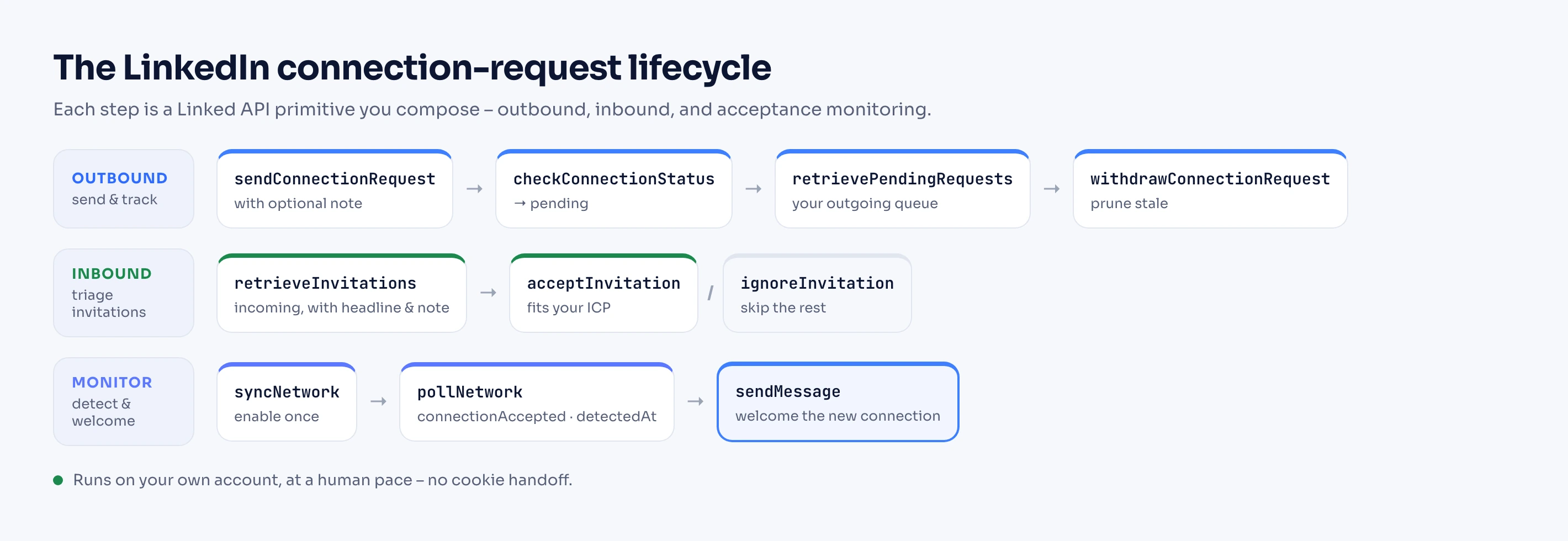
The rest of this guide walks each lane, in code. All of it runs on the Node and Python SDKs and the shell CLI; the same actions are available over the REST API, the MCP server, the AI-agent-friendly CLI (Claude Code, Cursor, Codex), and the ready-made agent skills. If you want an agent to run this rather than writing the code yourself, start with how to give an AI agent access to LinkedIn.
How to automate sending connection requests (in code)
The one rule that separates a clean automation from a messy one is the duplicate gate: check where you stand before you send. checkConnectionStatus tells you the connection status – whether you are already connected, already have a pending request out, have an incoming request to accept, or are genuinely notConnected and clear to invite. Three of those four wear the same profile badge, which is why the degree of connection you can see is not the state you need. Send only in the last case, and handle the one common edge – some people can only be added with a verified email, which sendConnectionRequest reports as emailRequired.
import { LinkedApi } from "@linkedapi/node";

const linkedapi = new LinkedApi({
  linkedApiToken: process.env.LINKED_API_TOKEN,
  identificationToken: process.env.IDENTIFICATION_TOKEN,
});

async function connectIfNew(
  personUrl: string,
  note: string,
  knownEmail?: string,
): Promise<string> {
  const check = await linkedapi.checkConnectionStatus.execute({ personUrl });
  const { data } = await linkedapi.checkConnectionStatus.result(check.workflowId);
  if (data?.connectionStatus !== "notConnected") {
    return data?.connectionStatus ?? "unknown"; // connected, pending, or incoming – skip
  }

  const req = await linkedapi.sendConnectionRequest.execute({ personUrl, note });
  const { errors } = await linkedapi.sendConnectionRequest.result(req.workflowId);

  // Edge: this person requires a verified email. Retry with one if you have it.
  if (errors?.some((e) => e.type === "emailRequired") && knownEmail) {
    const retry = await linkedapi.sendConnectionRequest.execute({
      personUrl,
      note,
      email: knownEmail,
    });
    await linkedapi.sendConnectionRequest.result(retry.workflowId);
    return "sent";
  }
  return errors?.length ? errors[0].type : "sent";
}From the shell, the same two steps are one command each:
linkedin connection status https://www.linkedin.com/in/john-doe
linkedin connection send https://www.linkedin.com/in/john-doe --note "Great to connect."
The note is a single field, not a sequence; what it should say is outreach copy, covered in the cold outreach guide. If the note is too long or your free account has used up its personalized invitations, sendConnectionRequest returns noteTooLong or noteLimitExceeded so you can drop the note and send anyway.
This runs on your own account. Every request goes through a human-paced cloud browser on your own LinkedIn account – no cookie handoff to a third-party cloud, and no blast queue. Linked API surfaces LinkedIn's own signals, such as
requestNotAllowedwhen you are pushing too hard, so your code can back off automatically. For how many requests are actually safe per day and per week, see the LinkedIn connection limit guide.
Keep your pending queue clean: list and withdraw
Requests that sit unanswered for weeks are dead weight: they count against the pending invitations LinkedIn lets you hold, and a pile of ignored invites is a signal you do not want to send – LinkedIn names invitations "ignored, left pending, or marked as spam" among its documented triggers for a restricted LinkedIn account. Withdrawing the stale ones keeps the queue healthy, and managing your connections and requests is a first-class part of the API. retrievePendingRequests returns everything still outstanding – each with a name, publicUrl, headline, and a relative sentTime like "1 month ago" – and withdrawConnectionRequest cancels one.
const wf = await linkedapi.retrievePendingRequests.execute();
const { data } = await linkedapi.retrievePendingRequests.result(wf.workflowId);

for (const request of data ?? []) {
  console.log(`${request.name} – sent ${request.sentTime}`);
  // Withdraw the ones that have been out too long (unfollow defaults to true).
  if (isStale(request.sentTime)) {
    await linkedapi.withdrawConnectionRequest.execute({ personUrl: request.publicUrl });
  }
}linkedin connection pending --json
linkedin connection withdraw https://www.linkedin.com/in/john-doeBy default, withdrawing also unfollows the person; pass unfollow: false (or --no-unfollow on the CLI) to keep following them. The manual side of this queue – where the Sent tab lives, what the recipient sees on withdrawal, expiry and cooldown rules – is covered in the pending invitations guide. How stale is "too stale," and how many pending invites are safe to hold, are pacing questions – the connection limit guide has the current numbers.
Handle incoming invitations automatically
The inbound side is its own queue – the docs cover it under working with invitations. retrieveInvitations lists every incoming invitation, and each carries an invitationType of connect, companyFollow, or newsletterSubscribe. For connect invitations you also get the sender's headline and note (both nullable), which is enough to auto-accept the ones that fit your ICP and ignore the rest with acceptInvitation / ignoreInvitation.
const wf = await linkedapi.retrieveInvitations.execute();
const { data } = await linkedapi.retrieveInvitations.result(wf.workflowId);

for (const invite of data ?? []) {
  if (invite.invitationType !== "connect") continue;
  const relevant = /founder|head of|vp|director/i.test(invite.headline ?? "");
  if (relevant) {
    await linkedapi.acceptInvitation.execute({
      invitationType: "connect",
      personUrl: invite.publicUrl,
    });
  } else {
    await linkedapi.ignoreInvitation.execute({
      invitationType: "connect",
      personUrl: invite.publicUrl,
    });
  }
}linkedin connection invitations --json
linkedin connection accept connect https://www.linkedin.com/in/john-doe
linkedin connection ignore connect https://www.linkedin.com/in/someone-elseCompany-follow and newsletter invitations come through the same method with their own companyUrl / newsletterUrl fields, so you can route those too.
Detect when someone accepts (and welcome them)
The payoff of automating requests is acting on each acceptance without watching for it by hand. Rather than re-list your connections and diff them, enable network monitoring once with syncNetwork, then read connection events with pollNetwork. Each event carries a type (connectionRequestReceived, connectionAccepted, or connectionAdded), the other person's personUrl, and a detectedAt timestamp for when Linked API observed it. The events come back newest-first, so filter for connectionAccepted, hand each new connection to your own welcome step, and advance your cursor to the newest event you saw.
// Enable network monitoring once per account.
const sync = await linkedapi.syncNetwork.execute();
await linkedapi.syncNetwork.result(sync.workflowId);

// Later, poll for acceptances. `events` comes back newest-first.
const { data } = await linkedapi.pollNetwork({ type: "connectionAccepted", since: lastSeen });
const events = data?.events ?? [];
for (const event of events) {
  await sendWelcome(event.personUrl); // your own follow-up
}
if (events.length) {
  lastSeen = events[0].detectedAt; // advance the cursor to the newest event
}linkedin network sync
linkedin network events --type connectionAccepted --jsonpollNetwork is a polling call, so detectedAt is when Linked API observed the acceptance, not a live push; events are retained for 90 days, so poll often enough to consume them. If you prefer push, subscribe to the network.connectionAccepted webhook and skip polling entirely. What the welcome should say, and when to follow up, is outreach rather than mechanics: see how to automate LinkedIn messages for the send-and-read flow and the cold outreach guide for copy and cadence.
When an extension or hosted tool is the better choice
An API is not always the right tool. If you are one person sending a handful of invites a week, a Chrome extension is the fastest path – nothing to code, nothing to host. If you want a packaged campaign UI with built-in dashboards and templates and you do not need the flow embedded anywhere, a hosted tool will run the lifecycle for you. Linked API earns its place when you are building connection automation into your own product, backend, or CRM, want the individual LinkedIn actions as programmable primitives, and want it running on your account at a human pace instead of in a browser tab you keep open. Finding who to connect with is a separate job – for that, see the Boolean search guide and the Sales Navigator scraper guide – and so is what your new connections see in their feed: automating your own publishing is covered in How to Automate LinkedIn Posts.
Frequently Asked Questions (FAQ)
Call checkConnectionStatus before you send and skip anyone who is already connected or pending. As a backstop, sendConnectionRequest also reports alreadyPending or alreadyConnected if a request or connection already exists, so a duplicate is a caught error rather than a second invite.
Some people only accept connection requests that include a verified email. When that is the case, sendConnectionRequest returns emailRequired. Pass the person's email as the optional input and retry. Email is an input for that case only – Linked API never returns email addresses as data.
Yes. retrievePendingRequests lists every outgoing request you are still waiting on, with the person's name, URL, headline, and a relative sent time. withdrawConnectionRequest cancels one; withdrawing unfollows the person by default, which you can turn off with unfollow: false.
Yes. retrieveInvitations returns your incoming invitations, and acceptInvitation / ignoreInvitation act on each by type and URL. For connect invitations you get the sender's headline and note, so you can auto-accept the ones that match your criteria and ignore the rest.
Enable monitoring once with syncNetwork, then poll pollNetwork for connectionAccepted events – each carries the person's URL and a detectedAt timestamp. If you would rather not poll, subscribe to the network.connectionAccepted webhook and Linked API pushes each event to your endpoint.
Yes. Requests run through a human-paced cloud browser on your own account, with no cookie handoff to a third-party cloud. Linked API surfaces LinkedIn's own limit signals, such as requestNotAllowed, so your code can slow down. For safe pacing, see the connection limit guide.
Linked API starts at $49/mo on the Core plan, billed annually, flat per seat – there is no per-request or per-lead metering. See pricing for the current plans.
Build it on your own account
You can build the whole connection lifecycle today. Linked API gives you sending, status checks, pending-queue management, incoming-invitation handling, and acceptance detection as composable primitives across the full surface set: the REST API and Node/Python SDKs, the shell CLI, the MCP server, the AI-agent-friendly CLI (Claude Code, Cursor, Codex), and ready-made agent skills (npx @linkedapi/skills) – all running on your own account at a human pace. Start on the Core plan at $49/mo, billed annually and wire it into your product, backend, or CRM.