
LinkedIn Jobs API: What Exists, and How to Get Job Data via API (2026)
There is no official LinkedIn API for searching or reading job postings. LinkedIn's only jobs API is a partner-gated tool for publishing jobs, so every "LinkedIn jobs API" you find is really a scraper or a dataset. The upside: job postings are largely public, which makes them one of the more accessible things to pull from LinkedIn. This guide covers what job data you can actually get, a real Python example against LinkedIn's public endpoints (and where it breaks), the search-then-enrich pattern that returns full detail as clean JSON, and how to monitor new postings for hiring signals.
The short version. There is no public LinkedIn jobs API. LinkedIn's only jobs API is a partner-gated tool for posting jobs, so every "LinkedIn jobs API" on the market is a scraper or a dataset. Job postings are public, which makes them one of the easier things to collect – but hand-rolled scrapers break at scale, and it is still automated access under LinkedIn's terms. The reliable pattern: search jobs through an account you own, open each one for the full record, get structured JSON.
Does LinkedIn have a jobs API?
Not the kind you want. LinkedIn's official Job Posting API exists only for approved partners to post jobs through applicant-tracking and job-distribution integrations, and LinkedIn is not accepting new partners for it. There is no public, self-serve API to search or read job listings.
So when a tool advertises a "LinkedIn Jobs API," it is a scraping or dataset product wrapping LinkedIn's public pages, not an official endpoint. That is fine – it is how the entire category works – but it changes how you should think about reliability and compliance: you are reading public pages, not calling a sanctioned API.
What data you can get from a LinkedIn job
A single posting carries a fairly complete record. Grouped by what it tells you:
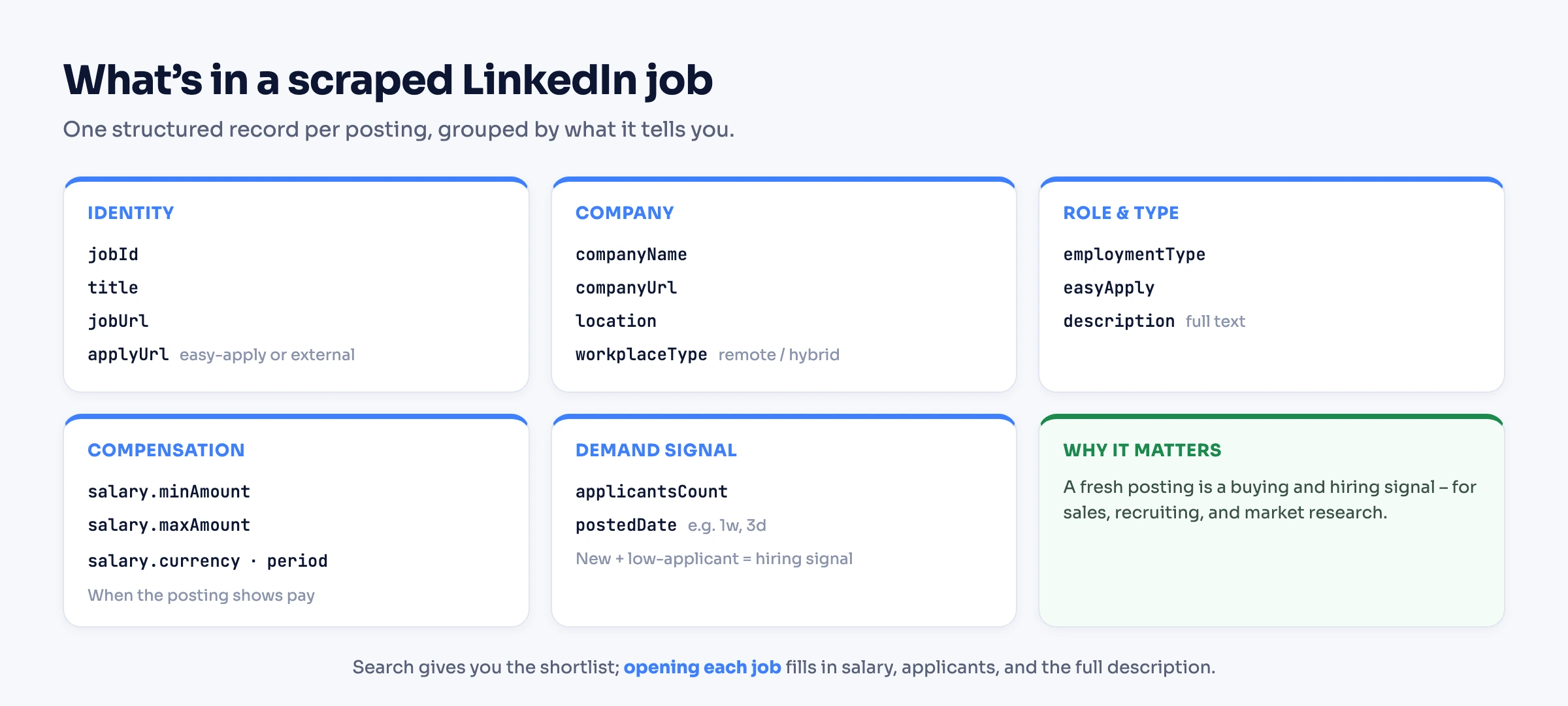
The full per-job object looks like this:
{
  "jobId": "4416248954",
  "jobUrl": "https://www.linkedin.com/jobs/view/4416248954/",
  "title": "Senior Product Manager",
  "companyName": "Example Company",
  "companyUrl": "https://www.linkedin.com/company/example-company",
  "location": "San Francisco, CA",
  "workplaceType": "remote",
  "employmentType": "Full-time",
  "postedDate": "1w",
  "applicantsCount": 84,
  "salary": { "currency": "usd", "minAmount": 140000, "maxAmount": 180000, "period": "yearly" },
  "description": "Example job description text.",
  "applyUrl": "https://www.linkedin.com/jobs/view/4416248954/apply/",
  "easyApply": true
}
Two honest caveats: salary only appears when the posting shows pay (driven by pay-transparency laws), and applicantsCount is approximate and varies by posting and region. Everything else is reliably present.
Method 1: DIY with Python
LinkedIn serves logged-out job data through public "guest" endpoints, which is why a basic Python scraper works with no account and no cookies:
- Search/list:
https://www.linkedin.com/jobs-guest/jobs/api/seeMoreJobPostings/search?keywords=...&start=0(paginate in steps of 25) - Per-job detail:
https://www.linkedin.com/jobs-guest/jobs/api/jobPosting/{jobId}
A minimal scraper over the search endpoint:
import requests
from bs4 import BeautifulSoup

# LinkedIn's public, logged-out jobs endpoint - there is no official jobs API
url = "https://www.linkedin.com/jobs-guest/jobs/api/seeMoreJobPostings/search"
params = {"keywords": "product manager", "location": "San Francisco", "start": 0}
res = requests.get(url, params=params, headers={"User-Agent": "Mozilla/5.0"})

soup = BeautifulSoup(res.text, "html.parser")
for card in soup.select("li"):
    title = card.select_one("h3.base-search-card__title")
    company = card.select_one("h4.base-search-card__subtitle")
    if title and company:
        print(title.get_text(strip=True), "|", company.get_text(strip=True))
# Paginate by increasing "start" in steps of 25.
Where this breaks. The guest endpoint is generous until it isn't. You will hit 429 Too Many Requests after roughly ten pages from one IP, so any real volume needs rotating proxies. Fields silently drop out (salary and applicant counts are inconsistent), the HTML changes and your selectors rot, and the most popular open-source LinkedIn job libraries now note that their anonymous mode is no longer maintained. It is great for a one-off pull, painful as a pipeline. We cover why hand-rolled scrapers decay in the scraping guide.
Method 2: Scraping APIs and datasets
If you would rather not maintain a scraper, two options handle the proxies for you: real-time scraping APIs (Apify job actors, Bright Data) that take a search or a job URL and return JSON, and job datasets (Coresignal, TheirStack) for bulk historical postings. The trade-off is the usual one – datasets are cheap at scale but stale, real-time is fresh but priced per request. We compare these models in the LinkedIn scraper API guide; to read a person's or company's posts and who engaged with them, see the LinkedIn post scraper guide.
Method 3: Account-based API (search, then enrich)
The pattern most teams actually want is search-then-enrich: a search returns a list of thin job cards, and opening each job returns the full posting. With Linked API you run this through your own account in a cloud browser and get structured JSON back, with no proxies or CAPTCHAs to manage.
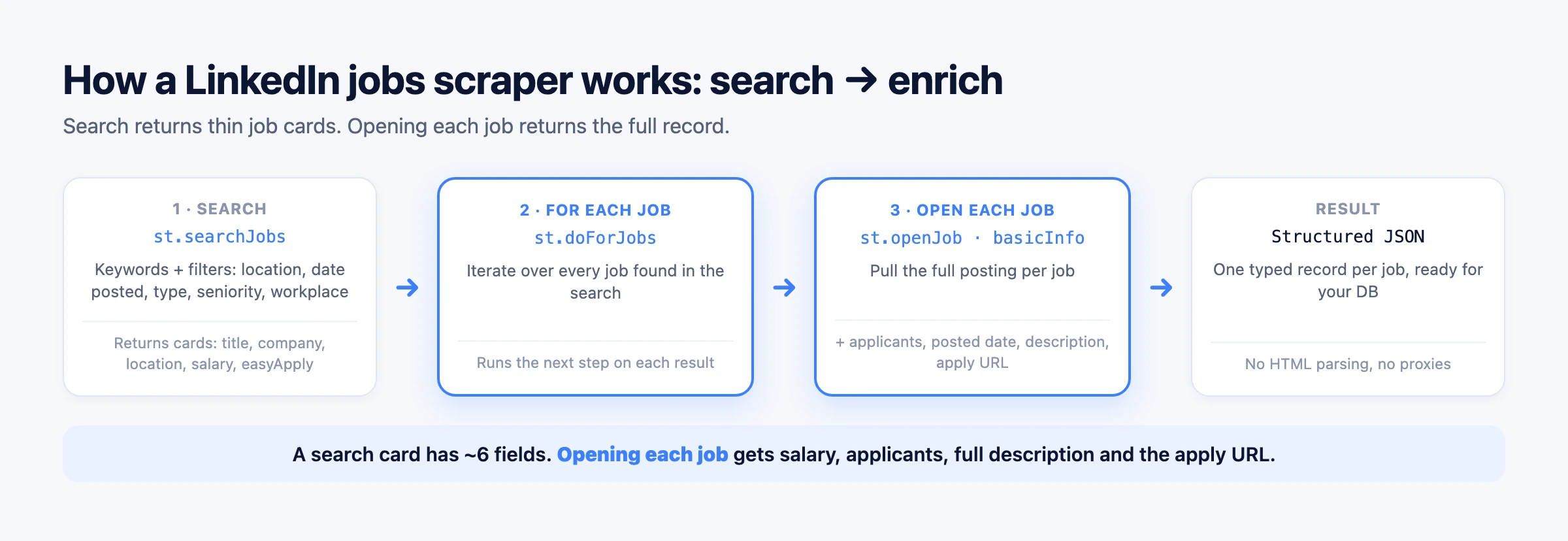
As a workflow, you search, iterate over each result, and open every job for its details:
{
  "actionType": "st.searchJobs",
  "term": "product manager",
  "limit": 25,
  "location": "San Francisco, California, United States",
  "filter": { "datePosted": "pastWeek" },
  "then": {
    "actionType": "st.doForJobs",
    "then": { "actionType": "st.openJob", "basicInfo": true }
  }
}
The same workflow through the SDK, via customWorkflow:
import LinkedApi from '@linkedapi/node';

const linkedapi = new LinkedApi({
  linkedApiToken: process.env.LINKED_API_TOKEN,
  identificationToken: process.env.IDENTIFICATION_TOKEN,
});

const workflow = await linkedapi.customWorkflow.execute({
  actionType: 'st.searchJobs',
  term: 'product manager',
  limit: 25,
  location: 'San Francisco, California, United States',
  filter: { datePosted: 'pastWeek' },
  then: {
    actionType: 'st.doForJobs',
    then: { actionType: 'st.openJob', basicInfo: true },
  },
});

const { data } = await linkedapi.customWorkflow.result(workflow.workflowId);
console.log(data);st.searchJobs supports the same filters as the LinkedIn jobs UI – datePosted, experienceLevels, employmentTypes, workplaceTypes, companies, industries, easyApply, and more (see st.searchJobs). One thing to know upfront: LinkedIn is rolling out an AI-powered jobs search alongside the classic one, it offers fewer refinements, and which version an account has is LinkedIn's decision – so a few of the filters above are not available on every account. The honest caveat: this runs on your own account, so throughput is bounded by your account's daily limits and it is automated access under LinkedIn's terms. Human-like pacing keeps the account healthy, but it is not a bulk firehose – for millions of historical postings, a dataset is the better tool.
How to monitor new job postings
The highest-value jobs use case is freshness, and it is the one almost no guide covers. LinkedIn's native job alerts are a delayed daily digest; for real-time signals you poll. Filter the search by recency and dedupe by jobId:
{
  "actionType": "st.searchJobs",
  "term": "account executive",
  "limit": 50,
  "location": "United States",
  "filter": {
    "datePosted": "past24Hours",
    "companies": ["Example Company"]
  }
}
Run that search on a schedule, keep a set of jobIds you have already seen, and treat anything new as a fresh posting. A new opening for a role you sell into is a buying signal; a competitor's new hire is a market signal. This is the pattern behind most "hiring intent" data products – and you can run it yourself.
What you can build
- Recruiting and sourcing – pull matching roles with company and apply URL, refreshed daily.
- Sales hiring-signals – new postings mean teams are growing and budgets are moving; route them to your CRM.
- Market and compensation research – aggregate salary ranges and titles across a sector or competitor set.
- Job-board aggregation – keep a fresh, deduped feed of relevant roles.
- Monitoring – alert the moment a target company opens a role.
Is it legal to scrape LinkedIn jobs?
Job postings are largely public – the guest endpoints serve logged-out data – and in the US, the Ninth Circuit affirmed a preliminary injunction in hiQ Labs v. LinkedIn (9th Cir. 2022), finding hiQ had raised serious questions that scraping publicly available data likely does not violate the Computer Fraud and Abuse Act. But public is not a free pass. LinkedIn enforces against extraction operations with blocks and lawsuits, and any personal data you touch falls under GDPR and CCPA.
Jobs are lower-risk than personal profiles because the data is corporate and public, but the same rules apply. We break down the full model – computer-access law, privacy, and enforcement – in our guide to scraping LinkedIn. This is not legal advice.
Limits and staying unblocked
A DIY scraper against the guest API gets rate-limited fast, often by around the tenth page from a single IP, which is why proxies become mandatory at any volume. An account-based run is instead bounded by your own account's daily limits. Either way, the rule is the same: pace like a human, and stop the moment you see a CAPTCHA or a restriction notice rather than pushing through.
Frequently Asked Questions (FAQ)
Only a partner-gated Job Posting API for publishing jobs, and LinkedIn is not accepting new partners for it. There is no public, self-serve API to search or read job listings, so every third-party "LinkedIn jobs API" is a scraper or dataset wrapping LinkedIn's public pages.
Job postings are public, and in hiQ v. LinkedIn the Ninth Circuit affirmed a preliminary injunction finding that scraping public data likely does not violate the CFAA. But LinkedIn's terms still prohibit automated access, and personal data is subject to GDPR and CCPA. Jobs are lower-risk than profiles, not risk-free. See our legal breakdown.
The simplest path is LinkedIn's public guest endpoints (/jobs-guest/jobs/api/seeMoreJobPostings/search and /jobPosting/{id}) with requests and BeautifulSoup, paginating in steps of 25. It works for small pulls but gets rate-limited quickly; for a reliable pipeline, use a scraping API or an account-based API instead.
Yes, when the posting includes it. Pay-transparency laws mean many postings now show a salary range, which comes through as a structured salary object. Postings without published pay return no salary.
There is no fixed number. A single IP hitting the guest API is usually throttled after about ten pages, so volume needs rotating proxies. An account-based approach is limited instead by your account's safe daily pace. Behavior matters more than raw count.
Poll a search filtered by datePosted (for example past24Hours), dedupe results by jobId, and treat new IDs as fresh postings. That gives you near-real-time hiring signals, which LinkedIn's once-a-day native alerts do not.
Open-source Python libraries and the public guest endpoints are free for small, occasional pulls. Most managed tools and APIs offer a small free tier and then charge by volume.
Yes. The job data is just JSON, so any language works over plain HTTP. With Linked API you can use the Node.js SDK, the Python SDK, or raw HTTP requests – all hit the same workflow API.
Need fresh LinkedIn job data without running and unblocking your own scraper? Start with Linked API – search jobs, open each one for the full record, and get clean JSON straight from your own account.