
LinkedIn Post Scraper: How to Extract Posts, Reactions, and Comments via API (2026)
A LinkedIn post scraper pulls the content and engagement of a post – its text, media, and reaction, comment, and repost counts – and, most usefully, the list of people who reacted and commented, each with their name, headline, and profile URL. There is no official LinkedIn API to read arbitrary post data, so every option is a scraper, and they differ a lot in reliability and account risk. This guide shows exactly what fields you can get, a real sample response, how to search posts by keyword, scrape one post, and pull a person's or company's recent posts or your own feed in code (Node and Python), and the part most guides skip: turning post engagers into a warm-lead list.
The short version. A post's content and its engager list – who reacted and who commented, with name, headline, and profile URL – are both extractable. Personal emails are not. Linked API finds posts by keyword through LinkedIn's own content search, reads known post URLs, a person's or company's recent posts, and your own home feed – all from your account, all bounded by a limit – and on big posts it samples engagement rather than dumping it whole. Chrome extensions and scripts run on your own account at machine speed and get it restricted; an API paces like a human and returns clean JSON.
What data is in a LinkedIn post
A post is really three records: the post itself, the reactions on it, and the comments on it. Here is what you get from each.
| Group | Fields |
|---|---|
| Post | url, time, type (original / repost), repostText, text |
| Media | images, hasVideo, hasPoll |
| Counts | reactionsCount, commentsCount, repostsCount |
| Reaction (per engager) | actor (type, name, profileUrl or companyUrl, headline, your connectionDegree), type (like / celebrate / support / love / insightful / funny) |
| Comment (per commenter) | author (type, name, profileUrl or companyUrl, headline, your connectionDegree), text, time, isReply, reactionsCount, repliesCount |
The reaction and comment records are the valuable part: each one carries the engager's profile URL – a durable key you can enrich or act on later. Note what is not here: no email, no phone. Post data is public-facing profile data, not contact data.
A real scraped post
The reactions and comments sections are opt-in – you ask for them, and you get typed JSON back instead of HTML to parse.
{
  "url": "https://www.linkedin.com/posts/jane-doe_growth-activity-7440011668937568257",
  "time": "2026-07-08T14:20:00Z",
  "type": "original",
  "repostText": null,
  "text": "We cut our onboarding drop-off by 40% this quarter. Three things that worked...",
  "images": ["https://media.linkedin.com/…/chart.png"],
  "hasVideo": false,
  "hasPoll": false,
  "reactionsCount": 214,
  "commentsCount": 37,
  "repostsCount": 9,
  "reactions": [
    {
      "actor": {
        "type": "person",
        "name": "Mark Lee",
        "urn": null,
        "profileUrl": "https://www.linkedin.com/in/mark-lee",
        "headline": "VP Sales at Northwind",
        "viewerState": { "connectionDegree": "2nd" }
      },
      "type": "insightful"
    },
    {
      "actor": {
        "type": "person",
        "name": "Sara Kim",
        "urn": null,
        "profileUrl": "https://www.linkedin.com/in/sara-kim",
        "headline": "Head of RevOps at Acme",
        "viewerState": { "connectionDegree": "3rd+" }
      },
      "type": "celebrate"
    }
  ],
  "comments": [
    {
      "author": {
        "type": "person",
        "name": "David Ross",
        "profileUrl": "https://www.linkedin.com/in/david-ross",
        "headline": "Growth Lead at Beacon",
        "viewerState": { "connectionDegree": "2nd" }
      },
      "text": "Which onboarding step moved the needle most?",
      "time": "2026-07-08T15:02:00Z",
      "isReply": false,
      "reactionsCount": 4,
      "repliesCount": 1
    }
  ]
}
Four ways to scrape LinkedIn posts, compared
There is no official post API, so the real choice is between four methods that trade off scale, output, and the risk to your account.
| Method | Scale | Output | Maintenance | Account-ban risk |
|---|---|---|---|---|
| Manual copy-paste | A few a day | You retype it | None | None |
| Chrome extension | Tens/day | A spreadsheet | Breaks on layout changes | High – acts on your account at machine speed |
| DIY Python scraper | High, until blocked | Raw HTML you parse | You own selectors and proxies | High – headless on your account |
| API on your own account | Steady, paced | Structured JSON (post + engagers) | Handled for you | Lower – paced like a human |
One scope note before the code: this account-based approach reaches posts four ways – a keyword search, a specific post URL, a person's or company's timeline, and your own home feed – and every one of them runs through your own account at a human pace. That makes it the right tool for live, targeted reads, and the wrong one for a sweeping historical archive of everything ever posted about a topic across many keywords: a dataset or a large-scale scraper is built for that volume, with the usual scraping-risk and stale-versus-live trade-offs. For the account-based model across all entities, see the LinkedIn scraper API guide; for vacancies rather than content posts, the LinkedIn jobs scraper.
Search LinkedIn posts by keyword
Install the SDK:
# Node.js
npm install -S @linkedapi/node

# Python
pip install linkedapi
Then search posts the way you would in LinkedIn's content search – a keyword plus the same filters the search page offers:
import LinkedApi from '@linkedapi/node';

const linkedapi = new LinkedApi({
  linkedApiToken: process.env.LINKED_API_TOKEN,
  identificationToken: process.env.IDENTIFICATION_TOKEN,
});

const workflow = await linkedapi.searchPosts.execute({
  term: 'onboarding drop-off',
  limit: 20,
  filter: { sort: 'latest', datePosted: 'pastWeek' },
});

const { data } = await linkedapi.searchPosts.result(workflow.workflowId);
for (const post of data ?? []) {
  console.log(post.time, post.author?.name, post.reactionsCount, post.url);
}Each result carries the post's URL, author (name, headline and profile URL for a person), text, hashtags, mentions and reaction, comment and repost counts. Beyond sort and datePosted, the searchPosts filters cover content type, who posted it (you, your connections, people you follow), specific authors and companies, mentions, and the author's company or industry – or pass a customSearchUrl copied from a LinkedIn search you configured by hand.
Two honest limits. LinkedIn widens a narrow query on its own and can return loosely related posts, so check results against your own criteria when an exact match matters. And a search returns at most 100 posts per call, from your own account's search. Run the same search daily with datePosted: 'past24Hours' and you are watching a keyword for people raising their hand – a buying-signal feed rather than complete social listening, because LinkedIn decides what its search returns. To see who engaged with a result, pass its url to the next step.
Scrape a single post and its engagers
Fetch a post by URL – from a search result or anywhere else – asking for its reactions and comments:
import LinkedApi from '@linkedapi/node';

const linkedapi = new LinkedApi({
  linkedApiToken: process.env.LINKED_API_TOKEN,
  identificationToken: process.env.IDENTIFICATION_TOKEN,
});

const workflow = await linkedapi.fetchPost.execute({
  postUrl: 'https://www.linkedin.com/posts/jane-doe_growth-activity-7440011668937568257',
  retrieveReactions: true,
  retrieveComments: true,
  reactionsRetrievalConfig: { limit: 50 },
  commentsRetrievalConfig: { limit: 50, sort: 'mostRecent' },
});

const { data } = await linkedapi.fetchPost.result(workflow.workflowId);
console.log(data?.text, data?.reactionsCount, data?.reactions?.length);
// each reaction: { actor: { type, name, urn, profileUrl or companyUrl, headline }, type }The limit in each config is what keeps this honest on a viral post: you pull a bounded, recent slice of the engagement, not a guaranteed copy of every one of thousands of reactions.
Scrape a person's or company's recent posts
To watch what someone publishes, fetch the person (or company) with retrievePosts and a postsRetrievalConfig. The since date is the key to monitoring – pass your last run's timestamp and you get only what is new:
const workflow = await linkedapi.fetchPerson.execute({
  personUrl: 'https://www.linkedin.com/in/jane-doe',
  retrievePosts: true,
  postsRetrievalConfig: { limit: 20, since: '2026-06-01T00:00:00Z' },
});

const { data } = await linkedapi.fetchPerson.result(workflow.workflowId);
for (const post of data?.posts ?? []) {
  console.log(post.time, post.reactionsCount, post.url);
}
// swap fetchPerson for fetchCompany with a companyUrl to track a company's postsThis returns a recent, bounded set of posts, not a full archive. Run it on a schedule (a nightly cron with since set to yesterday) and you have a monitor for a person's or company's new activity – the foundation for the use case below.
Is there a LinkedIn feed API?
Not an official one for reading a member's home feed: LinkedIn's Activity Feed API is deprecated and no longer grants access, and its current APIs cover publishing and managing your own organization's content rather than reading what your network posts. Two different jobs get called a "LinkedIn feed API", so here are both answers.
Showing your company's posts on a website does not need an API at all: LinkedIn's "Embed this post" option gives you a snippet per post, and website-widget tools handle a live wall of them.
Reading your own home feed into code or an AI agent – what your network is posting, as LinkedIn serves it to you – is what retrieveFeed does:
const workflow = await linkedapi.retrieveFeed.execute({ limit: 20 });
const { data } = await linkedapi.retrieveFeed.result(workflow.workflowId);

for (const post of data ?? []) {
  console.log(post.author?.name, post.feedContext, post.url);
}Each post comes back in the standard post shape plus feedContext – LinkedIn's own line explaining why the post is in your feed, such as a connection reacting to it. The feed is algorithmic rather than chronological, so there is no since: each call returns what LinkedIn serves the account now, up to 100 posts. From the shell, linkedin feed retrieve --limit 50 --json does the same through the CLI.
Turn post engagers into warm leads
Here is the part worth building for. A person who reacted to or commented on a relevant post has raised their hand. You already have their profile URL from the post – so the pipeline is short: read the post's engagers, optionally enrich each live, and act.
// You already fetched the post with retrieveReactions + retrieveComments above.
const leads = [
  ...(data?.reactions ?? []).map(({ actor, type }) => ({
    url: actor.type === 'person' ? actor.profileUrl : actor.companyUrl,
    name: actor.name,
    headline: actor.type === 'person' ? actor.headline : null,
    signal: type,
  })),
  ...(data?.comments ?? []).map(({ author }) => ({
    url: author.type === 'person' ? author.profileUrl : author.companyUrl,
    name: author.name,
    headline: author.type === 'person' ? author.headline : null,
    signal: 'commented',
  })),
];

// From here: enrich one live with fetchPerson(url), or act with
// sendConnectionRequest / sendMessage - all on your own account.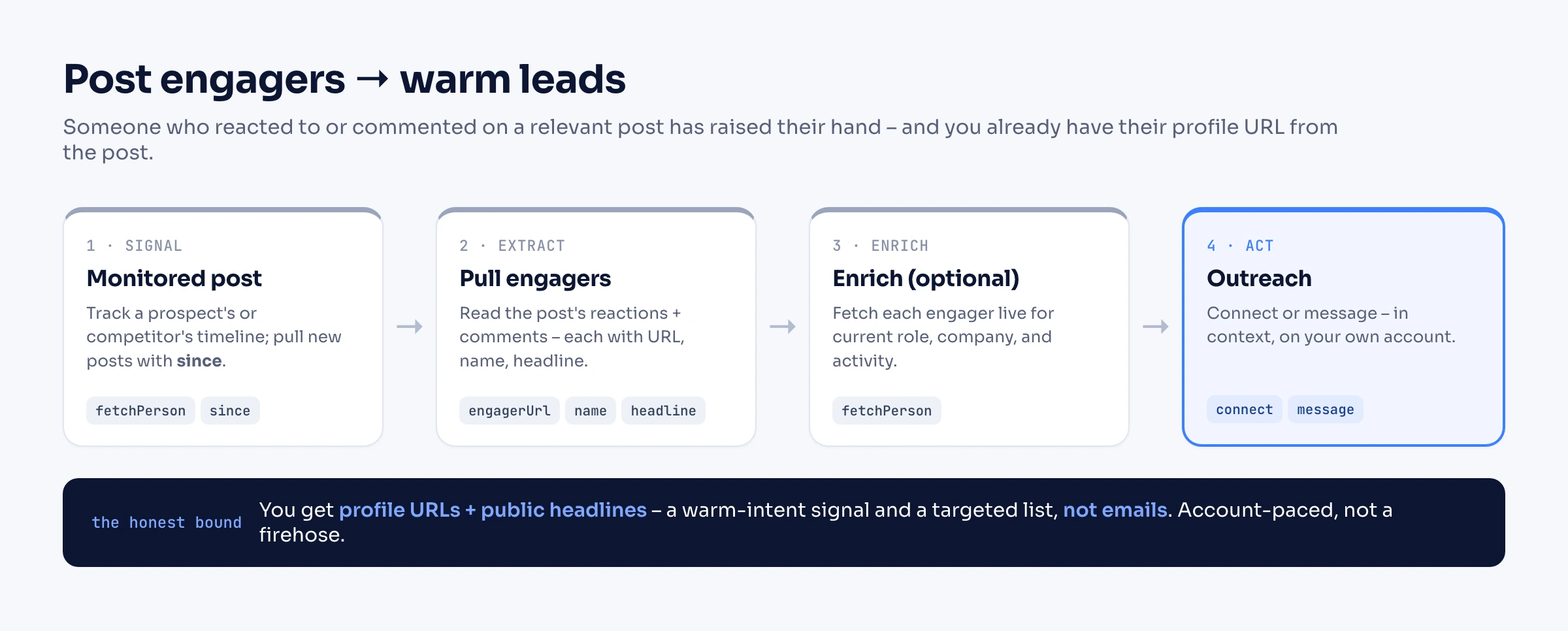
Two honest limits keep this grounded. You get profile URLs and public headlines, not emails – so this builds a targeted list and a warm-intent signal, not a contact database. And it runs on your own account at a human pace, so it is built for steady, relevant lists, not for scraping every reactor on a 10,000-like post. For what to do with the list next, see our cold outreach guide; if your source list lives in Sales Navigator, see the Sales Navigator guide.
Can you get an engager's email?
No, and it is the same story as any profile scraper: emails and phone numbers are not shown on posts or profiles, so a scraper reading LinkedIn cannot return them. What you get is the engager's profile URL and headline. To attach a verified email, match that person against a separate, consented B2B enrichment provider – a different product from post scraping, and the data does not come off LinkedIn.
Is scraping LinkedIn posts legal, and will my account get banned?
Post content and public engagement are largely visible data, and courts have treated scraping genuinely public data more leniently than accessing private data – but public is not a free pass. Personal data still falls under GDPR and CCPA, and LinkedIn enforces against extraction operations directly. We break down the full legal picture in our guide to scraping LinkedIn.
The ban risk is highest exactly where most people start: a Chrome extension or headless script driving your own account too fast. Linked API takes the account-based path – it runs on your own authenticated account through a human-paced cloud browser, within built-in workflow limits – and returns maintained, structured JSON, so you are not rewriting selectors every time the feed changes. Pace like a human, stop on any warning, and keep contact data to consented sources. Read our safety model before you scale.
Frequently Asked Questions (FAQ)
The post's content (text, media flags), its reaction, comment, and repost counts, and the list of people who reacted and commented – each with name, headline, and profile URL, plus the reaction type or comment text. Personal emails and phone numbers are not available.
Yes. Requesting reactions returns each reactor's profile URL, name, headline, and reaction type (like, celebrate, support, love, insightful, funny); requesting comments returns each commenter's URL, name, headline, and comment text. This is what makes a post a lead source.
No. LinkedIn does not expose personal emails on posts or profiles, so you get profile URLs, not contacts. Match those profiles against a consented enrichment provider if you need verified emails.
Yes – fetch the person with retrievePosts and a postsRetrievalConfig (limit, optional since). It returns a bounded recent set of their posts, not a guaranteed full archive; the same works for a company via fetchCompany.
Yes. Pass a since date in postsRetrievalConfig to pull only posts published after your last run, and schedule the call (for example, a nightly cron job). That turns the fetch into a monitor for new posts. The publishing direction – scheduling and automating your own posts – is covered in How to Automate LinkedIn Posts.
Yes – since September 2026. searchPosts runs LinkedIn's content search on your own account with a keyword and the same filters the search page offers (sort, date posted, content type, author, mentions), and returns up to 100 posts per call as structured JSON. LinkedIn can widen narrow queries, so check results against your own criteria when an exact match matters.
No. LinkedIn's official APIs cover your own content and approved partner use cases; there is no public API to read arbitrary posts and their engagement. Every "post scraper" you see is a scraping or account-based product.
Reading public post data is treated more leniently than accessing private data, but personal data still falls under GDPR and CCPA. See our legal breakdown.
There is no universal number – it depends on your account's age and history and on staying within a safe daily pace. An account-based API paces the work like a human rather than bursting; treat volume as bounded, not a firehose.
Need LinkedIn post data and the people behind the engagement, without running an extension or a fragile script? Start with Linked API – search posts by keyword, read posts, reactions, and comments, and pull your own feed – from your own account, as structured JSON, through the API and SDKs, CLI, MCP, and skills.