
LinkedIn Posts API and Post Automation (2026): Native Scheduler, Tools, and API
Publishing consistently on LinkedIn is one of those jobs that rewards a system and punishes willpower. Writing a good post is real work; pasting it into the composer at the right time on the right account is not – that part is exactly what you should automate. This guide covers how to automate LinkedIn posts at every level: what LinkedIn's built-in scheduler actually does, when a scheduling tool earns its subscription, and how to publish to your profile or company page from your own pipeline in code.
The short version. You can automate LinkedIn posts three ways: LinkedIn's native scheduler (free, up to 3 months ahead, but manual and one post at a time), a scheduling tool (content calendar, approvals, multi-network publishing), or an API that posts on your own account. With Linked API's
createPostyou publish to your personal profile or a company page from your own pipeline – a CMS, an RSS feed, a backend job, or an AI agent – with images, video, or a document attached. The rest of this guide is the honest decision path, plus working code.
Is there a LinkedIn posts API?
Yes – for publishing. LinkedIn's official API creates posts, and for some projects it is the right choice; it is not a way to read or collect other people's posts at scale, which is the post scraper guide's territory. The current route is the versioned Posts API (POST https://api.linkedin.com/rest/posts, with required Linkedin-Version headers), which replaced the legacy ugcPosts/Share endpoints.
Access comes in two distinct paths, and it is worth being precise about them. Posting as a member (w_member_social) is available through the self-serve Share on LinkedIn product on a developer app – no review gate for that scope. Posting as an organization (w_organization_social) and broader content management run through the Community Management API, whose Standard-tier access requires an application form, a screen recording of your app, and test credentials, per Microsoft's quick-start (docs as of May 2026). Notably, the Posts API exposes no scheduling parameter – posts are created as published (or draft), so timing logic lives in the caller there too.
Build on the official API when you are shipping an approved integration – a social suite, a marketing platform, a product feature for LinkedIn's own ecosystem. For automating your own account's publishing inside your own stack, the app-review path is usually more machinery than the job needs – which is exactly the gap the own-account API route above fills.
The three ways to automate LinkedIn posts
| Route | Cost | Where it runs | Personal / Page | Media | Best for |
|---|---|---|---|---|---|
| Native scheduler | Free | LinkedIn's composer | Both | What the composer supports (minus the excluded types below) | One person queueing posts ahead |
| Scheduling tool | Subscription | The vendor's app | Both | Vendor-dependent | Teams: calendars, approvals, multi-network |
| Your own pipeline via Linked API | Flat per-seat plan | Your code, on your own account | Both (companyUrl for Pages) | 9 images, or 1 video, or 1 PDF | Posting as a feature of your product, backend, or agent |
There is also a fourth, narrower route – building an approved developer app on LinkedIn's official Posts API – covered further down, because for most people it is an integration project, not an automation setup.
Can you schedule posts on LinkedIn natively?
Yes. LinkedIn's built-in scheduler is free and covers more than most people assume, so start here before adding any tool.
For personal posts, per LinkedIn's Schedule posts help page, you can schedule from the clock icon in the composer for any time "within 10 minutes to 3 months from the current time", on both desktop and the mobile app. Scheduled posts are not fire-and-forget drafts: from View all scheduled posts you can preview, edit the content, reschedule the time, or delete. Three post types are excluded – LinkedIn's list is "Events, Jobs, Services" – and scheduled times are standardized in UTC based on your device's time-zone settings, which is the usual explanation when a personal post publishes at an unexpected hour.
For company pages, the Schedule a LinkedIn Page post help page allows scheduling "anywhere between an hour from the current time to three months in advance" – note the 1-hour minimum lead time, versus 10 minutes for personal posts. The exclusion list is longer: "You can't schedule events, multiple photos, reshares, polls, jobs, and service posts for your Page." Scheduled Page posts are managed from the Page admin view, and one operational gotcha: a scheduled Page post cannot be promoted in Campaign Manager until it has actually published.
Where the native scheduler stops is structural, not cosmetic: there is no recurring queue, the horizon is capped at 3 months, every post goes through the composer one at a time, and there are no approval workflows or multi-network calendars. If your bottleneck is any of those, you have outgrown it.
How to automate LinkedIn posts with an API
The programmatic route treats posting as what it is in a real content system: one step in a pipeline you already own. Linked API is a LinkedIn automation API that runs actions on your own account through a human-paced cloud browser, and its createPost action is the publishing step:
- Post as yourself or as a company page – pass
companyUrlto publish on behalf of a Page you have content-admin access to. - Text up to 3,000 characters, matching the composer.
- Attachments: up to 9 images (JPEG, PNG, GIF, WebP, max 8 MB each), or 1 video (MP4, MOV, WebM, max 200 MB), or 1 PDF document (max 100 MB). Attachment types cannot be mixed in one post.
- Returns the created post's URL, so your system can store, track, or announce it.
One honest mechanic before the code: Linked API has no scheduled-post queue. createPost publishes when you call it – your cron job, queue worker, or workflow engine owns the timing. That is by design: the point of this route is that scheduling logic lives in your system, next to your content.
Install the SDK (npm install -S @linkedapi/node or pip install linkedapi) and publish through customWorkflow – posting is a raw-definition action, so there is no dedicated SDK method:
import LinkedApi from '@linkedapi/node';

const linkedapi = new LinkedApi({
  linkedApiToken: process.env.LINKED_API_TOKEN,
  identificationToken: process.env.IDENTIFICATION_TOKEN,
});

const workflow = await linkedapi.customWorkflow.execute({
  actionType: 'st.createPost',
  text: 'We just shipped scheduled exports – here is what changed and why it matters.',
  attachments: [{ url: 'https://example.com/release-chart.png', type: 'image' }],
});

const { data: completion } = await linkedapi.customWorkflow.result(workflow.workflowId);
console.log('Published:', completion.data.postUrl);To publish as your company page instead, add companyUrl: "https://www.linkedin.com/company/your-company" to the same definition. The same action is one line in the shell CLI:
linkedin post create "We just shipped scheduled exports – here is what changed" \
  --attachments "https://example.com/release-chart.png:image"

# Post as your company page
linkedin post create "Release 2.4 is live" \
  --company-url https://www.linkedin.com/company/your-company
Build the pipeline end to end: an approved-posts queue
A publish call is not yet automation. The smallest pipeline that behaves like a real content system has four parts: a queue of posts, an optional drafting step, a human approval gate, and a cron tick that publishes whatever is due.
The queue is just data – a JSON file or a database table where each item carries text, optional attachments, optional companyUrl, a publishAt time, and an approved flag. Drafts can come from anywhere: your team, a blog-to-post script, or an AI agent writing into the queue through the MCP server, the AI-agent-friendly CLI, or the ready-made skills (npx @linkedapi/skills) – the agent drafts, a human flips approved, and nothing publishes unreviewed. Then a cron job (every 15 minutes is plenty) publishes what is due:
import LinkedApi from '@linkedapi/node';
import { readFileSync, writeFileSync } from 'fs';

const linkedapi = new LinkedApi({
  linkedApiToken: process.env.LINKED_API_TOKEN,
  identificationToken: process.env.IDENTIFICATION_TOKEN,
});

const queue = JSON.parse(readFileSync('queue.json', 'utf8'));
const due = queue.filter(
  (post) => post.approved && !post.postUrl && new Date(post.publishAt) <= new Date(),
);

for (const post of due) {
  const workflow = await linkedapi.customWorkflow.execute({
    actionType: 'st.createPost',
    text: post.text,
    ...(post.attachments && { attachments: post.attachments }),
    ...(post.companyUrl && { companyUrl: post.companyUrl }),
  });
  const { data: completion } = await linkedapi.customWorkflow.result(workflow.workflowId);
  if (completion.success) {
    post.postUrl = completion.data.postUrl;
  } else {
    console.error(`Failed "${post.text.slice(0, 40)}…": ${completion.error.type}`);
  }
}

writeFileSync('queue.json', JSON.stringify(queue, null, 2));Published items keep their postUrl (your audit trail), failures stay in the queue with the error surfaced for retry, and the review gate means automation never outruns editorial judgment. Reading posts back – tracking who reacted and commented on what you published, or watching anyone else's feed – is the reverse direction, covered in the LinkedIn post scraper guide.
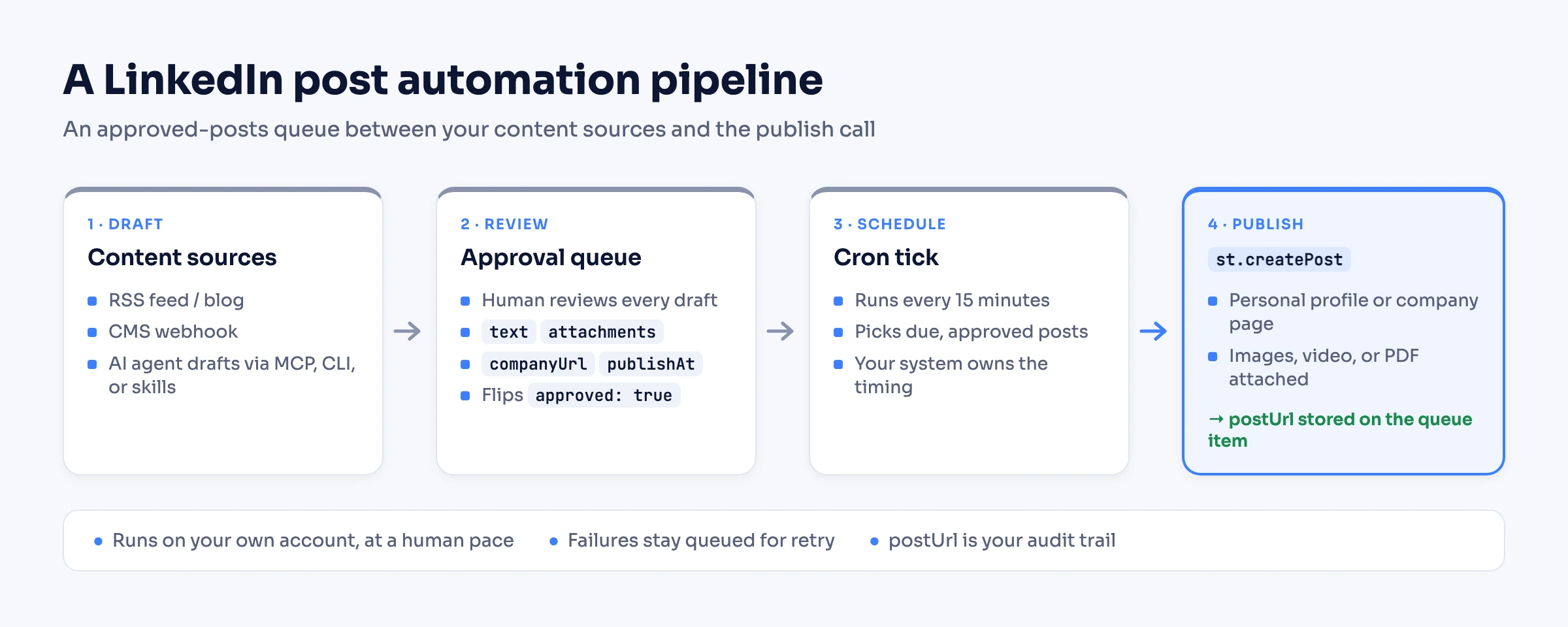
Three variations on the same skeleton:
- Blog/RSS → personal profile. A script watches your feed; each new article becomes a queued summary post with the article link and cover image.
- CMS webhook → company page. Your CMS fires a webhook on release-notes publish; the handler queues a Page post with
companyUrl, and the cron picks it up in the next tick. - n8n / Make. In n8n, use the Linked API node's Execute custom workflow action with the same raw
st.createPostdefinition; a plain HTTP Request to the REST API works as a fallback, and Make wires up the same way. (n8n also ships its own built-in LinkedIn node – that one posts through LinkedIn's official API with OAuth, a separate route with its own constraints.)
When native scheduling or a scheduler tool is all you need
Honest routing, in both directions. If you are one person queueing next week's posts, the native scheduler already does it: free, official, editable, three months out. Nothing in this guide beats it for that job.
If a team runs your content, a scheduler tool earns its keep with the things native lacks: a shared calendar, approval flows, cross-network publishing, and analytics. Buffer's free plan, for example, covers 3 connected channels with 10 scheduled posts per channel, with paid plans from around $5 per channel per month, billed annually (per Buffer's pricing, 2026). That is a fair price for coordination features you would otherwise build yourself.
The API route earns its keep at a specific threshold: when posting must live inside your product, backend, or agent – triggered by your data, gated by your review process, publishing to profiles and Pages your system manages. Below that threshold, use the simpler tool; past it, the tool becomes the bottleneck.
Keeping automated posting safe (and worth reading)
Automated posting is the calmest kind of LinkedIn automation – you are publishing to your own feed, not messaging strangers. Outbound is a different discipline with its own pacing rules: automating messages and automating connection requests each have their own guide. For posting, two habits keep it calm. First, run it like a human: Linked API executes every action on your own account through a cloud browser at a human pace, and a steady weekly rhythm serves you better than bursts of machine-gun publishing. Quality compounds; volume alone does not. Second, automate the publishing, not the engagement: auto-posting your content is a workflow, while automating fake engagement on it – pods, mass reactions, comment rings – is the pattern LinkedIn's Professional Community Policies actually target. For pacing questions across all your LinkedIn activity, the limits guide has the current picture.
Frequently Asked Questions (FAQ)
Yes, for publishing. The versioned Posts API creates posts as a member (the self-serve w_member_social scope via Share on LinkedIn) or as an organization (through the review-gated Community Management API). It does not give you a way to read or collect other people's posts at scale, and for automating your own account's publishing inside your own stack the app-review path is usually more machinery than the job needs – which is what an account-based route such as Linked API's createPost covers.
Yes, at three levels: LinkedIn's native scheduler queues individual posts up to 3 months ahead for free; scheduling tools add calendars, approvals, and multi-network publishing; and an API like Linked API's createPost publishes to your profile or company page directly from your own pipeline – CMS, RSS, backend job, or AI agent.
Yes. The built-in scheduler covers personal posts from 10 minutes to 3 months ahead (desktop and mobile) and company-page posts from 1 hour to 3 months ahead, per LinkedIn's help pages. Scheduled posts can be previewed, edited, rescheduled, or deleted before they publish.
LinkedIn's help pages document no numeric cap on how many posts you can schedule. The practical constraints are different: the 3-month scheduling horizon, and the excluded post types – events, jobs, and services for personal posts, with polls, reshares, and multi-photo posts additionally excluded for Pages.
Check the post type first: scheduling unsupported types (events, jobs, services – and for Pages also polls, reshares, multi-photo posts) fails with an error. For personal posts publishing at the wrong hour, scheduled times are standardized in UTC based on your device's time-zone settings. If a third-party tool did the scheduling, the failure may be caused by an expired account connection or a revoked Page permission – reconnect and check admin access.
Yes, two ways. With Linked API, pass companyUrl to createPost and the post publishes on behalf of a Page you have content-admin access to – same action, same pipeline as personal posts. On LinkedIn's official Posts API, organization posting uses the w_organization_social scope, which sits behind Community Management API access review.
Automation on LinkedIn always deserves care, but publishing your own content to your own feed is its low-risk end. Keep it on your own account at a human pace – which is how Linked API runs every action – keep editorial review in the loop, and put your automation effort into content quality rather than engagement tricks like pods or mass reactions.
Ready to make posting a feature of your own system? Start with Linked API – flat per-seat pricing from $49/mo, billed annually – and get createPost with every other action across the full surface set: the REST API and Node/Python SDKs, the shell CLI, the MCP server, the AI-agent-friendly CLI (Claude Code, Cursor, Codex), and ready-made agent skills (npx @linkedapi/skills) – on your own account and at a human pace.