
9 Best Evaboot Alternatives in 2026 (Compared by Use Case)
Evaboot is a focused, well-liked tool: it pulls a LinkedIn Sales Navigator search into a clean, filtered CSV and finds verified work emails. But that focus is also why people look for an alternative – it needs a paid Sales Navigator seat, it charges credits per lead, and it stops at a spreadsheet. Depending on what you actually need next – the same export without Sales Navigator, phone numbers, outreach, enrichment, or data you can act on from your own code – the right replacement is different. This guide matches each use case to the right tool, honestly, including where Evaboot is still the best pick.
The short version. If you just want one clean Sales Navigator CSV with emails, stay on Evaboot – it is good at that. Want the same export cheaper or without Sales Navigator? Scrupp or Wiza. Phone numbers too? Wiza or Lusha. A database instead of scraping? Apollo. Built-in outreach? Waalaxy. And if the CSV was never the goal – if you need LinkedIn data and the ability to act on it inside your own product – you want an API like Linked API, not another export tool.
Pick your alternative in 30 seconds
| Tool | Best for | Needs Sales Navigator | Beyond export (acts) | Pricing model |
|---|---|---|---|---|
| Evaboot (baseline) | Clean Sales Navigator CSV + emails | Yes | No – export only | Credit per lead |
| Linked API | Embeddable automation that acts, in your product | No | Yes – connect, message, react, comment | Flat per seat |
| Wiza | Sales Nav export with emails and phone numbers | Yes | No – export only | Credit-based |
| Phantombuster | Multi-platform scraping + light automation | Optional | Some (no-code actions) | Execution-time credits |
| Scrupp | Budget LinkedIn / Sales Nav export | Optional | No – export only | Credit-based |
| Apollo.io | Buying B2B data from a database + sequencing | No | Email sequences | Per user (free tier) |
| Captain Data | Cloud, no-code extraction at scale | Optional | Some (workflows) | Credits / per workflow |
| Clay | Multi-source enrichment waterfalls | No | No – enrich only | Credit-based |
| Waalaxy | LinkedIn + email outreach sequences | No | Yes – LinkedIn outreach | Per seat (free tier) |
| Lusha | Contact data including phone numbers | No | No – data only | Per user (free tier) |
Prices and tiers change often; figures below are approximate as of 2026, so check each vendor for current numbers.
Why teams look for an Evaboot alternative
Evaboot is genuinely good at its one job. The reasons people still switch are structural, not quality complaints.
- It requires Sales Navigator. The export feature only works with a Sales Navigator seat, so your real cost is Evaboot plus roughly $100/mo for Sales Navigator, per LinkedIn's pricing, 2026. This is the single most-cited reason to look elsewhere.
- Credits burn faster than expected. One exported lead is a credit and a found-and-verified email is another, so a lead with an email costs two credits – and large lists add up quickly.
- It is export-only. Evaboot hands you a CSV. It does not send connection requests, messages, or sequences, so you always need a second tool for the actual outreach.
- Email coverage varies by segment. Discovery is strong for tech and enterprise but drops for SMB and some industries, so expect a partial hit rate rather than a full list.
- It runs through your own account. Like most LinkedIn scrapers it extracts via a Chrome extension on your logged-in session, which carries the usual detection and account risk – more on that below.
CSV export vs an API that acts
Here is the distinction that decides most of these comparisons. Evaboot – and even its newer API – is a one-directional data faucet: you point it at a Sales Navigator search and clean rows come out. That is perfect when a CSV is the finish line. It is the wrong shape when the data was supposed to do something.
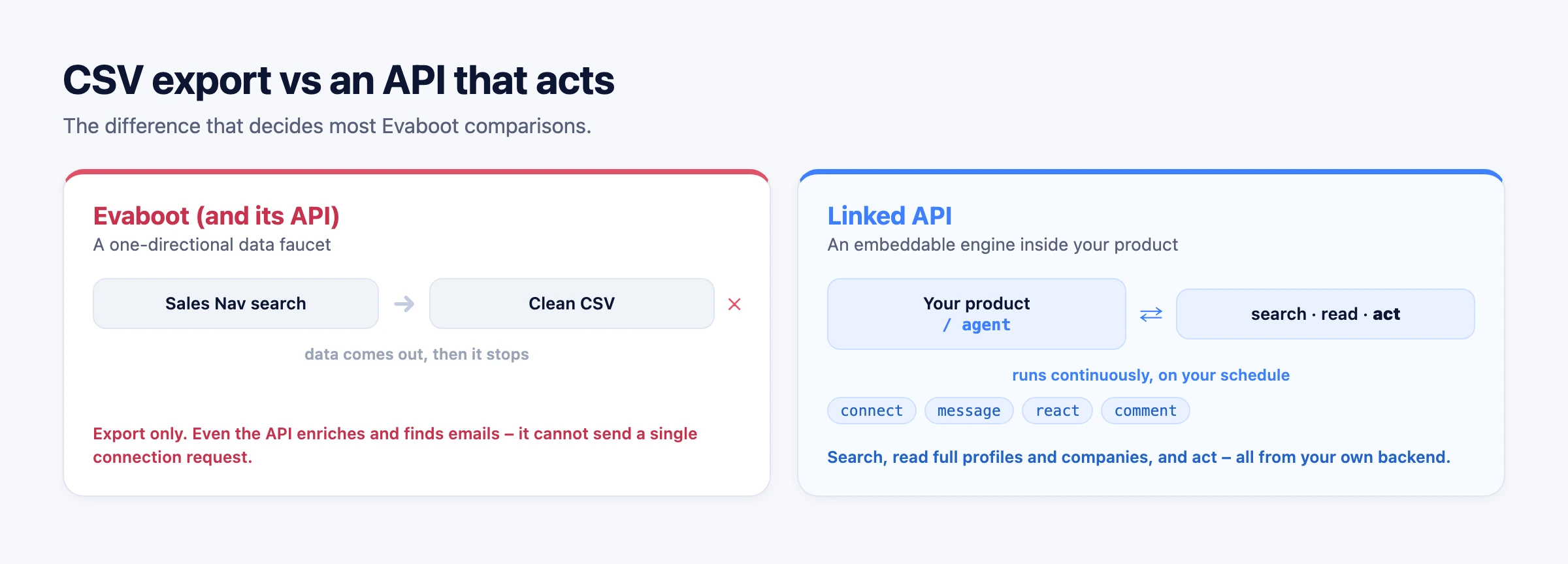
An account-based API like Linked API is the opposite shape. The same call that searches can also read full profiles and companies and then act – connect, message, react, comment – from your own backend, on a schedule, embedded in your product. Notably, Evaboot's own API cannot do this: it exports, enriches, and finds emails, but it cannot send a single connection request. With an SDK that is a few lines:
import LinkedApi from '@linkedapi/node';

const linkedapi = new LinkedApi({
  linkedApiToken: process.env.LINKED_API_TOKEN,
  identificationToken: process.env.IDENTIFICATION_TOKEN,
});

// 1. Search like a Sales Navigator query
const search = await linkedapi.searchPeople.execute({
  term: 'head of growth',
  filter: { locations: ['United States'], industries: ['Software Development'] },
});
const { data: people } = await linkedapi.searchPeople.result(search.workflowId);

// 2. Act on the results - the part an export tool cannot do
for (const person of people ?? []) {
  const req = await linkedapi.sendConnectionRequest.execute({
    personUrl: person.publicUrl,
    note: `Hi ${person.name.split(' ')[0]}, loved your growth work, let's connect.`,
  });
  await linkedapi.sendConnectionRequest.result(req.workflowId);
}If a static CSV is genuinely all you need, this is overkill and Evaboot is simpler. If the data feeds a product, an agent, or an ongoing workflow, an export tool is the wrong primitive.
The 9 best Evaboot alternatives
Linked API – best for embeddable automation that acts
This is our tool, and the honest scope is that it solves a different problem than Evaboot. It is a flexible LinkedIn automation API: you compose your own automation from primitives – search people, read profiles, companies, and posts, and act (connect, message, react, comment) – and embed it directly in your product, backend, or workflow. And you can use it both ways, each first-class: build it in through a clean REST API, the Node and Python SDKs, or a shell CLI – or get it out of the box by handing the same engine to an AI agent via the MCP server or ready-made skills, with nothing to wire up.
Two things set it apart from Evaboot specifically. There is no separate Sales Navigator requirement and no per-lead credit meter – billing is flat per seat (from $49/mo billed annually), and it runs through your own account in a cloud browser paced like a human, bounded by your account's daily limits. No automation is risk-free, so we do not claim zero ban risk. Best for developers and teams who want LinkedIn data and actions inside their own product or workflow, rather than a CSV they re-export every week. See how the model works in our LinkedIn scraper API guide.
Wiza – best Sales Navigator export with phone numbers
Wiza is the closest head-to-head with Evaboot: it exports Sales Navigator lists and finds verified emails, but it also returns phone numbers and a bit more enrichment, which is the gap many people hit with Evaboot. Like Evaboot it still needs a Sales Navigator seat and bills on credits, so it solves the "I need phones too" problem rather than the "I do not want to pay for Sales Navigator" one.
Phantombuster – best for multi-platform scraping plus light automation
If you want to scrape beyond Sales Navigator – LinkedIn at large plus Instagram, X, and more – and run some no-code actions rather than just export, Phantombuster's library of "Phantoms" is broader than Evaboot's single job. It does not require Sales Navigator for everything and can do light outreach, at the cost of a steeper learning curve and execution-time billing. We compare it and its rivals in depth in our Phantombuster alternatives guide.
Scrupp – best budget export
Scrupp covers the same core job – pull LinkedIn and Sales Navigator searches into a clean sheet with emails – at a lower price point, and it is more forgiving about working on standard LinkedIn searches, not only Sales Navigator. It is the value pick when you want Evaboot's output without the full Evaboot plus Sales Navigator cost, and you are fine with an extension-based export workflow.
Apollo.io – best database alternative to scraping
Apollo flips the model: instead of scraping a Sales Navigator search through your account, you query a large pre-built B2B contact database and sequence the results, on a free tier plus paid plans from around $49/user/mo billed annually ($65 monthly), per Apollo's pricing, 2026. You skip the Sales Navigator requirement and the scraping risk entirely; the tradeoff is database freshness and coverage versus live LinkedIn data. For the full breakdown, see our Apollo.io alternatives guide.
Captain Data – best cloud extraction at scale
Captain Data is a no-code, cloud-based extraction and enrichment platform aimed at teams running data workflows at scale. Because it runs in the cloud rather than a browser extension on your machine, it is positioned as lower-risk for volume work, and it chains multiple sources together. It is more platform than point tool, priced and scoped for bigger operations than a solo Evaboot user.
Clay – best for enrichment waterfalls
If the real goal was enriching a list rather than extracting it, Clay runs "waterfalls" across dozens of data providers to fill in emails, firmographics, and signals, with an API and credit-based pricing from around $185/mo on monthly billing ($167 annual), per Clay's pricing, 2026. It is far more thorough than Evaboot's built-in email finder, aimed at technical growth teams, and it pairs naturally with whatever you use to source the initial rows.
Waalaxy – best for built-in outreach
Waalaxy is the answer to Evaboot's export-only limitation: it extracts LinkedIn leads and runs LinkedIn sequences (with email on higher tiers) in one tool, with a simple UI and a usable free tier from around €19/user/mo on monthly billing, per Waalaxy's pricing, 2026. You lose Evaboot's Sales Navigator data-cleaning depth, but you gain the actual outreach step Evaboot leaves to a second product. For more outreach options, see our Dripify alternatives guide and, if Waalaxy is the tool you are comparing, our Waalaxy alternatives guide.
Lusha – best for phone numbers and contact data
When the missing piece is phone numbers and direct dials, Lusha is a contact-data provider with a browser extension and a free tier, pulling verified emails and phones from its database. It is not a Sales Navigator scraper; it is the enrichment layer you bolt on when an Evaboot-style export gets you names but not the direct contact details you need to call.
When Evaboot is still the right choice
A fair comparison says when not to switch. If your job is exactly what Evaboot is built for – take a Sales Navigator search, get a clean, filtered, deduplicated CSV with verified work emails, with almost no setup – Evaboot does that as well as anything, and its data-cleaning is genuinely a strength. If you already pay for Sales Navigator, only need a periodic list for cold email, and do not need phones, outreach, or programmatic access, there is little reason to move. The alternatives above win when you need more than that one clean export.
Account safety applies to every tool here
Switching tools does not remove the risk. Evaboot and most alternatives on this list extract through your own logged-in LinkedIn account, which can trigger restrictions if it behaves unnaturally. The safer patterns are the same regardless of vendor: run from your own authenticated account rather than aggressive cloud scraping, pace actions like a human, ramp new accounts slowly, stop on any warning or CAPTCHA, and keep contact data to consented sources. We break down the detection signals and the legal picture in our guide to scraping LinkedIn. Be skeptical of any tool that promises "zero ban risk" – no automation can. This is not legal advice.
Frequently Asked Questions (FAQ)
It depends on the job. For the same Sales Navigator export with phone numbers, Wiza; for a cheaper export, Scrupp; for a database instead of scraping, Apollo; for enrichment, Clay; for built-in outreach, Waalaxy; and for LinkedIn data plus the ability to act on it from your own code, an API like Linked API. There is no single winner because Evaboot does one narrow job that different tools extend in different directions.
Yes, but it is data-only. Evaboot's API exports Sales Navigator searches, enriches profile URLs, and finds and verifies emails. It cannot send connection requests, messages, reactions, or comments. If you need an API that acts on LinkedIn, not just one that returns data, you need a LinkedIn automation API such as Linked API.
Scrupp is the value pick for the same export job, and Apollo, Lusha, and Waalaxy all have free tiers to start. Remember to count Sales Navigator (~$100/mo, per LinkedIn's pricing, 2026) in the true cost of any tool that requires it – avoiding that requirement is often the bigger saving than the tool's own price.
A real API rather than an export tool. Linked API gives you a REST API, Node/Python SDKs, and a shell CLI to search, read, and act on LinkedIn from your own backend, returning structured JSON on flat per-seat pricing, with an MCP server and ready-made skills on top. Evaboot's API is an option if you only need data export and enrichment rather than LinkedIn actions.
No. Evaboot's API is built for data: exporting Sales Navigator lists, enriching URLs, and finding and verifying emails. Sending connection requests, messages, reactions, or comments requires a LinkedIn automation tool or an account-based API like Linked API that is designed to act, not just extract.
No LinkedIn automation is risk-free. Risk is lowest when actions run from your own authenticated account at a human-like pace rather than from aggressive cloud or extension scraping at machine speed. Whatever tool you pick, pace conservatively, ramp new accounts, and stop on warnings – and distrust any vendor claiming zero ban risk.
Want LinkedIn data you can act on – search, read profiles and companies, and connect or message – built into your own product or workflow instead of a CSV you re-export every week? Start with Linked API, or see how the API model compares in our LinkedIn scraper API guide.