
The Best Apollo.io Alternatives in 2026: Pick by the Job You're Replacing
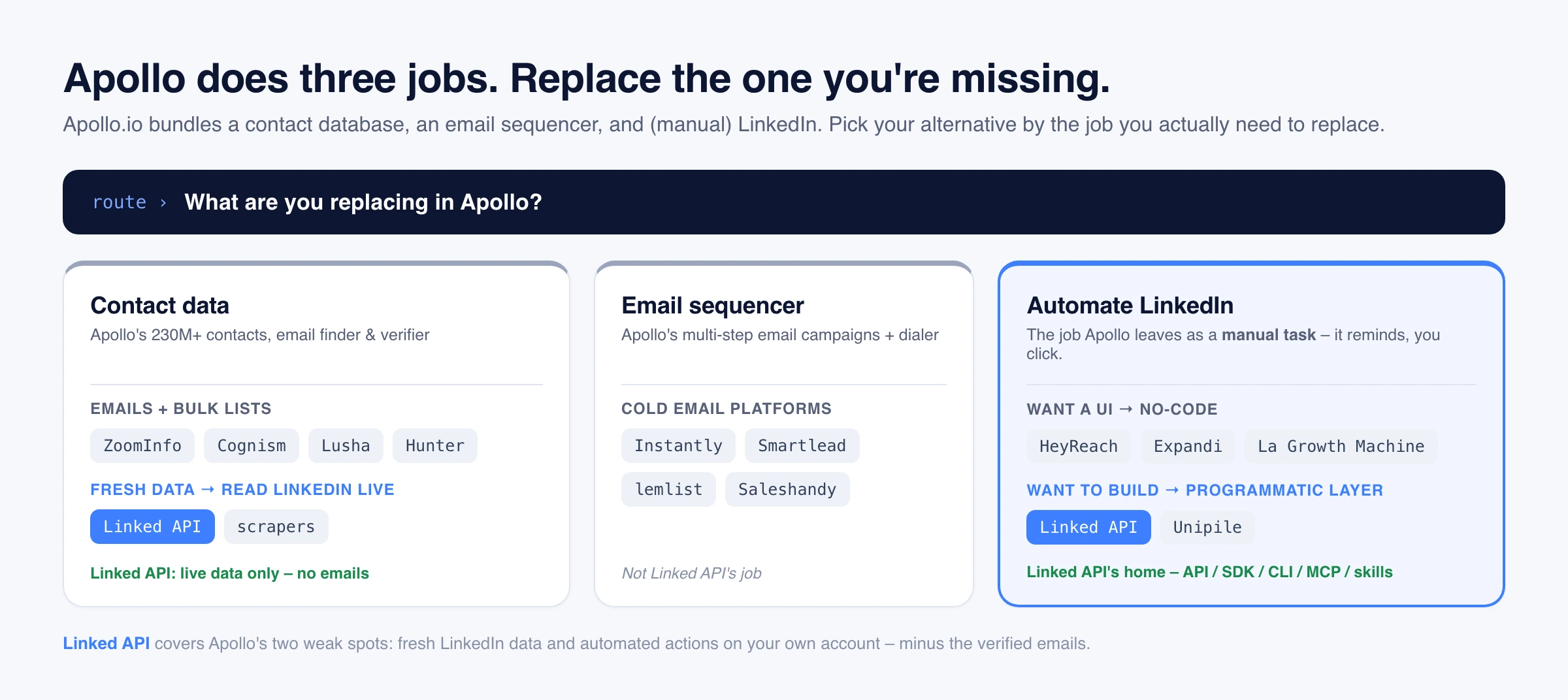
Search "Apollo.io alternatives" and most lists start with another contact database, email finder, or no-code UI. But Apollo is not one product – it bundles three separable jobs: a B2B contact database and email finder, an email sequencer, and LinkedIn outreach (which Apollo leaves as manual tasks). The right replacement depends on which job you are actually missing – and on two of those jobs, the honest answer is not another database at all. This guide sorts the alternatives by the job you are replacing, with dated 2026 pricing, and it is upfront about where Linked API fits and where it does not.
The short version. There is no single Apollo alternative, because Apollo does three jobs. For verified emails and bulk contact lists, use a database or finder (ZoomInfo, Cognism, Lusha, Hunter). For the email sequencer, use Instantly, Smartlead, or lemlist. For the two jobs Apollo does worst – keeping data fresh and automating LinkedIn – an account-based API like Linked API reads LinkedIn live and runs the connect and message steps Apollo leaves manual, on your own account. The one thing it will not do is hand you verified emails – that stays a database's job.
Why "Apollo alternative" is the wrong question
Why teams look for an Apollo alternative
Apollo holds a strong rating on G2 – 4.7 from roughly 9,600 reviews (per G2, July 2026) – and most users stay for the all-in-one breadth. The people shopping for a replacement usually hit one of a few recurring walls:
- Data accuracy, especially outside the US. Users report that bounce rates climb on older records and on non-US, EU, or APAC contacts, where coverage is thinner than in the US.
- Export credits that don't roll over. A heavy prospecting week burns the monthly allotment, and unused credits expire rather than bank – so spiky teams either pause or upgrade.
- Billing and renewal friction. Apollo's Trustpilot rating (2.9 from about 1,000 reviews, per Trustpilot, July 2026) sits far below its G2 score, and those reviews cluster on auto-renewal and account-suspension disputes rather than the core product.
- LinkedIn is manual-only. Apollo's sequences can include LinkedIn steps, but per Apollo's own documentation those steps are manual tasks a rep completes by hand – Apollo does not perform the connection request or message for you.
None of those is fatal on its own. The point is that they are four different problems, and the right replacement depends entirely on which one you have.
The three jobs Apollo actually does
Under one subscription, Apollo is really three tools stitched together:
- A contact database and email finder – its own pages market 230M+ verified contacts (as of 2026), plus an email finder and verifier and a Chrome extension. This job has two halves worth separating: finding and enriching people, which many tools do, and verified emails and phone numbers, which fewer do and which is Apollo's real moat.
- An email sequencer – multi-step email campaigns, a dialer, and task management.
- LinkedIn outreach – present only as manual reminders inside a sequence, not automation.
That split inside job 1 matters, because a common reason people leave Apollo is not that they need a different database – it is that the database itself has gone stale.
The Apollo alternatives at a glance
These are each vendor's published entry tier, checked July 2026 and dated per vendor in the sections below; vendors change them often, so treat these ranges as directional, not quotes.
| What you're replacing | Camp | Representative tools | Entry price (2026) |
|---|---|---|---|
| Emails + bulk contact data | Enterprise database | ZoomInfo, Cognism | Quote-only |
| Emails + bulk contact data | Self-serve finder | Lusha, Hunter, RocketReach, UpLead, Seamless.ai, LeadIQ, Snov.io | ~$34–$200/mo |
| Signals / enrichment | Enrichment | Clay, RB2B | ~$79–$185/mo |
| Leads inside LinkedIn | LinkedIn-native source | LinkedIn Sales Navigator | ~$90–$120/mo |
| Email outreach | Email sequencer | Instantly, Smartlead, lemlist, Saleshandy | ~$25–$69/mo |
| LinkedIn outreach (no-code) | No-code automation | HeyReach, Expandi, La Growth Machine, Dripify, Waalaxy | ~$59–$99/seat |
| Live LinkedIn data + outreach | API / SDK / CLI / MCP / skills | Linked API, Unipile, PhantomBuster | from ~$49/mo |
Replacing Apollo's contact data
Apollo's biggest job splits into two halves, and the right replacement is different for each: getting verified emails and bulk lists, and keeping data fresh. Sort your gap into one of them before you pick a tool.
For verified emails and bulk lists
This is the half Linked API does not do – we are not an email finder and cannot hand you personal emails or phone numbers. If that is your gap, pick from these.
Enterprise databases (deepest data, quote-only pricing):
- ZoomInfo – best for enterprise-grade B2B data depth plus intent signals, if you have the budget. Pricing is quote-only and annual, with no public price; entry deals are commonly estimated in the low five figures a year (per third-party estimates, July 2026).
- Cognism – best for GDPR- and CCPA-compliant, phone-verified mobile numbers for EU and UK outbound. Also quote-only, with no public pricing (per Cognism's site, July 2026).
Self-serve contact and email finders (the mid-market that dominates this search):
- Lusha – best for fast, self-serve contact and phone lookups via a Chrome extension for SMBs. Starter lists around $49.90 per user per month, with Pro higher and discounted annual pricing (per Lusha's pricing, July 2026).
- Hunter.io – best for simple, cheap, domain-based email finding and verification. Starter around $34 per user per month on annual billing (per Hunter's pricing, July 2026).
- RocketReach – best for broad email and mobile-phone lookups across a very large index. Essentials around $27–$33 per user per month annually, with phone numbers on the pricier Pro tier (per RocketReach's pricing, July 2026).
- UpLead – best for verified contacts with an accuracy guarantee and pay-as-you-go credits. Essentials around $74 per month on annual billing (per UpLead's pricing, July 2026).
- Seamless.ai – best for real-time email and phone lookups at volume, though watch the credit burn. Its pricing is now a free plan plus quote-based Pro and Enterprise tiers rather than a public entry price (per Seamless.ai's pricing, July 2026).
- LeadIQ – best for one-click prospect capture straight into your CRM from a Chrome extension. The cheap legacy tier is discontinued; paid entry now starts around $200 per month (per LeadIQ's pricing, July 2026).
- Snov.io – best for a budget all-in-one that combines an email finder, verifier, and drip campaigns. Starter around $39 per month, with LinkedIn automation sold as a separate add-on (per Snov.io's pricing, July 2026).
Enrichment and signals (a layer on top of a database, not a database you search):
- Clay – best for waterfall enrichment across 100+ data providers in one spreadsheet-style table. Its Launch tier runs around $185 per month after a March 2026 repricing (per Clay's pricing, July 2026).
- RB2B – best for person-level identification of your US website visitors, pushed to Slack. Its free tier became company-level only in early 2026; paid starts around $79 per month (per RB2B's pricing, July 2026).
And the LinkedIn-native option: LinkedIn Sales Navigator (Core around $100 per month, per LinkedIn's pricing, July 2026) is LinkedIn's own official product for finding and filtering leads inside LinkedIn. It is a lead source, not an Apollo-style all-in-one – it reveals no emails and runs no outreach. If Sales Navigator is where you actually prospect, see our Sales Navigator API guide for how to work with that data through an API.
For fresh data: read LinkedIn live instead of a decaying database
Here is the half most "alternative" lists miss. If your complaint is not that you need more contacts but that the ones you have are wrong – job changes Apollo missed, bounced emails, a title from two roles ago – the fix is not another pre-built database. It is reading the source live.
This is where an account-based API is a real alternative. Instead of querying a database that was scraped months ago, Linked API reads LinkedIn through your own authenticated account at the moment you ask: real-time people and company search by the same filters an Apollo search uses (title, industry, company, location, school), and live profile enrichment of anyone you already have a URL for. The data is fresh to LinkedIn at read time – there is no months-old snapshot in between.
import LinkedApi from '@linkedapi/node';

const linkedapi = new LinkedApi({
  linkedApiToken: process.env.LINKED_API_TOKEN,
  identificationToken: process.env.IDENTIFICATION_TOKEN,
});

// Discover people live, filtered like an Apollo search - but read from LinkedIn now
const search = await linkedapi.searchPeople.execute({
  term: 'head of growth',
  filter: { position: 'Head of Growth', locations: ['United States'], industries: ['Software Development'] },
  limit: 25,
});
const { data: people } = await linkedapi.searchPeople.result(search.workflowId);

// Enrich one live - current title, company, and experience, straight off the profile
const profile = await linkedapi.fetchPerson.execute({
  personUrl: people[0].publicUrl,
  retrieveExperience: true,
});
const { data } = await linkedapi.fetchPerson.result(profile.workflowId);
console.log(data?.name, data?.position, data?.companyName);
Two honest limits keep this from being a full database replacement. First, no emails or phone numbers – LinkedIn profiles do not expose personal contact details, so Linked API returns profile, company, and activity data but not an email (source those from a consented enrichment provider). Second, it is paced like a human on your own account, not a bulk firehose – it is the tool for keeping a working list current and for on-demand enrichment, not for pulling 50,000 net-new leads overnight. We cover the model in depth in the LinkedIn scraper API guide and the field-by-field detail in the LinkedIn profile scraper guide.
Replacing Apollo's email sequencer
If what you liked in Apollo was the multi-step email campaigns and you want better deliverability or lower cost, this camp is your target:
- Instantly – best for high-volume cold email with unlimited inboxes and built-in warmup. Growth around $37.60 per month on annual billing ($47 monthly), per Instantly's pricing, July 2026.
- Smartlead – best for deliverability-first cold email at scale, with an API and whitelabel. Basic around $39 per month, per Smartlead's pricing, July 2026.
- lemlist – best for personalization-heavy, multichannel sequences (email plus manual LinkedIn steps) with a built-in lead database. Its Email plan runs about $55 per user per month billed annually ($69 monthly), per lemlist's pricing, July 2026.
- Saleshandy – best for budget cold email at volume, with unlimited email accounts on paid tiers. Starter around $25 per month, per Saleshandy's pricing, July 2026.
Note that lemlist, like Apollo, treats LinkedIn steps as manual actions inside a sequence. That is fine if a human is doing the clicking – but it is not automation, which brings us to the job none of the tools above actually does.
The job Apollo can't do: automating LinkedIn
We just saw Linked API read LinkedIn data live. The other half of what Apollo can't do is act on LinkedIn. Apollo can remind you to send a connection request or message, but it will not send it. Per Apollo's own documentation, LinkedIn tasks in a sequence must be completed manually – a rep opens LinkedIn and clicks. (Apollo's relationship with LinkedIn has been strained: as reported by MarTech, in March 2025 LinkedIn removed Apollo's and Seamless.ai's brand pages over Chrome-extension scraping, and Apollo then scrubbed LinkedIn-prospecting language from its site.)
So if your bottleneck is that a rep with 500 leads has to hand-click every LinkedIn touch, no database and no email sequencer fixes it. You need a tool built for LinkedIn actions. There are two honest paths.
Path 1: no-code LinkedIn tools (if you want a UI)
If you want to point and click, a dedicated no-code LinkedIn automation tool is the better answer – we will say that plainly:
- HeyReach – best for agencies running many LinkedIn seats under one roof, with a unified inbox and whitelabel. Around $79 per sender per month, or about $63 on annual billing, with flat agency tiers above that (per HeyReach's pricing). Compared against the field in HeyReach alternatives.
- Expandi – best for safe cloud automation for an individual SDR or small team, with a dedicated IP. Business around $99 per month per seat (per Expandi's pricing, July 2026).
- La Growth Machine – best for multichannel sequences (LinkedIn plus email plus calls) billed per identity. Basic around €60 per month (per La Growth Machine's pricing, July 2026).
We also maintain honest, dedicated comparisons for the tools you have probably heard of: Dripify, Waalaxy, Phantombuster, and Evaboot.
Path 2: a programmatic LinkedIn layer (if you want to build)
If you would rather wire LinkedIn actions into your own product, CRM, or workflow – no UI, just an interface your code calls – you want a programmatic layer:
- Linked API – best for developers and ops teams who want both live LinkedIn data and LinkedIn actions on their own authenticated account, through a documented REST API, official SDKs (Node and Python), a CLI, an MCP server, and packaged agent skills. Core is $49 per month billed annually (per Linked API's pricing, July 2026).
- Unipile – best for embedding LinkedIn plus email and WhatsApp messaging into your app via a hosted API, priced per connected account with a €49 per month minimum covering up to 10 accounts (per Unipile's pricing, July 2026). Deep head-to-head: Linked API vs Unipile.
- PhantomBuster – best for semi-programmatic work: prebuilt "Phantoms" plus an account API on every plan, from €69 per month, €56 billed annually (per PhantomBuster's pricing, July 2026). It drives LinkedIn through browser automation, so mind LinkedIn's terms (below). Deep head-to-head: Linked API vs PhantomBuster.
The actions Apollo turns into manual reminders – send a connection request, send a message, react and comment, check connection status, and manage existing connections – become calls you make from your own stack:
// The LinkedIn touch Apollo leaves as a manual task - sent from your own account
const connect = await linkedapi.sendConnectionRequest.execute({
  personUrl: 'https://www.linkedin.com/in/jane-doe',
  note: 'Hi Jane - really enjoyed your post on RevOps tooling. Mind if I connect?',
});
await linkedapi.sendConnectionRequest.result(connect.workflowId);

// Once she accepts, follow up - no rep clicking required
const message = await linkedapi.sendMessage.execute({
  personUrl: 'https://www.linkedin.com/in/jane-doe',
  text: 'Thanks for connecting, Jane! Quick question about your outbound stack...',
});
await linkedapi.sendMessage.result(message.workflowId);
Linked API runs on your own authenticated LinkedIn account through a human-paced cloud browser, within built-in workflow limits. Read our safety model before you scale. The honest framing: this is your account, paced like a person, doing the LinkedIn work Apollo left on your to-do list.
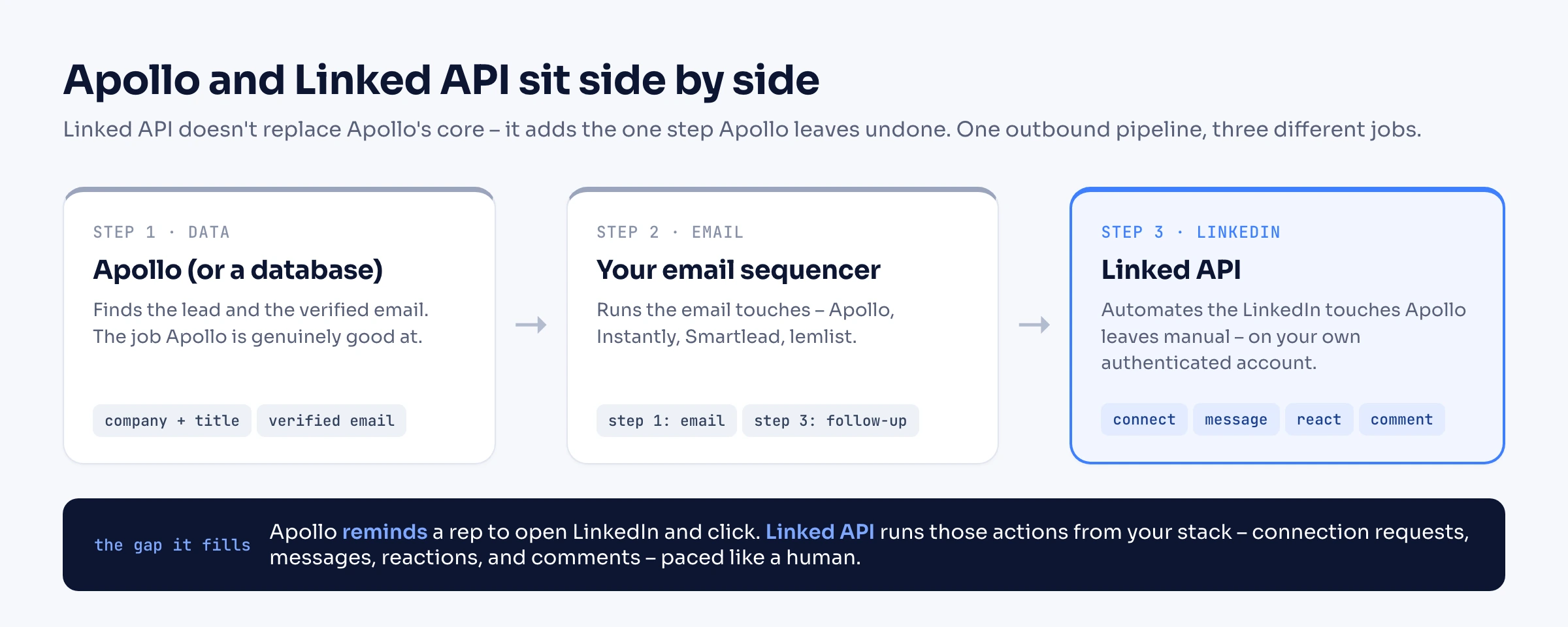
Notice what the diagram shows: Linked API sits next to Apollo, not on top of it. Apollo (or any database) still supplies the verified email; Linked API keeps the LinkedIn data current and runs the LinkedIn touches. That is the honest relationship – it replaces the parts of Apollo that go stale or stay manual, not the email database at its core.
When Apollo – or a database or no-code tool – is still the right call
Switching for its own sake is a waste. Stay where you are if:
- You need verified emails. Apollo's real moat is a large database of verified emails and phone numbers, and Linked API does not provide those. If email is your channel, keep a database – Apollo, or one of the finders above.
- You need bulk net-new volume. Reading LinkedIn live is paced like a human; it is not the way to pull tens of thousands of net-new leads at once. That is a database job.
- You mostly run email, on a budget. Apollo's all-in-one bundle of data, emails, and a sequencer is good value for pure email prospecting, especially in the US.
- You are not technical and want a UI. A programmatic layer is the wrong tool if nobody on the team writes code. A no-code LinkedIn tool (HeyReach, Expandi) or Apollo's own manual tasks will serve you better than an API you have to integrate.
Linked API earns its place on Apollo's two weak spots: keeping LinkedIn data fresh, and automating the LinkedIn outreach Apollo leaves by hand. For the verified-email database at Apollo's core, pair it with a data provider rather than replace one with the other.
Frequently Asked Questions (FAQ)
There is no single best one, because Apollo does three separate jobs. For verified emails and bulk contact data, look at ZoomInfo or Cognism (enterprise) or Lusha, Hunter, and RocketReach (self-serve). For its email sequencer, look at Instantly, Smartlead, or lemlist. For fresh LinkedIn data and the LinkedIn automation Apollo can't do, look at an account-based API like Linked API, or a no-code tool like HeyReach or Expandi. Pick by the job you are actually replacing.
Partly, and it depends on which half of the database you mean. For keeping data fresh – real-time people and company search and live profile enrichment – yes: Linked API reads LinkedIn at request time, so there is no months-old database snapshot to bounce on. But it does not give you verified emails or phone numbers, and it is paced like a human on your own account rather than a bulk list-builder. For emails and large net-new lists, use a database or finder.
No. LinkedIn profiles do not expose personal emails or phone numbers, so Linked API returns profile, company, and activity data but not contact emails. Source those from a consented B2B enrichment provider, and use Linked API for live LinkedIn data and LinkedIn actions.
No. Apollo can add LinkedIn steps to a sequence, but per its own documentation those are manual tasks – it reminds a rep to open LinkedIn and act, and does not send the connection request or message itself. For automated LinkedIn connect and message actions you need a dedicated LinkedIn tool or an API like Linked API.
Several tools have free tiers, but most serious use is paid. Apollo itself has a free plan; Hunter, RocketReach, and Snov.io offer limited free credits; RB2B has a free (now company-level) tier; and many LinkedIn tools offer trials. Free tiers are good for testing, not for running a real pipeline.
As reported by MarTech, LinkedIn removed the brand pages of Apollo.io and Seamless.ai in March 2025 over the use of Chrome extensions to scrape LinkedIn data. Apollo subsequently removed LinkedIn-prospecting language from its marketing.
Linked API's approach is to run on your own authenticated account through a human-paced cloud browser with built-in workflow limits, rather than a scraped central database. Read our safety model for how that works before you scale.
As of July 2026, per Apollo's pricing, its paid plans start around $49 (Basic) and $79 (Professional) per user per month billed annually. Databases range from quote-only (ZoomInfo, Cognism) to around $185 per month (Clay); email sequencers run about $25–$69 per month; no-code LinkedIn tools are roughly $59–$99 per seat; and Linked API's Core plan is $49 per month billed annually. Each figure is dated per vendor in the sections above.
Apollo's data goes stale and its LinkedIn steps are manual. Linked API reads LinkedIn live and automates the actions Apollo leaves by hand – on your own account, through the API, SDKs, CLI, MCP, and skills. It will not hand you verified emails, so pair it with a database for that – and let it keep the LinkedIn side current and hands-free.