
Talent Mapping in Recruitment: Build a LinkedIn Market Map
A market map tells you where the people you want work before a vacancy forces the question. Most guides describe one. This one builds one from LinkedIn, and is plain about what that data can and cannot tell you.
The short version. Talent mapping in recruitment charts the external market for a role: which companies employ the kind of people you want, where they are based, and who they are – before you need them. Market mapping is the company-level picture; talent mapping adds the named people. An AI agent can draft one from LinkedIn in your own account. It finds the target companies, lists the people in matching roles at each, reads a few representative profiles, and records what it could not confirm. The result is an observed map – what LinkedIn returns to your account, capped and dated – not a headcount. It leaves out salary data, contact details and anything about protected characteristics.
What talent mapping means in recruitment
The term covers three different things, and only two of them are about hiring from outside:
| Term | What it produces | Covered here |
|---|---|---|
| Talent mapping (external) | Named people in a defined market, profiled against a role | Yes |
| Market mapping | A picture of the market itself – companies, team structures, where talent is concentrated | Yes |
| Internal talent mapping | Your current staff against future needs – succession plans, the 9-box grid | No – that is a workforce-planning exercise |
Recruiter-training company SocialTalent draws the line well: "Market mapping is the systematic analysis of the talent landscape in a given market … Where talent mapping produces a list of named individuals, market mapping produces a picture of the market itself" (SocialTalent). In agency work the two overlap, and most maps carry both.
Why recruiters build them:
- To win the mandate. TalentMaps' agency guide puts it bluntly: "command of the market is often what wins a retained or exclusive assignment over a contingent scrap."
- To sell intelligence. QX Global and Recruiterflow both describe market maps used for business development and client acquisition, not only for live searches.
- To show coverage. Leonar's executive-search workflow ends with presenting the map to the client as evidence of where the search looked.
The pressure behind it is real: in LinkedIn's January 2026 research, two-thirds of recruiters said qualified talent had become harder to find, and 93% planned to increase their use of AI in 2026.
What goes in a market map
A layout you can copy. Each row is one company, or one person at a company:
| Group | Columns |
|---|---|
| Company | Company · HQ · Company size (LinkedIn's company-wide figure) · Fit tier (A, B, C) |
| People | Name · Current title · Location · Profile URL · Time in role · Previous company |
| Judgment | In scope (yes, borderline, no) · Notes |
| Provenance | Search used · Cap · Date retrieved · Coverage status · Next research step |
Two notes. Salary bands and "availability" are common extra columns, but LinkedIn data does not supply them – fill them from your own sources or leave them out. And the provenance columns are what make a map trustworthy: Leonar's coverage table records evidence with a date and marks verified versus unknown, and HeroHunt advises storing the exact search criteria and the date each search ran. A map without provenance cannot be refreshed or defended.
Observed, not a headcount
Even LinkedIn's own paid tool is careful here: Talent Insights reports the "Number of LinkedIn members in the target talent pool" (LinkedIn Help). A count drawn from LinkedIn is members who list that company and title, not the company's real team.
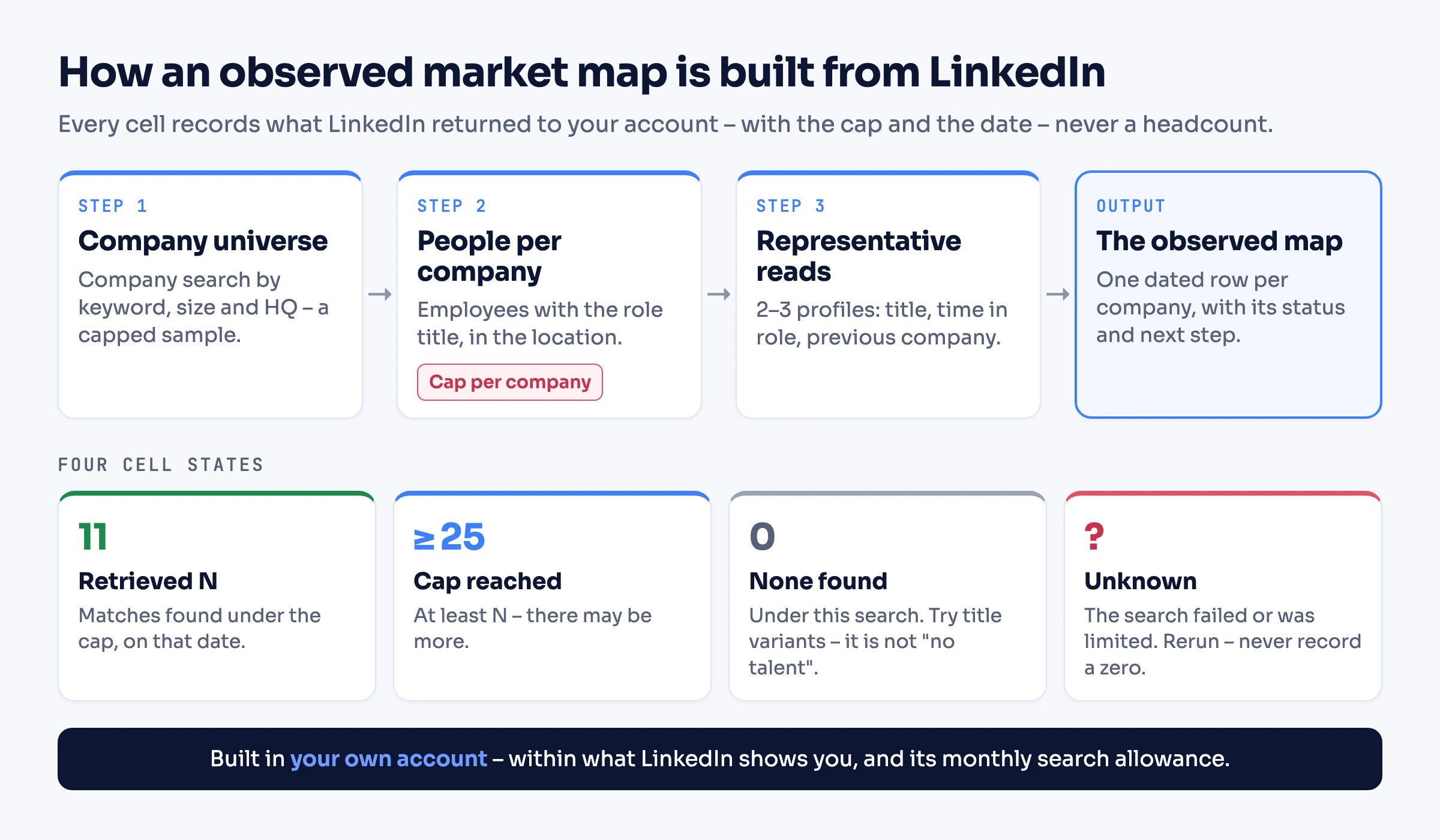
So the map below records what was observed, under rules that keep it honest:
- Retrieved matches, with the cap and the date. "11 Data Engineer matches in London, cap 25, retrieved 16 October" – not "11 data engineers work there."
- A cell that hits the cap reads "at least N". There may be more.
- A search that failed is "unknown", never zero. It goes back on the list.
- Zero found is "none found under this search". It is not "no talent here" – people use other titles.
- Company size stays separate. The company page's figure covers the whole company and is labelled that way.
- Every cell is dated. People move; refresh before you reuse a map.
The LinkedIn-native routes
Before building anything, know what LinkedIn gives you directly:
- The People tab on a company page (free). LinkedIn Help describes it as offering "employee insights on their job title, areas of study, skills, and how you're connected with them" (LinkedIn Help). It is the fastest way to look at one company. Viewing member profiles there counts toward LinkedIn's commercial use limit.
- Standard people search with current-company and location filters – the same allowance applies. It resets at midnight PST on the 1st of each month, and LinkedIn publishes no number. More in our breakdown of search query limits.
- LinkedIn Talent Insights. LinkedIn's paid talent-intelligence product, separate from Recruiter, with aggregate pools by title, location, company and skill; pricing is through LinkedIn's sales team. It is the right tool when you need market-wide totals and trends rather than named people.
The method below sits between the two: named people and companies, built from what your own account can see, with every gap recorded.
The worked example: a market map for one brief
Everything below is illustrative: the companies (A to F), the people and the numbers are invented to show the method, not taken from a live run.
The client goal: an agency is preparing a pitch for a client hiring Senior Data Engineers in London fintech.
What this map actually covers – say it on the map itself: London-based people with "Data Engineer" title matches, at fintech companies headquartered in London with 201–1,000 employees, drawn from a capped sample of the first 30 companies the search returns.
- Seniority is unverified except for the representative profiles read, so the map gives no "senior" count.
- London teams of companies headquartered elsewhere are outside this sample. That is a named coverage gap with its own next step.
The steps:
- The company universe. A company search for the keyword
fintech, sizes 201–500 and 501–1,000, headquartered in London, limit 30. - People per company. For each company, employees with the position "Data Engineer" located in London, capped at 25.
- Representative reads. The experience of up to three people per company: their title and time in role at that company, and their previous employer. People can hold more than one current role, so only the role at the mapped company counts.
The map (illustrative, retrieved 16 October 2026):
| Company | Company size (whole company, LinkedIn) | Data Engineer matches in London (cap 25) | Representative people | Status | Next step |
|---|---|---|---|---|---|
| Company A | 640 | 11 | Person 1: Senior Data Engineer, 2 years in role, previously at a bank · Person 2: Data Engineer, 8 months, previously an analytics engineer | Observed | Read two more profiles for seniority |
| Company B | 920 | At least 25 | Person 3: Lead Data Engineer, 3 years in role | Cap reached | Rerun with a higher cap or split by title |
| Company C | 310 | 6 | Person 4: Data Engineer, 1 year, previously at a consultancy | Observed | – |
| Company D | 450 | 0 | – | None found under this search | Try title variants: Analytics Engineer, Data Platform Engineer |
| Company E | 280 | – | – | Unknown – the search failed | Rerun next month |
| Company F | 870 | 4 | Person 5: Senior Data Engineer, 4 years in role | Observed | – |
Not in this sample: London teams of fintechs headquartered outside London. Next step: a second company search, or a people search by current company and location.
What the map tells the client: where observed Data Engineer title matches cluster within the sample (A and B); which companies need a second pass with title variants (D) or a higher cap (B); and what is still unknown – seniority beyond the profiles read, company E, and the London teams of firms based elsewhere. No headcounts, and no senior count.
Run it with an AI agent
The same map can be built from a plain-language instruction. Connect an assistant to your LinkedIn account through a ready-made skill in Claude Code, Codex or Cursor, the MCP server in Claude or ChatGPT, or the agent-friendly CLI – setup is covered in giving an AI agent access to LinkedIn. It then uses tools such as search_companies, fetch_company and fetch_person.
A runnable instruction – a starting point, not an observed run:
Build a market map for Data Engineers in London fintech.

1) Search companies: keyword "fintech", sizes 201-500 and 501-1000, headquartered
   in London. Take the first 30 results – this is a capped sample, say so.
2) For each company, list employees with position "Data Engineer" located in
   London, up to 25. Record the number retrieved, the cap and today's date.
   If you hit 25, write "at least 25". If the search fails or LinkedIn limits it,
   write "unknown" – never 0. If it returns nothing, write "none found".
3) For up to 3 people per company, read their experience: their title and time in
   role at THIS company (ignore other current jobs), and their last employer before
   it. Note seniority only where that title shows it.

Never report a headcount or a count of senior people. Show the company-wide size
separately and label it. Do not infer gender, ethnicity, age or any other
protected trait. Note that London teams of companies headquartered elsewhere are
not covered.

Stop and show me the map as a table before doing anything else.
Or build it in code
The same contract in code. Every row carries its cap, date and status, and a failed retrieval stays a failure instead of becoming an empty list.
import LinkedApi from '@linkedapi/node';
import { writeFileSync } from 'node:fs';

const linkedapi = new LinkedApi({
  linkedApiToken: 'your-linked-api-token',
  identificationToken: 'your-identification-token',
});

const COMPANY_SAMPLE = 30;
const PEOPLE_CAP = 25;
const REPRESENTATIVES = 3;
const ROLE = 'Data Engineer';
const LOCATION = 'London';

type TCellStatus = 'observed' | 'capReached' | 'noneFound' | 'failed';

interface TRepresentative {
  name: string;
  profileUrl: string;
  currentTitle?: string;
  monthsInRole?: number;
  previousCompany?: string;
}

interface TMapRow {
  company: string;
  companyUrl: string;
  companySizeWholeCompany?: number;
  retrieved?: number;
  cap: number;
  status: TCellStatus;
  error?: string;
  representatives: TRepresentative[];
  retrievedAt: string;
}

async function findCompanies() {
  const workflow = await linkedapi.searchCompanies.execute({
    term: 'fintech',
    filter: { sizes: ['201-500', '501-1000'], locations: [LOCATION] },
    limit: COMPANY_SAMPLE,
  });
  const { data, errors } = await linkedapi.searchCompanies.result(workflow.workflowId);
  if (errors.length > 0) throw new Error(`Company search stopped: ${errors[0]?.type}`);
  return data ?? [];
}

function isSameCompany(a: string, b: string) {
  return a.trim().toLowerCase() === b.trim().toLowerCase();
}

// People can hold several current roles, so evidence comes only from the mapped company.
async function readRepresentative(name: string, profileUrl: string, companyName: string): Promise<TRepresentative> {
  const run = await linkedapi.fetchPerson.execute({ personUrl: profileUrl, retrieveExperience: true });
  const { data: person } = await linkedapi.fetchPerson.result(run.workflowId);
  const roles = person?.experiences ?? [];
  const current = roles.find((role) => role.endTime === null && isSameCompany(role.companyName, companyName));
  const previous = roles.find((role) => role.endTime !== null && !isSameCompany(role.companyName, companyName));
  return {
    name,
    profileUrl,
    currentTitle: current?.position,
    monthsInRole: current?.duration,
    previousCompany: previous?.companyName,
  };
}

async function mapCompany(companyUrl: string, companyName: string): Promise<TMapRow> {
  const retrievedAt = new Date().toISOString().slice(0, 10);
  const run = await linkedapi.fetchCompany.execute({
    companyUrl,
    retrieveEmployees: true,
    employeesRetrievalConfig: { limit: PEOPLE_CAP, filter: { position: ROLE, locations: [LOCATION] } },
  });
  const { data: company, errors } = await linkedapi.fetchCompany.result(run.workflowId);
  const base = { company: companyName, companyUrl, cap: PEOPLE_CAP, representatives: [], retrievedAt };
  // A failed or limited retrieval is unknown, never zero.
  if (errors.length > 0 || !company?.employees) {
    return { ...base, companySizeWholeCompany: company?.employeesCount, status: 'failed', error: errors[0]?.type ?? 'no employee data' };
  }
  const people = [...new Map(company.employees.map((person) => [person.publicUrl, person])).values()];
  const status: TCellStatus = people.length === 0 ? 'noneFound' : people.length >= PEOPLE_CAP ? 'capReached' : 'observed';
  const representatives = [];
  for (const person of people.slice(0, REPRESENTATIVES)) {
    representatives.push(await readRepresentative(person.name, person.publicUrl, companyName));
  }
  return { ...base, companySizeWholeCompany: company.employeesCount, retrieved: people.length, status, representatives };
}

async function buildMap(path: string) {
  const rows: TMapRow[] = [];
  for (const company of await findCompanies()) {
    rows.push(await mapCompany(company.publicUrl, company.name));
  }
  writeFileSync(path, JSON.stringify({ scope: `${ROLE} title matches in ${LOCATION}, sample of ${COMPANY_SAMPLE} companies`, rows }, null, 2));
}Run buildMap (or build_map) and open the file: one row per company, each with its status, cap and date. Calls are asynchronous – execute starts the work and result waits for it – and action failures come back in errors, not as exceptions. That is how a failed retrieval reaches the map as failed instead of a misleading zero.
References: searching for companies, retrieving company data, what a company read returns in our company data guide, and the Node and Python SDKs.
Budget the search allowance
A map spends LinkedIn's monthly search allowance faster than any single search, so cap it at three levels:
- Companies. TalentMaps suggests 30 to 60 target companies for a map; start at the low end.
- People per company. A cap of 25 tells you where talent clusters; raise it only for the companies that hit it.
- Profile reads. Two or three representatives per company are enough to judge what the titles mean.
Linked API also enforces its own per-action limits, which you can set (limits API). If the allowance runs out mid-map, the unfinished companies are marked unknown and can resume next month – or sooner with Premium Business, Recruiter Lite or Sales Navigator, which LinkedIn says raise it.
What the map leaves out: fairness and data minimisation
- No inferred protected characteristics. Do not ask an agent to guess gender, ethnicity, age or any other protected trait from names or photos, and do not build "diversity maps" that way. In its 2024 audit of AI recruitment tools, the UK ICO found tools inferring characteristics such as ethnicity from names, and said information "intentionally inferred in this way is still special category data" (ICO audit report).
- Only the fields you need. A map needs titles, companies, locations and tenure – not everything a profile shows. The same ICO report recommends giving people privacy information within a month when their data comes from job networking sites; check which obligations apply to you.
- LinkedIn's position, stated plainly. LinkedIn's User Agreement does not permit third-party automation, and any automation carries account risk – details in LinkedIn account restricted. What keeps the risk in check is how this runs: your own account, a dedicated cloud browser, a human pace and limits you configure.
From map to outreach
A map is research. When a vacancy opens, you qualify people from it against that specific role and contact the strongest – that workflow, with an evidence-backed shortlist and a reviewed first message, is in AI candidate sourcing on LinkedIn. The sales world has its own version of mapping: charting one target account's buyers, covered in our guide to the B2B buying committee.
What this does not do
- It does not give headcounts – only matches observed under a cap, with a date.
- It does not provide salaries, contact details or internal performance data.
- It is not internal succession planning or a 9-box review.
- It works only with what your connected account can see on LinkedIn.
- It does not replace Talent Insights when market-wide aggregates are what you need.
Frequently Asked Questions (FAQ)
It is charting the external market for a role before you hire: which companies employ the people you want, where they are, and who they are. Recruiters use maps to plan searches, win mandates and advise clients.
Market mapping describes the market – companies, team structures and where talent is concentrated. Talent mapping adds the named people. In agency work the two are usually combined in one map.
Company names, sizes and locations; people's titles, locations, time in role and previous employers; and provenance – which search found them and when. Salary bands and availability usually come from other sources.
No. The 9-box grid rates current employees on performance and potential for succession planning. External talent mapping looks at people outside your company.
Use the People tab on each target company's page and standard people search with company and location filters. Both count toward LinkedIn's monthly commercial use limit, so keep the company list short and record what you could not check.
They count members who list the company on their profile, not the company's actual staff, so treat them as an observed sample. Even LinkedIn's Talent Insights labels its figure as the number of LinkedIn members in a talent pool.
An AI agent can draft one: run the company and people searches, read representative profiles and record the gaps. A recruiter still sets the scope, checks the map and decides what it means for the client.
Not data inferred from names or photos. The UK ICO's audit of AI recruitment tools said ethnicity inferred that way is still special category data. Keep the map to job-related information.
Build it in, or hand it to an agent
Use it both ways. Build the mapping workflow into your own tools with the REST API, the Node and Python SDKs or the CLI. Or have an AI agent run it out of the box through the MCP server, the agent-friendly CLI or a ready-made skill. Plans start at $49 a seat a month billed annually – see pricing.
Facts verified October 16, 2026 – LinkedIn page, search and Talent Insights details checked against LinkedIn Help; the ICO audit quotes against the ICO's published report; competitor coverage checked against their live pages on that date.