
AI Candidate Sourcing on LinkedIn Without a Recruiter Seat
Sourcing is the slowest part of filling a role, and most advice on AI sourcing assumes one of two things: a LinkedIn Recruiter seat, or a separate candidate database. This guide covers the setup most small teams actually have – a standard LinkedIn account – and walks one vacancy from search to a reviewed first message.
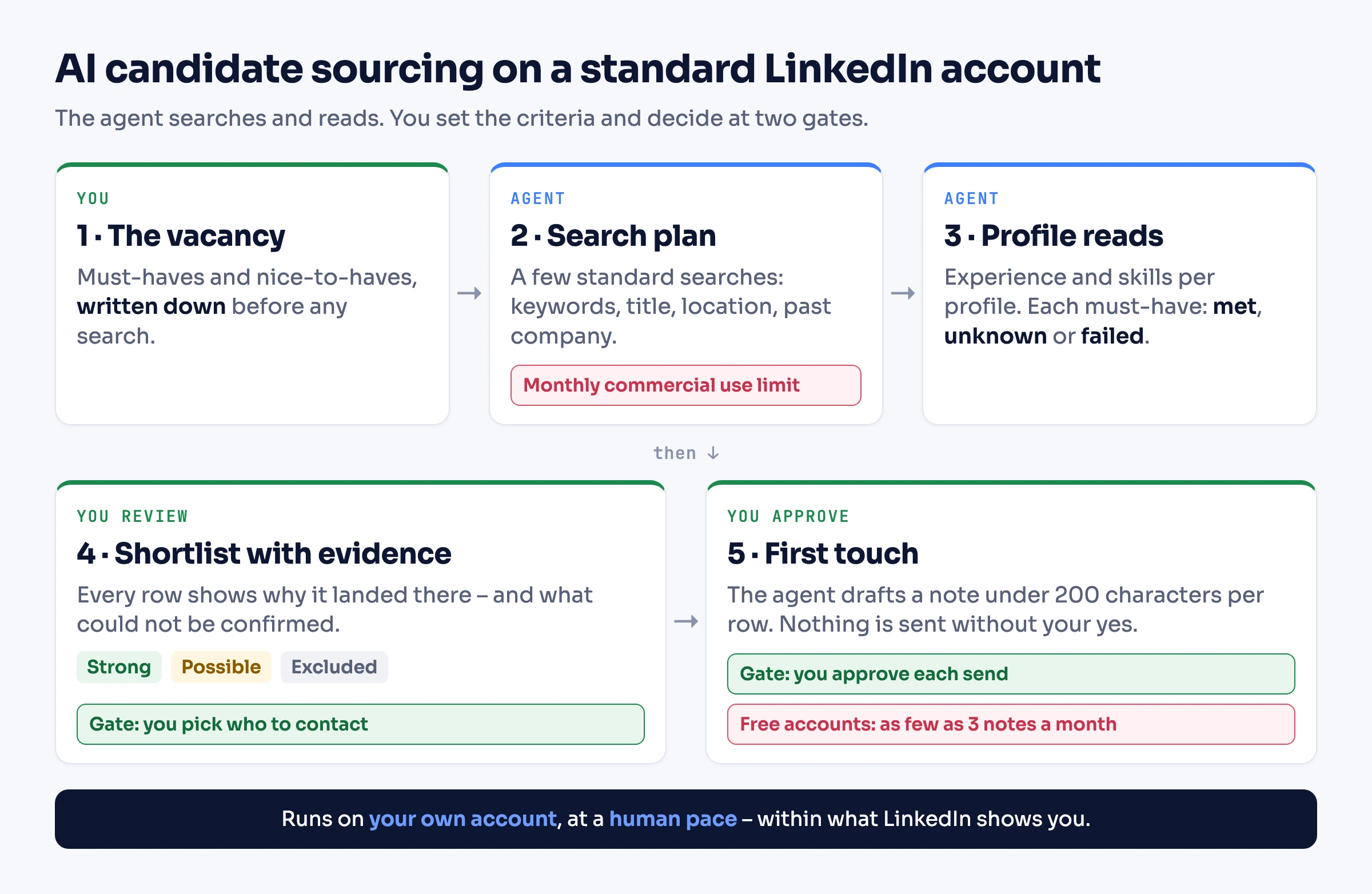
The short version. AI candidate sourcing means an agent does the searching and the reading. It turns a vacancy into a handful of searches, reads each profile against the role's must-haves, and hands you a shortlist with the evidence behind every name. Without a Recruiter seat it runs on LinkedIn's standard people search in your own account. You get filters for title, location, current and past company, school and industry – limited to what your account can see and to LinkedIn's monthly search allowance. You review the shortlist and every first message before anything is sent. What you do not get: Recruiter's extra filters and InMail credits, candidate emails or phone numbers, or an ATS.
What AI candidate sourcing is – and what stays human
Sourcing means finding people who have not applied. AI sourcing hands the repetitive part of that to software: running the searches, reading the profiles, and making a first judgment against the role's criteria. The criteria and the decisions stay with you.
| Delegate to the agent | Keep with you |
|---|---|
| Turning the role into a few precise searches | The must-haves and nice-to-haves themselves |
| Reading every profile the searches return | Who makes the shortlist |
| Scoring each person against the criteria, with the evidence | Whether to contact someone, and what the message says |
| Flagging gaps and unknowns instead of guessing | Everything after the reply – screening, interviews, the offer |
| A first draft of the connection note |
It is worth doing well because sourced candidates convert. Gem's 2026 Recruiting Benchmarks report that sourced candidates are "nearly eight times more likely to be hired than inbound applicants", with direct sourcing delivering 11% of hires from 2.6% of applications. And AI is already part of the job: in LinkedIn's Future of Recruiting 2025 report, 37% of organizations are integrating or experimenting with generative AI in hiring, and those using it save about 20% of their work week.
Can you source on LinkedIn without Recruiter?
Yes, within what standard search shows. Here is what each LinkedIn tier adds for sourcing:
| Standard (free) | Premium Business | Recruiter Lite | Recruiter | |
|---|---|---|---|---|
| People-search filters | Locations, current and past company, school, industry, connection degree, connections of, followers of, profile language, service categories, keywords | Same, plus "Actively hiring" | 20 recruiting filters, including skills and years of experience | 40+ filters, including Open to Work |
| Reach | 1st, 2nd and 3rd+ degree results | Same | Up to 3rd-degree connections | The full LinkedIn network |
| Monthly search allowance | Commercial Use Limit | Raised | Raised | Searches run in Recruiter |
| InMail credits per month | None | 15 | 30 | 150 per seat |
| Notes on connection requests | As few as three a month, 200 characters | Unlimited, 300 characters | – | – |
| Hiring Assistant | No | No | No | Paid add-on |
Sources: LinkedIn Help on people search filters, the commercial use limit, InMail credits, personalized invitations and the Recruiter plan comparison.
Two native options are worth knowing before you build anything:
- LinkedIn's own AI search. LinkedIn now documents natural-language people search ("Finance leaders at nonprofits in Boston") where it is available on your account. It finds people. The workflow below adds what comes after the search: reading each profile, weighing the evidence and drafting a first touch for your review.
- Hiring Assistant. This is LinkedIn's native AI agent for recruiters. It "runs dozens of searches across LinkedIn" and drafts messages, per LinkedIn's product page. It is sold as an add-on to Recruiter, is not available on Recruiter Lite, and has no published price. If you already have Recruiter, start there.
So is standard search plus an agent a "LinkedIn Recruiter alternative"? For the searching and reading, yes. For Recruiter's reach, recruiting filters and InMail volume, no – that is what the seat buys.
Turn the vacancy into a search plan
Not every criterion can be a filter. Split the role into what standard search can narrow and what only a profile read can confirm:
| Criterion | Where it gets checked |
|---|---|
| Job title | Position filter, or keywords |
| Location | Locations filter |
| Employer history | Current company and past company filters |
| Education | School filter |
| Sector | Industry filter |
| A skill or a stack | Keywords to narrow, then the profile to confirm |
| Years of experience, seniority | The profile only – those filters are Recruiter features |
| Open to work | The public #OpenToWork frame only. Members who share it with "Recruiters only" are visible only to Recruiter users |
Then budget the searches. Profile searches count toward LinkedIn's commercial use limit, which kicks in when your activity "indicates that you're likely using LinkedIn for commercial use, like hiring or prospecting". The allowance resets on the 1st of each month, and LinkedIn shows no counter. Premium Business, Recruiter Lite and Sales Navigator raise it. A few sharp searches beat many broad ones – more in our breakdown of search query limits.
For the keyword part, LinkedIn search accepts Boolean AND, OR and NOT – see LinkedIn Boolean search, and X-ray search for the Google route.
The worked example: one vacancy to a reviewed shortlist
Everything below is illustrative: the vacancy, the candidates (A to E) and the results are invented to show the method, not taken from a live run.
The vacancy: a Senior Backend Engineer (Go) for a payments startup, based in Germany or remote within Germany.
- Must-haves: five or more years in backend engineering; Go used in production; located in Germany.
- Nice-to-haves: payments or fintech experience; Kubernetes.
The search plan – two searches, no more:
| Search | Keywords | Filters | Limit |
|---|---|---|---|
| 1 | golang | Position "Backend Engineer", location Germany | 40 |
| 2 | golang | The same, plus past company N26, Trade Republic or SumUp | 40 |
The second search overlaps the first, so results are deduplicated by profile URL before anyone is read twice.
The evidence pass. The agent reads the experience and skills of every distinct profile and applies one rule to each must-have:
- met – the profile shows it (a role, its dates, its description);
- unknown – the profile does not say either way;
- failed – the profile shows the opposite.
Two cases stay unknown on purpose. Go listed under skills alone does not count as production use – it needs a role or a description that mentions it. And fewer than five visible years in backend roles is not a failure, because a profile can leave earlier roles out. Then:
- every must-have met → strong;
- anything unknown, nothing failed → possible, with the unknown named;
- any must-have failed → excluded, with the reason.
Nice-to-haves only order people within a band.
The output – the top of the shortlist (illustrative):
| Candidate | Fit | Must-have evidence | Gaps and unknowns | Nice-to-haves |
|---|---|---|---|---|
| A | Strong | Backend roles since 2019 (about 7 years); "payment APIs in Go" in the current role; Berlin, Germany | – | Payments, Kubernetes |
| B | Strong | Six years in backend roles; "migrated services from Java to Go" in the current role; Munich, Germany | – | Kubernetes |
| C | Possible | Backend roles since 2020 (about 6 years); Hamburg, Germany | Go appears in skills only – production use not shown | Fintech |
| D | Possible | Go named in the current role; Cologne, Germany | Earlier titles say "Software Engineer" with no description – backend tenure unclear | – |
| E | Excluded | Eight years of Go backend work | Located in Amsterdam, Netherlands – fails the location must-have | Payments |
C and D are the point of the method: the agent marks what it could not confirm instead of rounding up. E is excluded with a reason you can check in seconds.
Run it with an AI agent
The same workflow runs from a plain-language instruction. Connect an assistant to your LinkedIn account through a ready-made skill in Claude Code, Codex or Cursor, the MCP server in Claude or ChatGPT, or the agent-friendly CLI. Setup is covered in giving an AI agent access to LinkedIn. The agent then uses tools such as search_people, fetch_person and send_connection_request.
A runnable instruction – treat it as a starting point, not an observed run:
I'm hiring a Senior Backend Engineer (Go) for a payments startup in Germany.
Must-haves: 5+ years in backend engineering; Go used in production; located in Germany.
Nice-to-haves: payments or fintech experience; Kubernetes.

Run exactly two LinkedIn people searches, up to 40 results each:
1) keywords "golang", position "Backend Engineer", location Germany;
2) the same, with past companies N26, Trade Republic or SumUp.
Deduplicate by profile URL, then read each person's experience and skills.

For each must-have record met, unknown or failed, with the evidence (role, dates,
company, quote). Go in the skills list alone is "unknown", not "met".
Fewer visible backend years is "unknown" too – profiles can be incomplete.
All met = strong; any unknown and none failed = possible; any failed = excluded.

If a search fails or LinkedIn limits searching, stop and tell me – don't treat
it as zero results.

Stop and show me a table: name, profile URL, fit, evidence, gaps and unknowns.
For strong and possible rows, draft a connection note under 200 characters that
names one specific thing from their profile and the role. Send nothing until I
approve each row, then report each outcome.
The pause before sending is part of your instruction, not a built-in approval queue – keep it explicit.
Or orchestrate it in code
The same contract in code. The scoring is a plain function over the profile fields, so the reference path needs no LLM; a comment marks where one could replace the text checks.
import LinkedApi from '@linkedapi/node';
import { readFileSync, writeFileSync } from 'node:fs';

const linkedapi = new LinkedApi({
  linkedApiToken: 'your-linked-api-token',
  identificationToken: 'your-identification-token',
});

const NOTE_LIMIT = 200;
const MIN_BACKEND_MONTHS = 60;
const SEARCHES = [
  { term: 'golang', filter: { position: 'Backend Engineer', locations: ['Germany'] }, limit: 40 },
  {
    term: 'golang',
    filter: {
      position: 'Backend Engineer',
      locations: ['Germany'],
      previousCompanies: ['N26', 'Trade Republic', 'SumUp'],
    },
    limit: 40,
  },
];

const BACKEND_ROLE = /\b(backend|back-end|server-side|platform)\b/i;
const ENGINEERING_ROLE = /\b(engineer|developer)\b/i;
const PAYMENTS = /\b(payments?|fintech|banking)\b/i;
const KUBERNETES = /\b(kubernetes|k8s)\b/i;

// Text checks keep the example deterministic; an LLM call could replace them.
function mentionsGo(text: string) {
  return /\bgolang\b/i.test(text) || /\bGo\b(?!-)/.test(text);
}

type TStatus = 'met' | 'unknown' | 'failed';
type TFit = 'strong' | 'possible' | 'excluded' | 'unread';

interface TCheck {
  status: TStatus;
  evidence: string;
}

interface TShortlistRow {
  name: string;
  profileUrl: string;
  fit: TFit;
  checks?: Record<string, TCheck>;
  niceToHaves?: string[];
  draftNote?: string;
  review: { decision: 'pending' | 'approve' | 'drop'; edited: boolean };
  outcome?: string;
}

async function findProfiles() {
  const profiles = new Map<string, string>();
  for (const params of SEARCHES) {
    const workflow = await linkedapi.searchPeople.execute(params);
    const { data, errors } = await linkedapi.searchPeople.result(workflow.workflowId);
    // A failed search is not an empty market – searchingNotAllowed means the monthly allowance is spent.
    if (errors.length > 0) throw new Error(`Search stopped: ${errors[0]?.type}`);
    for (const person of data ?? []) profiles.set(person.publicUrl, person.name);
  }
  return profiles;
}

async function readProfile(personUrl: string) {
  const run = await linkedapi.fetchPerson.execute({ personUrl, retrieveExperience: true, retrieveSkills: true });
  const { data, errors } = await linkedapi.fetchPerson.result(run.workflowId);
  return { person: data, error: errors[0]?.type };
}

type TProfile = NonNullable<Awaited<ReturnType<typeof readProfile>>['person']>;

function checkBackendYears(person: TProfile): TCheck {
  const roles = person.experiences ?? [];
  if (roles.length === 0) return { status: 'unknown', evidence: 'No experience listed' };
  const backendRoles = roles.filter((role) => BACKEND_ROLE.test(role.position) && ENGINEERING_ROLE.test(role.position));
  const backendMonths = backendRoles.reduce((sum, role) => sum + role.duration, 0);
  if (backendMonths >= MIN_BACKEND_MONTHS) {
    const evidence = backendRoles.map((role) => `${role.position} at ${role.companyName} (${role.duration} months)`);
    return { status: 'met', evidence: evidence.join('; ') };
  }
  // A profile can list only part of a career, so a short visible tenure is unknown, never failed.
  const years = Math.round(backendMonths / 12);
  return { status: 'unknown', evidence: `About ${years} years in roles titled backend; earlier tenure not shown` };
}

function checkGoInProduction(person: TProfile): TCheck {
  const role = (person.experiences ?? []).find((r) => mentionsGo(`${r.position} ${r.description ?? ''}`));
  if (role) return { status: 'met', evidence: `Go named in the ${role.position} role at ${role.companyName}` };
  const inSkills = (person.skills ?? []).some((skill) => mentionsGo(skill.name));
  return { status: 'unknown', evidence: inSkills ? 'Go in skills only – production use not shown' : 'Go not mentioned' };
}

function checkLocation(person: TProfile): TCheck {
  if (!person.countryCode) return { status: 'unknown', evidence: 'Country not shown' };
  return person.countryCode === 'DE'
    ? { status: 'met', evidence: person.location }
    : { status: 'failed', evidence: `Located in ${person.location}` };
}

function assess(person: TProfile) {
  const checks = {
    backendYears: checkBackendYears(person),
    goInProduction: checkGoInProduction(person),
    location: checkLocation(person),
  };
  const statuses = Object.values(checks).map((check) => check.status);
  const fit: TFit = statuses.includes('failed') ? 'excluded' : statuses.every((s) => s === 'met') ? 'strong' : 'possible';
  const profileText = [
    ...(person.experiences ?? []).map((role) => `${role.companyName} ${role.description ?? ''}`),
    ...(person.skills ?? []).map((skill) => skill.name),
  ].join(' ');
  const niceToHaves: string[] = [];
  if (PAYMENTS.test(profileText)) niceToHaves.push('payments or fintech');
  if (KUBERNETES.test(profileText)) niceToHaves.push('Kubernetes');
  return { fit, checks, niceToHaves };
}

function draftNote(firstName: string, company: string) {
  const note = `Hi ${firstName}, your backend work at ${company} stood out. We're hiring a senior Go engineer for a payments startup in Germany – open to a short chat?`;
  return note.length <= NOTE_LIMIT
    ? note
    : `Hi ${firstName}, we're hiring a senior Go engineer for a payments startup in Germany – open to a short chat?`;
}

const FIT_ORDER: Record<TFit, number> = { strong: 0, possible: 1, excluded: 2, unread: 3 };

async function writeShortlist(path: string) {
  const rows: TShortlistRow[] = [];
  for (const [profileUrl, name] of await findProfiles()) {
    const review: TShortlistRow['review'] = { decision: 'pending', edited: false };
    const { person, error } = await readProfile(profileUrl);
    if (!person) {
      rows.push({ name, profileUrl, fit: 'unread', checks: { read: { status: 'unknown', evidence: error ?? 'no data' } }, review });
      continue;
    }
    const { fit, checks, niceToHaves } = assess(person);
    const firstName = name.split(' ')[0] ?? name;
    const note = fit === 'excluded' ? undefined : draftNote(firstName, person.companyName);
    rows.push({ name, profileUrl, fit, checks, niceToHaves, draftNote: note, review });
  }
  rows.sort((a, b) => FIT_ORDER[a.fit] - FIT_ORDER[b.fit] || (b.niceToHaves?.length ?? 0) - (a.niceToHaves?.length ?? 0));
  writeFileSync(path, JSON.stringify(rows, null, 2));
}

async function sendApproved(path: string) {
  const rows: TShortlistRow[] = JSON.parse(readFileSync(path, 'utf8'));
  for (const row of rows) {
    if (row.review.decision !== 'approve' || !row.draftNote) continue;
    const invite = await linkedapi.sendConnectionRequest.execute({ personUrl: row.profileUrl, note: row.draftNote });
    const { errors } = await linkedapi.sendConnectionRequest.result(invite.workflowId);
    // noteLimitExceeded: the free note allowance is spent – decide yourself whether to send without a note.
    row.outcome = errors[0]?.type ?? 'sent';
  }
  writeFileSync(path, JSON.stringify(rows, null, 2));
}To use it:
- Run
writeShortlist(orwrite_shortlist) and open the file. - For each row, set
review.decisiontoapproveordrop. If you rewritedraftNote, setreview.editedtotrue. - Run
sendApproved(orsend_approved).
Every call is asynchronous: execute starts the work and returns a workflow ID, and result waits for it. Action failures come back in errors, not as exceptions, which is why a failed search stops the run instead of reading as zero candidates.
For a quick look before writing any code, the same search runs from the CLI:
linkedin person search --term "golang" --position "Backend Engineer" --locations "Germany" --limit 40 --jsonSearch reference: searching for people. SDK setup: Node and Python SDKs.
Make the first touch
How you reach someone depends on your relationship to them – check the connection degree first:
| Relationship | Route |
|---|---|
| 1st-degree connection | A direct message |
| 2nd or 3rd+ | A connection request with a note |
| Open Profile member | A free message – LinkedIn caps how many and publishes no number |
Notes are the scarce resource on a free account. LinkedIn allows a personal note on as few as three connection requests a month (its Help pages have said three to five), up to 200 characters each; Premium removes the monthly cap. So spend notes on the strong rows, and send the rest without a note or after upgrading. InMail to people outside your network needs Premium (15 credits a month on Business) or Sales Navigator, which Linked API reaches through its Sales Navigator actions – details in our LinkedIn InMail guide.
A note that works names one specific, true thing from the profile and the role in a phrase – no pasted job ad. The example note from the code – 143 characters with this name and company:
Hi Lena, your backend work at ExamplePay stood out. We're hiring a senior Go engineer for a payments startup in Germany – open to a short chat?
Guardrails: fairness, review, pace and limits
Fairness comes first in recruiting. Score only on job-related evidence – the must-haves you wrote down. Never ask an agent to infer age, gender, ethnicity or any other protected trait from names, photos or graduation dates, and do not use those signals to rank. Keep the evidence column, so a person can see why each candidate landed where they did. The shortlist is a recommendation; a human makes the decision. Rules on automated hiring tools exist in some places, so check the ones that apply to you.
Review and approval are yours. The pause before sending lives in your agent instruction or your code, as above.
Action caps are the platform's. Linked API enforces per-action limits by category – searches, profile views, connection requests, messages – over daily, weekly or monthly periods, and you can set your own (limits API). LinkedIn publishes no weekly invitation number. If you go over, it may restrict invitations, and that restriction "typically lasts one week". Our connection limit guide has the details.
LinkedIn's position. LinkedIn's User Agreement does not permit third-party automation, and any automation carries account risk – what LinkedIn says, and what happens if an account is restricted, is in LinkedIn account restricted. What keeps the risk in check is how this runs: your own account, a dedicated cloud browser, a human pace, limits you configure, and a person approving each message.
What this does not do
- It does not give you Recruiter projects, pipelines or Recruiter-only filters.
- It does not find candidate email addresses or phone numbers.
- It is not an ATS, and it does not track candidates through your hiring stages.
- It does not chart a whole talent market across companies – that is talent mapping.
- It works only with what your connected account can see on LinkedIn.
- Drafts need a human eye before they go out.
Frequently Asked Questions (FAQ)
It is using AI to find people for a role who have not applied: turning the role into searches, reading profiles against the criteria, and producing a shortlist with the evidence for each person. A recruiter still decides who to contact and what to say.
Yes. Standard LinkedIn search filters by title, location, current and past company, school and industry, and an agent can read each profile for the criteria the filters cannot cover. The trade-offs are a monthly search allowance, no recruiting filters such as years of experience, and no InMail on a free account.
Standard search plus an AI agent covers the searching and reading that Recruiter speeds up. It does not replace what the seat buys: reach across the full network, 40+ recruiting filters, Open to Work signals shared only with recruiters, and InMail volume.
LinkedIn does not publish the number. Profile searches count toward a monthly commercial use limit that resets on the 1st of each month, and LinkedIn shows no counter. Premium Business, Recruiter Lite and Sales Navigator raise the allowance.
Message your 1st-degree connections directly, and send everyone else a connection request – with a short personal note while your monthly note allowance lasts. Members with an Open Profile can also be messaged for free, within a limit LinkedIn does not publish.
No. LinkedIn sells Hiring Assistant as an add-on to LinkedIn Recruiter; it is not available on Recruiter Lite or on standard and Premium accounts.
Any automation carries some risk. What keeps it in check is how it runs: on your own account, in a dedicated cloud browser, at a human pace, within per-action limits you configure, with a person approving each message.
No. It works with what LinkedIn shows your account – names, headlines, experience, skills and locations – and contacts people on LinkedIn itself. For emails you would need a separate contact-data provider.
Build it in, or hand it to an agent
Use it both ways. Build the sourcing workflow into your own tools with the REST API, the Node and Python SDKs or the CLI. Or have an AI agent run it out of the box through the MCP server, the agent-friendly CLI or a ready-made skill. Plans start at $49 a seat a month billed annually – see pricing. For the sales version of the same workflow, see AI for sales prospecting on LinkedIn.
Facts verified October 16, 2026 – LinkedIn plan features, search and invitation limits checked against LinkedIn Help and LinkedIn's product pages; Gem's benchmark figures checked against its published report on that date.