
LinkedIn Company Scraper and API: Extract Company Data, Employees and Decision-Makers
A LinkedIn company page holds a small database: the firmographics, the people who work there, the decision-makers, and everything the company posts. Turning that into structured data you can actually use – at scale, and while managing the risk to your account – is what a company scraper is for.
The short version. A LinkedIn company scraper turns a company's LinkedIn URL into structured data. You have three methods: a cookieless dataset (runs via proxies with no login, but typically returns company fields, and sells people or posts as separate products), a session-borrowing browser tool (you hand your logged-in LinkedIn cookie to a third-party cloud, which is the real ban vector), or an API on your own account. Linked API's
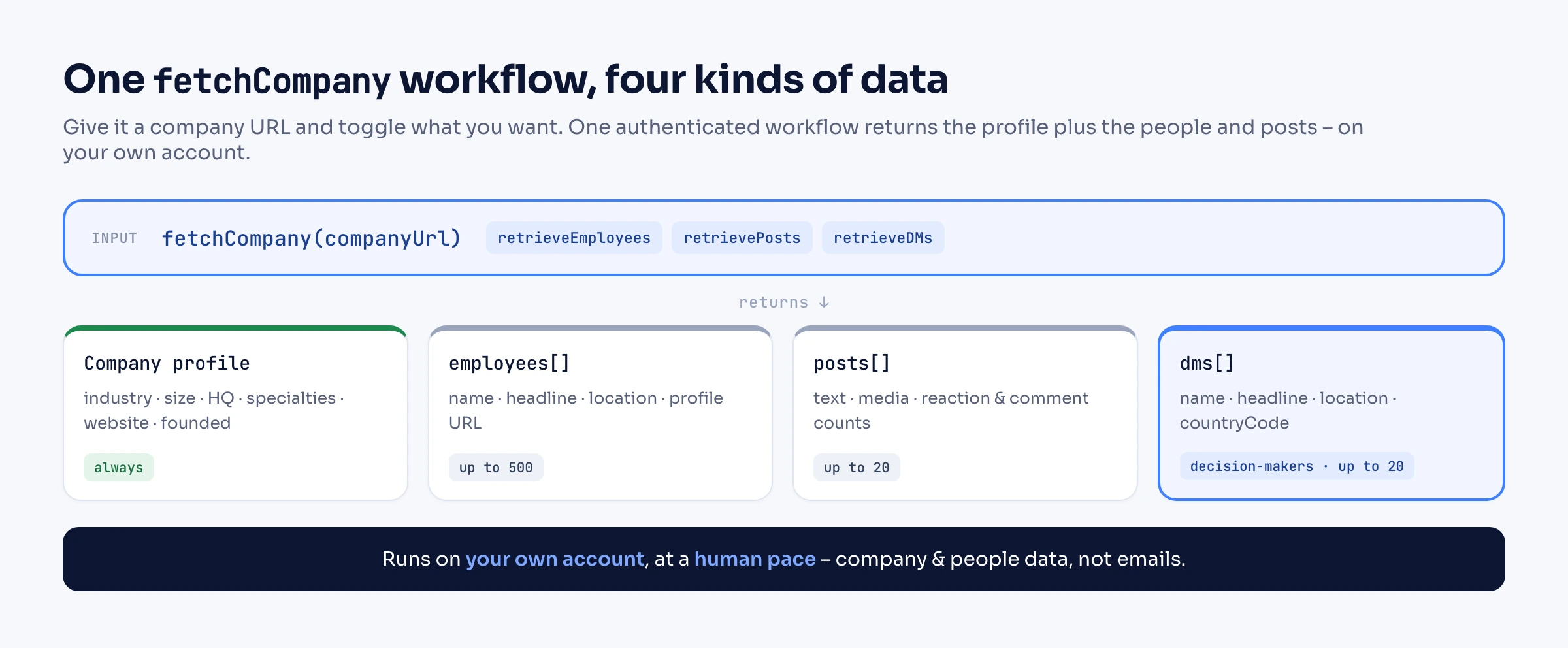
fetchCompanyreturns the company profile plus its employees, posts, and decision-makers in one workflow, andsearchCompaniesfinds companies by size, industry, and location – on your own account at a human pace, returning company and people data, not emails.
What you can pull from a LinkedIn company
One fetchCompany workflow returns the firmographic profile, and you can opt in to the employees, decision-makers, and posts alongside it.
| Data | What you get | How |
|---|---|---|
| Company profile | name, industry, size (employeesCount), HQ location, specialties, website, year founded, open-jobs count, logo | fetchCompany |
| Employees | up to 500 people (name, headline, location, profile URL), filterable by role, location, school, or past company | retrieveEmployees |
| Decision-makers | up to 20 key people (name, headline, location, country code (countryCode), profile URL) | retrieveDMs |
| Company posts | up to 20 recent posts (text, media, reaction and comment counts) | retrievePosts |
| Not returned | emails, phone numbers, follower counts, any funding, venture-financing, or investor detail | – |
That last row is the honest boundary: Linked API returns company and people data from LinkedIn, not contact details or a firmographic database's funding history.
The people rows are where most workflows start: the employees list feeds talent mapping for recruiters, and the decision-makers are the first step in mapping a B2B buying committee at a target account.
Is there a LinkedIn company API?
Only a narrow one. LinkedIn's official Organization Lookup API lives inside the Community Management API and is built for Pages you administer: the full record requires the rw_organization_admin permission and an ADMINISTRATOR role on that organization, the lookup for organizations you do not administer returns a handful of fields – id, name, vanity name, website, logo, locations and type – and the documentation states that wildcards and boolean search are not supported. Nothing in it returns employees, decision-makers or posts for an arbitrary company, so every "LinkedIn company API" or "company data API" on the market is an account-based or scraping product. Linked API's route is account-based: fetchCompany opens any public company page by URL through a dedicated cloud browser on your own account and returns the data in the table above, and searchCompanies finds the companies to fetch.
Three ways to scrape LinkedIn company data
The methods differ mostly in where the browser runs and whose account it uses – which is also what decides your ban risk.
| Method | How it runs | What you get | Account-safety trade-off |
|---|---|---|---|
| Cookieless dataset / scraper | On a vendor's cloud via rotating proxies, no login | Company profile fields; some are pre-collected datasets, others are live URL scrapers, and people or posts tend to be separate products (per Bright Data's collection options, 2026) | Doesn't touch your account, but you consume a product rather than composing your own authenticated query |
| Session-borrowing browser tool | On a vendor's cloud, driven by your logged-in LinkedIn cookie | Company data, often with a chained employee export | You hand your session to a third party – the real ban vector, and often day-capped (around 80 companies/day, per PhantomBuster's page, 2026) |
| API on your own account | On your own authenticated account through a human-paced cloud browser | Profile + employees + posts + decision-makers in one workflow | Runs as you, at a human pace, with no cookie handoff; account-paced rather than a bulk overnight dump |
A common question here: does LinkedIn have an official way to do this? LinkedIn's own APIs (Marketing, Talent) are partner-gated and need program approval – they are not a general-purpose way to pull an arbitrary company from its URL. So in practice you either scrape the public page or use an API that acts on your own account. The rest of this guide covers the API route, where Linked API retrieves structured company records on your behalf.
How to scrape one company from its URL
Install the SDK (npm install -S @linkedapi/node or pip install linkedapi), initialise the client with your tokens, and call fetchCompany with the company URL. Toggle retrieveEmployees, retrieveDMs, and retrievePosts to pull those alongside the profile; each has a config for its limit (and the employees list takes a filter).
import LinkedApi from '@linkedapi/node';

const linkedapi = new LinkedApi({
  linkedApiToken: process.env.LINKED_API_TOKEN,
  identificationToken: process.env.IDENTIFICATION_TOKEN,
});

const company = await linkedapi.fetchCompany.execute({
  companyUrl: 'https://www.linkedin.com/company/microsoft',
  retrieveEmployees: true,
  retrieveDMs: true,
  retrievePosts: true,
  employeesRetrievalConfig: {
    limit: 100,                                  // up to 500
    filter: { position: 'engineer', locations: ['United States'] },
  },
  postsRetrievalConfig: { limit: 20 },           // up to 20
  dmsRetrievalConfig: { limit: 20 },             // up to 20
});

const { data } = await linkedapi.fetchCompany.result(company.workflowId);
if (data) {
  console.log(data.name, data.industry, data.employeesCount);
  console.log(data.employees?.length, 'employees,', data.dms?.length, 'decision-makers');
}On the shell, the company CLI does the same in one line, and the AI-agent surfaces – the MCP server and ready-made skills – expose it to Claude Code, Cursor, and Codex.
linkedin company fetch https://www.linkedin.com/company/microsoft --employees --dms --jsonThe employees filter is what turns "a company" into "the right people at a company": pass a position, locations, schools, currentCompanies, or previousCompanies and you get a targeted slice instead of the whole roster. Full field reference is in the fetchCompany docs and the company data guide.
Find the companies to scrape
If you do not already have the URLs, searchCompanies builds the list. Filter by sizes, locations, and industries, or hand it a LinkedIn search results URL as customSearchUrl, then loop each result's publicUrl into fetchCompany.
const search = await linkedapi.searchCompanies.execute({
  term: 'fintech',
  limit: 50,                                     // up to 1000
  filter: {
    sizes: ['51-200', '201-500'],
    locations: ['United States'],
    industries: ['Financial Services'],
  },
});

const { data: companies } = await linkedapi.searchCompanies.result(search.workflowId);
for (const c of companies ?? []) {
  console.log(c.name, c.industry, c.publicUrl);   // feed publicUrl back into fetchCompany
}linkedin company search --term "fintech" --sizes "51-200,201-500" --industries "Financial Services" --jsonCompany sizes use LinkedIn's own bands (1-10, 11-50, 51-200, 201-500, 501-1000, 1001-5000, 5001-10000, 10001+). Each result returns name, publicUrl, industry, location, and logoUrl; pass the publicUrl straight into fetchCompany to go deep. If you work in Sales Navigator, the nvSearchCompanies and nvFetchCompany variants add filters like revenue (they need a Sales Navigator seat); see the Sales Navigator API guide. See also the search reference and how to find companies with filters.
Staying safe: your own account, human pace, no cookie handoff
The account risk in company scraping is not the data – public company pages are meant to be read. It is how a tool gets it. Browser tools that run on a vendor's cloud ask for your logged-in LinkedIn cookie, and handing your session to a third party is what actually gets accounts flagged – the tools' own pages flag it too.
Linked API takes a different path: every workflow runs on your own account through a human-paced cloud browser, so you never export a cookie to anyone. It also applies its own caps by design – one fetchCompany returns up to 500 employees, 20 posts, and 20 decision-makers, and searchCompanies up to 1,000 results, with the workflow pacing itself between actions. Separately, it surfaces LinkedIn's own limit signals: if LinkedIn restricts a retrieval you get a clear retrievingNotAllowed or searchingNotAllowed to back off on, rather than a silent overrun. Our account limits guide and safety model go deeper on pacing your volumes.
When a cookieless scraper or data provider fits better
Linked API is not always the right tool. If you need a one-off dump of tens of thousands of company records and you do not have (or do not want to use) a LinkedIn account, a cookieless dataset provider is the better fit – it trades composability for raw scale. And if your job is really about emails, direct dials, or funding-round histories, that is a firmographic or enrichment database, not a LinkedIn scraper.
Linked API is the right fit when you want the profile, the people, and the decision-makers together, on your own account, wired into your own product or workflow. For the broader picture, see the LinkedIn scraping pillar and the scraper API overview; for other entities, the profile scraper, jobs scraper, and post scraper.
Frequently Asked Questions (FAQ)
Yes. A company scraper turns a LinkedIn company URL into structured JSON you can store or feed into a workflow. The available fields and account-safety trade-offs depend on the method you pick, covered above.
Call fetchCompany with retrieveEmployees on. You get up to 500 employees per company (name, headline, location, profile URL), and you can filter the list by role, location, school, or current/previous company to pull just the people you care about.
Yes. fetchCompany returns the firmographic profile – industry, exact headcount (employeesCount), HQ location, specialties, website, year founded, and open-jobs count – from the company URL, with no extra configuration.
The main ban vector is handing your logged-in cookie to a third-party cloud tool. Avoid that: use a method that runs on your own account at a human pace and stays within LinkedIn's limits. Linked API does this by design and surfaces LinkedIn's own limit signals so you can slow down before hitting a wall.
Cookieless dataset providers scrape public pages via proxies with no login, but they typically return company fields only. To also get the employee roster, posts, and decision-makers, you use an authenticated method – Linked API runs on your own account rather than borrowing a session.
Yes. Turn on retrieveDMs and fetchCompany returns up to 20 decision-makers (name, headline, location, country code (countryCode), profile URL) in the same result as the profile and employees – so you know who to contact, not just where.
Up to 500 per company with fetchCompany, controlled by employeesRetrievalConfig.limit. To go wider than one company, use searchCompanies (up to 1,000 companies) and fetch each in turn.
It depends on the job. For a raw bulk dump with no account, a cookieless dataset provider wins. For the profile, employees, posts, and decision-makers together, embedded in your own stack on your own account, an API like Linked API is the better fit.
Want the company profile, its people, and its decision-makers in one workflow, on your own account? Start with Linked API – pull company data through the API and SDKs, CLI, MCP server, and skills, and wire it straight into your own stack.