
LinkedIn X-Ray Search: Operators, Examples, and What Google's Index Can't See (2026)
LinkedIn X-ray search means using Google to find LinkedIn profiles instead of searching inside LinkedIn. You point Google at LinkedIn's profile pages with site:linkedin.com/in/, add the words you expect to find on the profile, and read the results while logged out. It is free, it needs no account, and it exists because there is no general-purpose LinkedIn people-search API open to ordinary developers – see what LinkedIn's API actually gives you. This guide covers the operators that genuinely work, strings you can copy, the boundary where Google's copy of LinkedIn stops being enough, and what to do at that point.
The short version. X-ray search uses Google operators –
site:linkedin.com/in/, quotes and-, plus a few Google does not document – to find public LinkedIn profiles without logging in. It works because members' public profiles are visible to search tools, and it is genuinely free. Its ceiling is architectural rather than a bug: you are searching Google's copy of LinkedIn, so you get what members chose to make public, as Google last crawled it, matched on keywords. There is no reliable structured filter for current versus past employer. When that distinction matters, run the search inside LinkedIn instead.
X-ray search is not the same thing as LinkedIn boolean search. Both use boolean logic, which is why the two get mixed up constantly, but they query different indexes. Boolean search runs inside LinkedIn, on your own account, using LinkedIn's operators and filter fields – a separate technique with its own operators and rules. X-ray runs outside LinkedIn, in Google, against public copies of profiles. Everything below is about the second one.
What LinkedIn X-ray search is (and why it works at all)
X-ray search works because LinkedIn members can expose their profile to search engines. LinkedIn's own help page tells members they can "control what sections of your profile are eligible for display to people who are not signed in to LinkedIn, or can be viewed on search tools such as Google or Bing" (LinkedIn public profile visibility).
That single setting is the whole foundation. Google crawls those public profiles, stores them, and lets you query its copy with ordinary search operators. Nothing is bypassed and nothing is unlocked – you are reading pages members published deliberately.
The technique got its name because it feels like seeing through LinkedIn's own search, which caps results by account tier and biases toward your network. Google has no such view of you. What it does not give you is LinkedIn's structured fields – there is nothing to filter on for who currently works where, which is the point at which the method eventually runs out.
The X-ray operators that work
The table below carries only the operators that are useful for finding profiles. Whether Google documents an operator is a separate question from whether it helps here, so it is noted per row rather than used to decide what belongs in the table.
Documented by Google and useful here (Refine Google searches):
| Operator | What it does | Constraint to know |
|---|---|---|
site: | Restricts results to one site or path. site:linkedin.com/in/ returns profiles only. | Retrieval is not exhaustive – see below. |
"exact phrase" | Matches the phrase as written. | Quote every multi-word title, or Google matches the words separately and independently. |
- | Excludes a term. | No space between the operator and the word: -recruiter, never - recruiter. |
Not documented by Google, but working in practice. These four appear on every X-ray guide as though they were official. They are not on Google's operator help page, so treat them as best-effort: use them, then sanity-check the results rather than trusting them silently.
| Operator | What it does | Constraint to know |
|---|---|---|
intitle: | Matches text in the page title. A LinkedIn profile title carries the name and headline. | Best-effort; verify a sample of results. |
inurl: | Matches text in the URL. Useful for separating /in/ from /company/. | Best-effort. |
OR | Either term matches. | Must be uppercase. Lowercase or is treated as a normal word. |
* | Stands in for a whole word. | A whole word, not a partial stem. Most reliable inside a quoted phrase: "head of * marketing". |
Documented by Google but not useful for this job. filetype: filters by document format, and LinkedIn profiles are ordinary HTML pages, so it narrows nothing here. before: and after: filter on Google's document dates – not on employment dates, and not a dependable signal for how fresh a profile is. If you have seen them recommended for X-ray, that is why they are absent from the tables above.
One limit applies to every string you will write. Google states plainly that the site: operator "doesn't necessarily return all the URLs that are indexed under the prefix specified in the query" (Google Search Central). An X-ray search is a sample of what Google chose to show you, never a complete list of matching profiles.
Common X-ray syntax mistakes
- A space after the operator. Google is explicit: "Do not put spaces between the operator and your search term."
- Lowercase
or. It stops being an operator and becomes a search word. - Unquoted multi-word titles.
head of growthmatches the three words anywhere on the page;"head of growth"matches the title. site:linkedin.comwhen you wanted people. That includes posts, jobs and company pages. Usesite:linkedin.com/in/for profiles.
X-ray search strings you can copy
Each string is labelled with what it actually does, which is not always what it looks like it does.
By title and location
site:linkedin.com/in/ "head of growth" "Berlin"Mentions a company – not a current-employer filter
site:linkedin.com/in/ "product manager" ("Acme" OR "Globex")This finds profiles where those company names appear anywhere: current role, a job from six years ago, or a recommendation someone wrote. A snippet often hints at which, but there is no structured employer field to filter on, so you sort it out by reading the results.
By school
site:linkedin.com/in/ "data scientist" "Technical University of Munich"By localized LinkedIn host
site:de.linkedin.com/in/ "vertriebsleiter"This selects LinkedIn's German-language host. It is not a "people located in Germany" filter – plenty of people in Germany are served on www.linkedin.com, and this string will miss them.
Excluding the noise
site:linkedin.com/in/ "software engineer" "Amsterdam" -recruiter -intern -"talent acquisition"Company pages instead of people
site:linkedin.com/company/ "solar installation" "Netherlands"What Google's index can't know
X-ray is not broken, and the strings above genuinely work. But five limits are structural, and no amount of operator skill removes them.
1. The index lags, sometimes by months. LinkedIn is direct about this: "After you make changes to your public profile, it can take several weeks or months at times for search tools like Google, Yahoo, or Bing to detect changes and refresh. LinkedIn doesn't control that refresh process" (LinkedIn public profile visibility). A person who changed jobs in March may still read as their old title.
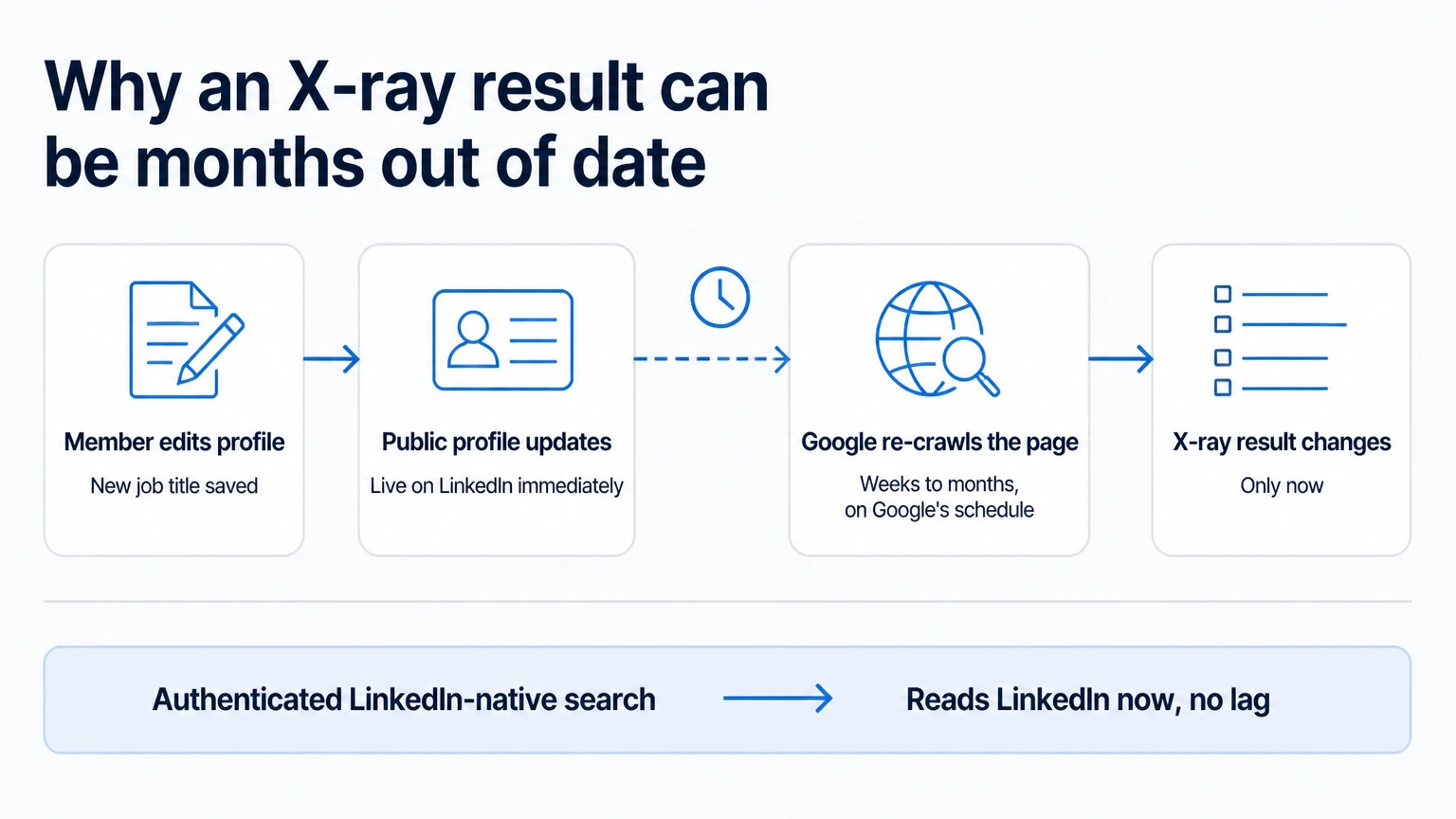
2. No reliable structured current-versus-past employer filter. Google matches words on a page, so a profile mentioning Acme may be a current role, a former one, or a line in someone's recommendation. A snippet often hints at which, but there is no field meaning "currently works here" that you can filter or sort on – so at any volume you are verifying by hand.
3. Google operators are not LinkedIn fields. intitle: searches text. LinkedIn's own search has structured fields for position, industry, location, school and employer. These are different mechanisms, and the second is not reachable from Google.
4. You only ever see what members allowed. Public-profile visibility is member-controlled per section. Someone who narrowed theirs is invisible to X-ray no matter how precise your string is.
5. Retrieval is not exhaustive. As Google states above, site: does not necessarily return everything indexed under that prefix. You cannot know what you missed, which makes X-ray unsuitable as a coverage-complete source list.
X-ray vs LinkedIn-native search: which to use when
| X-ray search (Google) | LinkedIn-native search (Linked API) | |
|---|---|---|
| Where the search runs | Google's index of public profiles | LinkedIn itself, authenticated |
| What it matches on | Keywords in a public snippet | LinkedIn's own structured fields |
| Freshness | Google's crawl – weeks to months of lag | LinkedIn as it is now |
| Current vs past employer | No reliable structured filter | currentCompanies and previousCompanies, separately |
| Filters available | Google operators | Position, locations, industries, companies, schools |
| Output | A page of links you copy by hand | Structured results your code can consume |
| Login required | None – runs logged out | Your own LinkedIn account |
| Cost | Free | Flat per seat, from $49/mo billed annually |
| Best for | One-off lookups, no account, no budget | Repeatable searches, products, CRM enrichment |
When the job outgrows Google: run the search inside LinkedIn
At the point where the current-versus-past distinction matters, or you need the same search to run every week, the answer is to stop searching Google's copy and search LinkedIn. There are two ways in, and they are equally first-class – pick the one that matches how you work.
Ask an agent (nothing to build)
If you would rather not write code, you do not have to. Ask in plain language:
Find heads of growth in Berlin who currently work at Acme or Globex and give me their LinkedIn URLs.
That runs through the MCP server in any MCP client, through the AI-agent-friendly CLI in Claude Code, Cursor or Codex, or through a ready-made skill installed with npx @linkedapi/skills. Install it, ask, read the results. There are no blocks to drag and nothing to wire, and the agent composes the search from the same filters described below.
Build it in (compose it yourself)
To embed the search in your own product, backend or CRM, call it directly. Pass a keyword term alongside the structured filter – this is what makes the current-versus-past distinction available at all:
import LinkedApi from '@linkedapi/node';

const linkedapi = new LinkedApi({
  linkedApiToken: process.env.LINKED_API_TOKEN,
  identificationToken: process.env.IDENTIFICATION_TOKEN,
});

const search = await linkedapi.searchPeople.execute({
  term: 'growth',
  limit: 25,
  filter: {
    position: 'Head of Growth',
    locations: ['Berlin'],
    currentCompanies: ['Acme', 'Globex'],
  },
});

const { data: people } = await linkedapi.searchPeople.result(search.workflowId);
for (const person of people ?? []) {
  console.log(person.name, person.headline, person.publicUrl);
}Swap currentCompanies for previousCompanies and you have the search Google cannot express: people who used to work somewhere and no longer do.
The same search runs from the shell:
linkedin person search --term "growth" --limit 25 --position "Head of Growth" --locations "Berlin" --current-companies Acme,Globex --jsonTwo honest notes on the output. A search returns search results – name, profile URL, headline, location – and not full profiles; pulling experience, education, skills or posts is a separate fetchPerson call, covered in the profile scraper guide. And results never include personal email addresses or phone numbers. Full parameters are in the people search docs and person data docs; if you would rather build the query in LinkedIn's UI and hand over its URL, the boolean search guide covers that route. If you source in Sales Navigator, the nv variants take the same shape with extra filters such as years of experience – see the Sales Navigator scraper guide. For the wider picture of getting LinkedIn data without maintaining a scraper, start from how to scrape LinkedIn.
When X-ray is still the right tool
X-ray is not a worse version of API search. For several jobs it is simply the correct choice, and switching would be overkill:
- One-off lookups. Finding one person once does not justify an account, a seat or a line of code.
- No LinkedIn account, or a locked-down one. X-ray runs logged out. It never touches your account, so it consumes nothing and risks nothing.
- Zero budget. It is free, permanently.
- Checking what is publicly visible. If you want to see how someone appears to the outside world, X-ray shows exactly that, because that is all it can see.
There is a third option worth naming honestly. If what you want is a finished interface with sourcing, sequences and campaign management already built in, a closed automation suite is a reasonable answer, and several exist. Linked API is the opposite trade: primitives you compose, embedded wherever you need them, or driven by an agent – which is the right shape when the search feeds your own product or workflow, and the wrong shape when you wanted a ready-made UI.
Is X-ray search safe for your account?
X-ray itself touches nothing. You are logged out and running a Google query, so LinkedIn sees no activity from you at all, and none of your account's search allowances are consumed. The limits guide covers what LinkedIn's own in-app search costs you by comparison.
Running searches through the API is different, because that genuinely uses your account – so it is built to behave like you. Each account gets a real, dedicated cloud browser that you authorize once through LinkedIn's own sign-in flow; Linked API never stores your password. Actions run at a human pace, and you set the per-action ceilings yourself, per day, week or month. See safety for how that works in practice.
Frequently Asked Questions (FAQ)
It is the technique of finding LinkedIn profiles through Google instead of LinkedIn's own search, by restricting Google to LinkedIn's profile pages with site:linkedin.com/in/ and adding the words you expect on the profile. It works on public profiles, while logged out, and requires no LinkedIn account.
No, though they are easy to confuse because both use boolean logic. Boolean search runs inside LinkedIn on your own account, using LinkedIn's operators and its filter fields. X-ray runs in Google, against public copies of profiles, using Google's operators. The difference is which index you are querying, not which logic you use – see the boolean search guide for the in-LinkedIn technique.
Yes, entirely. It uses ordinary Google search with standard operators, so there is nothing to buy and no seat to hold. The cost is your time building strings and copying results by hand.
No. That is one of its real advantages. X-ray reads public profiles through Google while you are signed out, so it never touches a LinkedIn account and never consumes any account's search allowance.
Usually one of four reasons: your quoted phrases are stricter than the wording on the profiles; the site: operator does not necessarily return everything Google has indexed under that path; some members have narrowed which sections of their public profile are visible to search tools; or Google has not re-crawled the profiles since they changed. There is no fixed result cap to work around – tighten or loosen your terms and compare.
No. intitle: is a Google operator and only works in Google. LinkedIn's own search has no title:-style field command – you use its boolean operators and its filter fields instead, which the boolean search guide covers.
Only by accident. If a member published contact details in a public section of their profile and Google indexed that text, it can surface – but it is not a reliable contact source and most profiles will not yield one. Linked API does not return personal email addresses or phone numbers either; searches and profile fetches return LinkedIn profile data.
No. You are querying Google, not LinkedIn, so LinkedIn's commercial-use limit and tier-based result caps do not apply. Those limits apply to searching inside LinkedIn, whether by hand or through an API – the limits guide has the working numbers.
Yes. Linked API runs the search inside LinkedIn on your own account and returns structured results, with filters for position, location, industry, school, and current versus previous employer. You can call it from the REST API, the Node and Python SDKs or the CLI, or have an agent run it through the MCP server or a ready-made skill.
Start where the search stops
Use X-ray for what it is genuinely good at – free, logged-out, one-off lookups on public profiles. When the search needs to be repeatable, current, or feed something you are building, run it inside LinkedIn instead: ask an agent through the MCP server, the CLI or a ready-made skill, or build it in with the REST API and SDKs. Every route runs on the same dedicated cloud browser, on an account you own, inside the limits you set. See pricing for plans.
Facts verified 7 August 2026 – LinkedIn public-profile visibility and refresh statements checked against LinkedIn Help, and Google search-operator behaviour checked against Google Search Help and Google Search Central, on that date.